ASP.NET Core 自訂表單驗證範例
 |  | 2 |  |
這篇是我寫給自己的筆記,記錄如何在 ASP.NET Core 實作自訂表單驗證。就是自己用資料庫存帳號密碼,要設計註冊及登入介面,並考慮忘記密碼重設... 等實作細節。
自幹帳密登入是件麻煩又複雜的事,弄不好還會導致資安風險,決定這麼做之前,建議先想想其他解決方案的可能性,例如:讓使用者用 Google、FB、Outlook/Hotmail、Twitter 帳號登入、使用 ASP.NET Identity 會員管理機制... 等等,都是好選項,基本上會比自己做簡單且安全。
但如果最後仍決定要自己做,相信一定會有很好的理由,那麼就深吸一口氣謹慎設計吧,願原力與大家同在。
一般 HTML 表單登入成功後,建立 Session Cookie 時需留意內容加密、逾時、防止 JavaScript 竊取等細節,這塊 ASP.NET Core 的內建機制已做得十分完善及彈性,建議直接引用,不要自己搞。
我的範例專案採用 .NET 10,包含以下功能:
- Login.cshtml 介面輸入帳號密碼,檢查密碼相符後以 HttpContext.SignInAsync() 寫入 Cookie 完成登入
- Index.cshtml 限登入後使用,可識別使用者登入身分,展示用 [Authorize] Attribute 限定必須登入才能存取
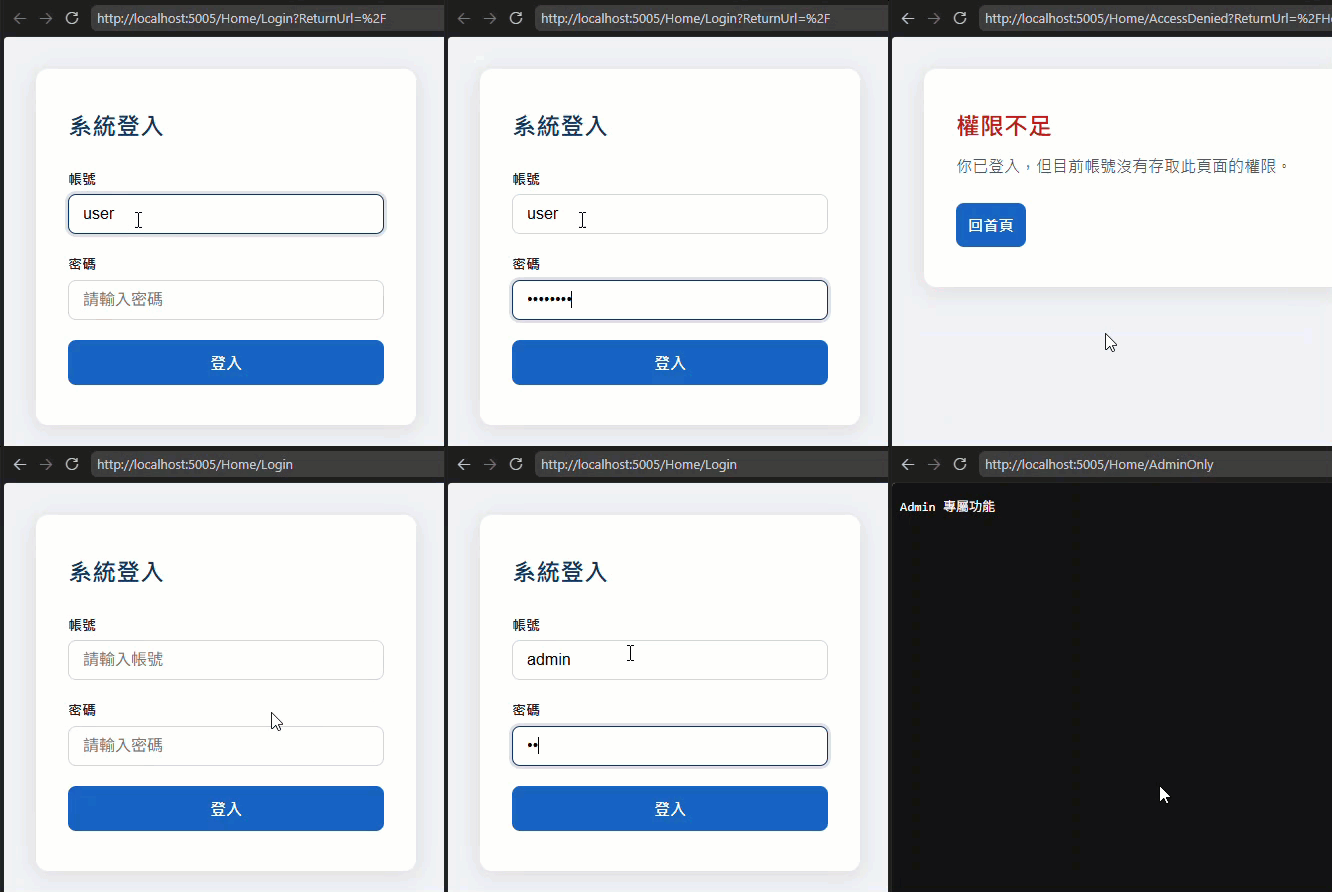
- /Home/AdminOnly 限定 Admin 角色(Role)才能存取,展示如何用 [Authorize] Attribute 控制存取角色
- /Home/Logout 展示用 HttpContext.SignOutAsync() 登出
以上邏輯主要集中在 Program.cs 及 HomeController.cs,說明如下。
在 Programe.cs 要呼叫 Services.AddAuthentication(CookieAuthenticationDefaults.AuthenticationScheme).AddCookie() 宣告使用標準 HTML 表單 Cookie 式登入(其他選項還有 JWT Bearer、OpenIdConnect/OIDC、OAuth... 等),並且記得不要遺漏 Services.AddAuthorization()、app.UseAuthentication()、 app.UseAuthorization()。
using Microsoft.AspNetCore.Authentication.Cookies;

var builder = WebApplication.CreateBuilder(args);

builder.Services.AddControllersWithViews();

builder.Services.AddAuthentication(CookieAuthenticationDefaults.AuthenticationScheme)
    .AddCookie(options =>
    {
        options.LoginPath = "/Home/Login";
        options.LogoutPath = "/Home/Logout";
        options.AccessDeniedPath = "/Home/AccessDenied";
        // 禁止 JavaScript 存取
        options.Cookie.HttpOnly = true;
        // 強制使用 HTTPS 傳輸 Cookie
        options.Cookie.SecurePolicy = CookieSecurePolicy.Always;
        // 持續使用時自動延長 Cookie 生命週期
        options.SlidingExpiration = true;
        options.ExpireTimeSpan = TimeSpan.FromMinutes(30);
    });

builder.Services.AddAuthorization();

var app = builder.Build();

if (!app.Environment.IsDevelopment())
{
    app.UseExceptionHandler("/Error");
    app.UseHsts();
}

app.UseHttpsRedirection();
app.UseStaticFiles();

app.UseAuthentication();
app.UseAuthorization();

app.MapDefaultControllerRoute();

app.Run();
AddCookie() options 的常用選項如下:參考
| 選項 | 預設值 | 說明 |
|---|---|---|
LoginPath | /Account/Login | 未認證時導向的登入頁 |
LogoutPath | /Account/Logout | 登出時導向的路徑 |
AccessDeniedPath | /Account/AccessDenied | 授權拒絕(Forbid)時導向的頁面 |
ReturnUrlParameter | "ReturnUrl" | 登入後回原頁的 Query String 參數名稱 |
Cookie.Name | .AspNetCore.Cookies | Cookie 名稱 |
Cookie.HttpOnly | true | 禁止 JavaScript 存取 Cookie |
Cookie.SecurePolicy | SameAsRequest | HTTPS 限制(Always / SameAsRequest / None) |
Cookie.SameSite | Lax | 跨站請求限制,防 CSRF(Strict / Lax / None) |
Cookie.Domain | null | Cookie 作用網域 |
Cookie.Path | / | Cookie 作用路徑 |
Cookie.MaxAge | null | 瀏覽器端 Cookie 最長存活時間(與 ExpireTimeSpan 不同) |
ExpireTimeSpan | 14 天 | 認證 ticket 有效期限(優先於 Cookie.Expiration) |
SlidingExpiration | false | 超過半段時間後自動延長 ticket 效期 |
Events | 預設不實作事件 | 掛載事件回呼函式(見下方事件列表) |
SessionStore | null | 可自訂將識別身分資料存於 Server 端,Cookie 只存 Session ID |
TicketDataFormat | 自動建立 | 自訂 Cookie 內容的加密/解密格式 |
DataProtectionProvider | null | 指定 Data Protection 提供者 |
CookieManager | ChunkingCookieManager | 自訂 Cookie 讀寫元件(自動分塊處理大 Cookie) |
ClaimsIssuer | null | 指定 Claims 的 Issuer |
Events 可掛載回呼(options.Events)
| 事件 | 時機 |
|---|---|
OnValidatePrincipal | 每次請求驗證 Cookie 時,可用來拒絕已失效的身份 |
OnSigningIn | SignInAsync 執行前 |
OnSignedIn | SignInAsync 執行後 |
OnSigningOut | SignOutAsync 執行前 |
OnRedirectToLogin | 即將重導向至登入頁前(可自訂回傳 401) |
OnRedirectToLogout | 即將重導向至登出頁前 |
OnRedirectToAccessDenied | 即將重導向至拒絕頁前(可自訂回傳 403) |
OnRedirectToReturnUrl | 登入成功後即將重導向回原頁前 |
為求簡化,範例專案沒使用 DB 存密碼,直接寫在 appsettings.json (共有兩個帳號,user 及 admin,密碼都是 P@ssW0rd),雜湊則使用寫個符合 OWASP 要求的密碼雜湊公用函式一文的 Argon2idPasswordHasher 計算及驗證。
程式重點幾乎都 HomeController.cs:
using Microsoft.AspNetCore.Authentication;
using Microsoft.AspNetCore.Authentication.Cookies;
using Microsoft.AspNetCore.Authorization;
using Microsoft.AspNetCore.Mvc;
using System.Security.Claims;

namespace cust_form_auth.Controllers;


public class AppUser
{
    public string UserId { get; set; } = string.Empty;
    public string PasswordHash { get; set; } = string.Empty;
}

public class HomeController(IConfiguration config) : Controller
{
    // GET /Home/Index
    [Authorize]
    public IActionResult Index()
    {
        return View();
    }

    [Authorize(Roles = "Admin")]
    public IActionResult AdminOnly()
    {
        return Content("Admin 專屬功能");
    }

    // GET /Home/AccessDenied
    // 已登入但權限不足時,Cookie 驗證會導向這裡。
    [Authorize]
    public IActionResult AccessDenied() => View();

    // GET /Home/Login
    public IActionResult Login(string? returnUrl = null)
    {
        if (User.Identity?.IsAuthenticated == true)
            return RedirectToAction(nameof(Index));

        ViewBag.ReturnUrl = returnUrl;
        return View();
    }

    // POST /Home/Login
    [HttpPost]
    [ValidateAntiForgeryToken]
    public async Task<IActionResult> Login(string userId, string passwd, string? returnUrl = null)
    {
        if (string.IsNullOrWhiteSpace(userId) || string.IsNullOrEmpty(passwd))
        {
            ViewBag.ReturnUrl = returnUrl;
            ViewBag.ErrorMessage = "帳號與密碼不可空白。";
            ViewBag.UserId = userId;
            return View();
        }

        // TODO: 實務應用多會以資料庫儲存,此處使用 JSON 設定檔示意
        var users = config.GetSection("AppUsers").Get<List<AppUser>>() ?? [];
        var matched = users.FirstOrDefault(u =>
            string.Equals(u.UserId, userId, StringComparison.Ordinal));

        if (matched is null ||
            !await Argon2idPasswordHasher.VerifyPasswordAsync(passwd, matched.PasswordHash))
        {
            ViewBag.ReturnUrl = returnUrl;
            // 不告知使用者是帳號錯誤還是密碼錯誤,減少資訊外洩
            ViewBag.ErrorMessage = "帳號或密碼錯誤,請重新輸入。";
            ViewBag.UserId = userId;
            return View();
        }

        // ClaimTypes.Name 會成為 User.Identity.Name,用以識別登入者
        // ClaimTypes.Role 可搭配 [Authorize(Roles = "User")] 做角色授權
        var claims = new List<Claim>
        {
            new(ClaimTypes.Name, matched.UserId),
            new(ClaimTypes.Role, "User")
        };
        if (matched.UserId == "admin")
        {
            claims.Add(new Claim(ClaimTypes.Role, "Admin"));
        }

        // 使用 CookieAuthenticationDefaults.AuthenticationScheme 建立身分識別
        // 這個 Scheme 必須和 Program.cs 裡 AddAuthentication/AddCookie 設定的一致
        var identity  = new ClaimsIdentity(claims, CookieAuthenticationDefaults.AuthenticationScheme);

        // ClaimsPrincipal 代表目前登入的使用者,ASP.NET Core 會把它序列化到驗證 Cookie。
        var principal = new ClaimsPrincipal(identity);

        // 寫入登入 Cookie,讓後續請求可通過 [Authorize] 驗證。
        await HttpContext.SignInAsync(
            CookieAuthenticationDefaults.AuthenticationScheme,
            principal,
            new AuthenticationProperties {
                // 關閉瀏覽器時清除 Cookie,不記憶已登入狀態
                IsPersistent = false
            });

        // 防止 Open Redirect 導向至第三方網站
        if (!string.IsNullOrEmpty(returnUrl) && Url.IsLocalUrl(returnUrl))
            return Redirect(returnUrl);

        return RedirectToAction(nameof(Index));
    }

    // POST /Home/Logout
    [HttpPost]
    [ValidateAntiForgeryToken]
    [Authorize]
    public async Task<IActionResult> Logout()
    {
        await HttpContext.SignOutAsync(CookieAuthenticationDefaults.AuthenticationScheme);
        return RedirectToAction(nameof(Login));
    }
}
重點說明:
- /Home/Index 加上
[Authorize],未登入時會被導向 /Home/Login - /Home/AdminOnly 加上
[Authorize(Roles = "Admin")],ASP.NET Core 會檢查登入者 Claims 資料必須包含 Admin Role 才能存取,否則導向 AccessDenied.cshtml - /Home/Login POST 時檢查帳號密碼,密碼正確時建立 Claim 資料集合
List<Claim>,寫入 Name、Role 等資料,這些內容會被加密寫入 Cookie。
接著將 Claim 資料包成 ClaimsIdentity 建立 ClaimsPrincipal,再傳入 HttpContext.SignInAsync() 完成登入。 - /Home/Logout 則呼叫 HttpContext.SignOutAsync() 完成登出。
操作畫面如下:
完整專案範例在 Github。
A personal note on implementing custom form authentication in ASP.NET Core using cookie authentication, Claims, roles, login/logout, authorization attributes, and secure password verification with Argon2id. Includes key options and a GitHub sample.
Comments
# by Fatina
弄不還會導致資安風險 => 弄不好還會導致資安風險
# by Jeffrey
to Fatina,已修正,謝~