寫個符合 OWASP 要求的密碼雜湊公用函式
 |  | 3 |  |
如何儲存密碼攸關資訊安全,將密碼以明文寫進資料庫跟酒駕同罪,是零容忍的犯行,將密碼加密後儲存也不應發生(如果某系統按「忘記密碼」會把你設定的密碼寄給你,別用,塊陶!!),使用夠安全的雜湊演算法是唯一正解。因此,若你手邊的系統需要儲存密碼,請先學習如何正確將密碼轉成雜湊再動手,要丟給 AI 寫也成,但至少該有判斷程式好壞的鑑賞力,別上線一套有漏洞的系統而不自知。
如果你對密碼雜湊議題還不熟悉,推薦兩篇舊文:密碼要怎麼儲存才安全?該加多少鹽?-科普角度、儲存密碼該用什麼雜湊演算法?
最近剛好手邊的專案需要儲存密碼(註:我一直認為要自己管理密碼是下策,請優先考量直接使用 AD 帳號驗證或是整合 Google/Microsoft/Github/LINE/FB 帳號登入,但總有時侯得自己來),我決定寫一個符合 OWASP 要求的密碼雜湊公用函式,方便日後專案共用,會比每次叫 AI Coding 現場生一套更穩定可靠。
依據上回的評比,Argon2id 應是現階段的首選。Argon2id 有幾個決定安全強度的參數包含 DegreeOfParallelism、MemorySize、Iterations,依據 OWASP 的建議:
Use Argon2id with a minimum configuration of 19 MiB of memory, an iteration count of 2, and 1 degree of parallelism.
我設計了一個可設定不同強度的 Argon2id 雜湊計算公用函數 Argon2idPasswordHasher,有個 Argon2idStrength 列舉共有 Default、High、Highest 三種參數組合,Default 為 OWASP 建議值,另外有 High、Highest 兩組值。依社群討論,增加 Memory 比 Iteration 更有效,至於 DegreeOfParallelism 可依系統主機實際處理器核心數調整,可設為 4。(OWASP 建議值為 1 是考量許多網站部署在 VPS 只有單核) 我沒找到什麼公認的強度建議,High、Highest 的參數值是隨便抓的,一般應用我覺得用 OWASP 建議的預設值就夠了。
| 強度 | MemorySize | Iterations | DegreeOfParallelism |
|---|---|---|---|
| Default | 19M | 2 | 1 |
| High | 64M | 2 | 1 |
| Highest | 128M | 2 | 1 |
為了保留切換不同強度參數的彈性,雜湊結果會包名現在使用的參數組(我用列舉對映數字代表,0 = Default, 1 = High,...),在應用時,可自動使用相同參數組執行 Argon2id 運算,另外雜湊結果需保存隨機 Salt 值(一般建議 16 Bytes 以上),搭配密碼內容可產生相同雜湊值,故雜湊結果除了雜湊值外,還要保含參數組代碼及 Salt,格式為 <param-set-id>$<salt>$<hash-value>,實際範例如 0$CGoH7XZ506QO4AdBITYQWg==$YBy9gEr5sN6dlWhy6EX9xpDni+fhmGO/Ad21h7osGcI=,長度為 1 + 1 + 24 (Math.Ceil(16/3)*4) + 1 + 44 (Math.Ceil(32/3)*4) = 71 chars
以下是簡單的公用 Argon2id 雜湊函式範例:
using System.Security.Cryptography;
using System.Text;
using Konscious.Security.Cryptography;

public static class Argon2idPasswordHasher
{
    // Argon2id 參數組,預設值來自 OWASP 建議值
    class Argon2idParamSet
    {
        public int MemorySize { get; set; } = 19 * 1024;
        public int Iterations { get; set; } = 2;
        public int DegreeOfParallelism { get; set; } = 1;
    }
    public enum Argon2idStrength
    {
        Default = 0,
        High = 1,
        Highest = 2
    }
    static Dictionary<Argon2idStrength, Argon2idParamSet> _paramSets = new()
    {
        { Argon2idStrength.Default, new Argon2idParamSet() },
        {
            Argon2idStrength.High,
            new Argon2idParamSet
            {
                MemorySize = 64 * 1024,
                Iterations = 2,
                DegreeOfParallelism = 1
            }
        },
        {
            Argon2idStrength.Highest,
            new Argon2idParamSet
            {
                MemorySize = 128 * 1024,
                Iterations = 3,
                DegreeOfParallelism = 1
            }
        }
    };
    private const int SaltSize = 16;
    private const int HashSize = 32;
    public static async Task<string> HashPasswordAsync(string password, Argon2idStrength strength = Argon2idStrength.Default)
    {
        ArgumentException.ThrowIfNullOrWhiteSpace(password);
        // 產生隨機 salt
        var salt = RandomNumberGenerator.GetBytes(SaltSize);
        var hash = await HashPasswordAsync(password, salt, strength);

        return string.Join(
            '$',
            ((int)strength).ToString(),
            Convert.ToBase64String(salt),
            Convert.ToBase64String(hash));
    }

    public static async Task<bool> VerifyPasswordAsync(string password, string encodedHash)
    {
        if (string.IsNullOrWhiteSpace(password) || string.IsNullOrWhiteSpace(encodedHash))
            return false;

        var parts = encodedHash.Split('$');
        if (parts.Length != 3)
            throw new FormatException("Invalid encoded hash format.");

        try
        {
            var strength = (Argon2idStrength)int.Parse(parts[0]);
            var salt = Convert.FromBase64String(parts[1]);
            var expectedHash = Convert.FromBase64String(parts[2]);
            var actualHash = await HashPasswordAsync(password, salt, strength);
            return CryptographicOperations.FixedTimeEquals(actualHash, expectedHash);
        }
        catch (FormatException)
        {
            return false;
        }
    }

    private static async Task<byte[]> HashPasswordAsync(
        string password,
        byte[] salt,
        Argon2idStrength strength = Argon2idStrength.Default
    )
    {
        var paramSet = _paramSets[strength];
        var argon2 = new Argon2id(Encoding.UTF8.GetBytes(password))
        {
            Salt = salt,
            MemorySize = paramSet.MemorySize,
            Iterations = paramSet.Iterations,
            DegreeOfParallelism = paramSet.DegreeOfParallelism
        };

        return await argon2.GetBytesAsync(HashSize);
    }
}
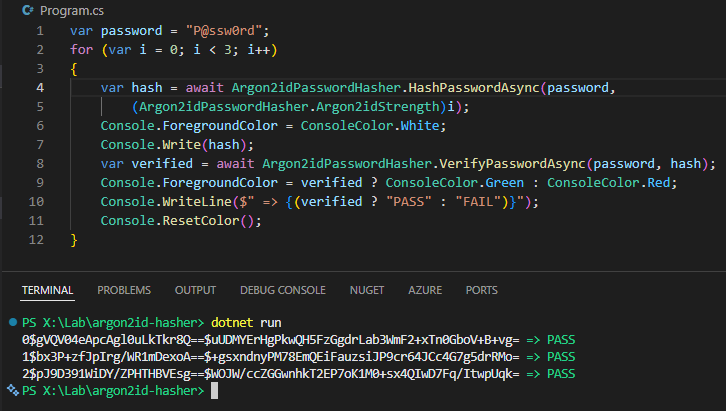
實測用 Default、High、Highest 三種參數計算雜湊並驗證:
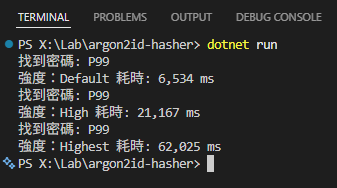
最後,簡單測試不同參數強度下,連續執行 100 次雜湊計算與比對並測量耗費時間,稍微感受暴力攻擊不同強度 Argon2id 雜湊密碼所需的成本:
var password = "P99";
var pwdPool = Enumerable.Range(0, 100).Select(i => $"P{i:D2}").ToArray();
for (var i = 0; i < 3; i++)
{
    var hash = await Argon2idPasswordHasher.HashPasswordAsync(password,
        (Argon2idPasswordHasher.Argon2idStrength)i);
    var sw = new System.Diagnostics.Stopwatch();
    sw.Start();
    foreach (var pwd in pwdPool)
    {
        var isValid = await Argon2idPasswordHasher.VerifyPasswordAsync(pwd, hash);
        if (isValid)
        {
            Console.WriteLine($"找到密碼: {pwd}");
        }
    }
    sw.Stop();
    Console.WriteLine($"強度:{(Argon2idPasswordHasher.Argon2idStrength)i} 耗時: {sw.ElapsedMilliseconds:n0} ms");
}
OWASP 建議的 19M 記憶體大小,計算一次約 0.06s、64M 約 0.21s、128M 0.62s,若想平行運算加速,主機記憶體大小會限制可執行的 Thread 數上限,增加攻擊難度。
收入工具箱備用。
Introduces a reusable .NET Argon2id password hasher with OWASP-based parameters, salt storage format, strength presets, verification logic, and benchmark results, emphasizing secure password storage and the cost impact of memory-hard hashing.
Comments
# by 小黑
謝哥
# by Latishaaaaaaaaaaa
如何儲存密碼悠關資訊安全 誤字「悠」,應為「攸」 目前還在普通加密階段,看看這篇學個新知識w
# by Jeffrey
to Latishaaaaaaaaaaa,已改正,謝~