【茶包射手日記】難抓的 XML 多餘字元
 |  | 0 |  |
在 XML 裡手滑多按一個 s,若不是出現在 Attribute 名稱、值或文字型元素(例如:<SomeText>....</SomeText>),應該可用語法檢查工具輕鬆找出來,例如 NotePad++ 的 XML Tools Plugin:
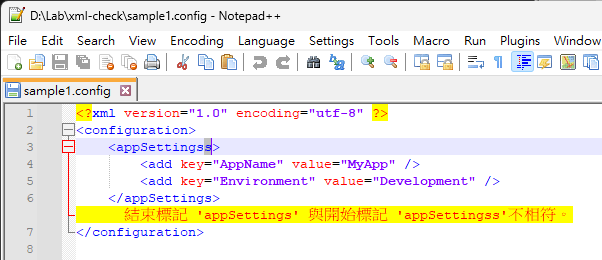
或是用 PowerShell 或 .NET 也能快速抓出來:

遇到一個比較刁鑽的狀況:
<?xml version="1.0" encoding="utf-8" ?>
<configuration>
	<appSettings>s
		<add key="AppName" value="MyApp" />
		<add key="Environment" value="Development" />
	</appSettings>
</configuration>
s 被加在 <appSettings> 後方,我們都知道它不符合 .NET .config 規範,但這個是完全合法的 XML 格式,可通過所有 XML 語法工具檢查,甚至當成 XML 也能正常讀取。
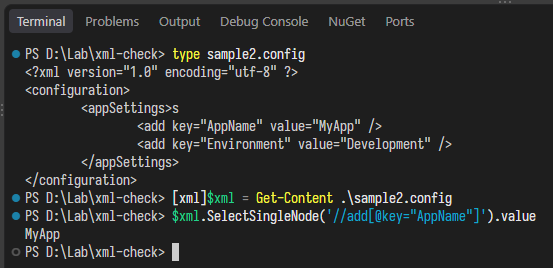
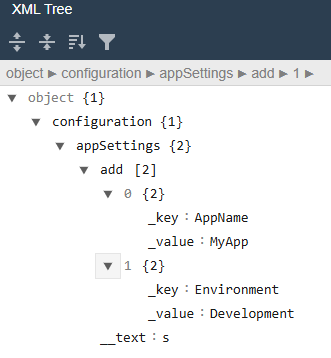
這是因為 s 被視為一個文字節點(Text Node),appSettings 元素包含 TextNode 對 XML 語法是合法的,雖然這不符合 .config 規範。(下圖來自 JSON fromatter XML Parser)
但用 .NET System.ConfigurationManager.AppSettings 讀取時會出錯,範例程式如下:
using System;
using System.Configuration;

internal static class Program
{
    private static int Main()
    {
        try
        {
            string appName = ConfigurationManager.AppSettings["AppName"];
            Console.WriteLine(appName);
        }
        catch (Exception exception)
        {
            Console.Error.WriteLine(exception.ToString());
        }
    }
}
依多餘字元插入位置不同,錯誤訊息也可能不同:
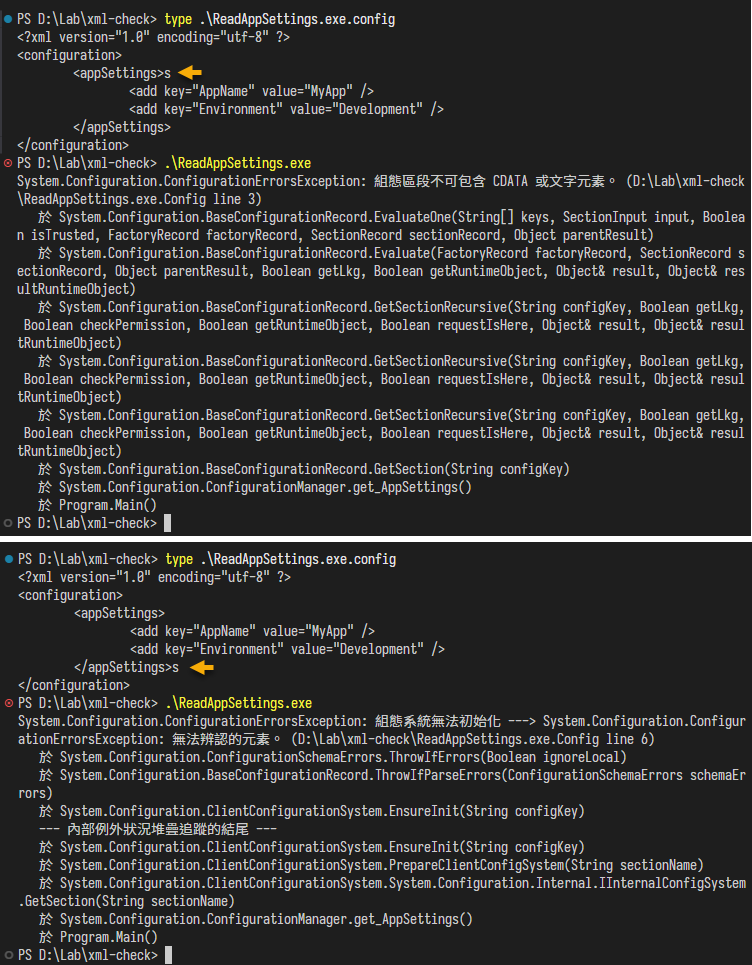
說穿了這是 XML 特性使然,XML 雖然每天在用,基本原理已離我太遙遠才會大驚小怪,藉此機會溫習一番。
至於為什麼會多出一個 s?苦主推測可能來自受管控 RDP 連線反應遲頓,存檔快捷鍵 Ctrl - S 分家所致,IT 現場真是無奇不有。
A stray character in a .NET configuration file may form a valid XML text node, escaping XML syntax checks while breaking ConfigurationManager. This case highlights the difference between well-formed XML and schema-specific validity—and a curious risk of laggy Ctrl+S over RDP.
Comments
Be the first to post a comment