實測處理器 AES 硬體加速效果
 |  | 1 |  |
昨天 AES GCM 加解密有提到,新一代處理器都有支援 AES 硬體加速,x86 系列是靠 AES-NI (New Instruction) 指令集,Intel 及 AMD 較新的處理器都有內建支援,用硬體電路 在 CPU 裡直接實作 AES 的核心運算邏輯,計算速度會比軟體程式演算快上 N 倍。但,這個 N 等於多少?這篇就來簡單實測一下。
我決定用 openssl 測試,主要理由是 openssl 有個 OPENSSL_ia32cap 環境變數 可自由控制使用 AES-NI 或純軟體邏輯。OPENSSL_ia32cap="~0x200000200000000" 時會強制 OpenSSL 不用 AES-NI 和 PCLMULQDQ,退回到純軟體加解密。
此外 openssl 內建 openssl-speed 效能測試,能測試不同批次讀寫量(Chunk 或 Buffer 大小,即圖中顯示的 16/64/256/1024/8192/16384 size blocks)下的運算效能,以我的 i5-12500 為例,AES-256-CBC 由需循序計算區塊,資料批次大小超過 256 bytes 後達到最高值約 1.4GB/s、AES-256-GCM 支援平行計算不同區塊,故批次提高到 8K bytes 以上可達到最大值約 3.9GB/s:
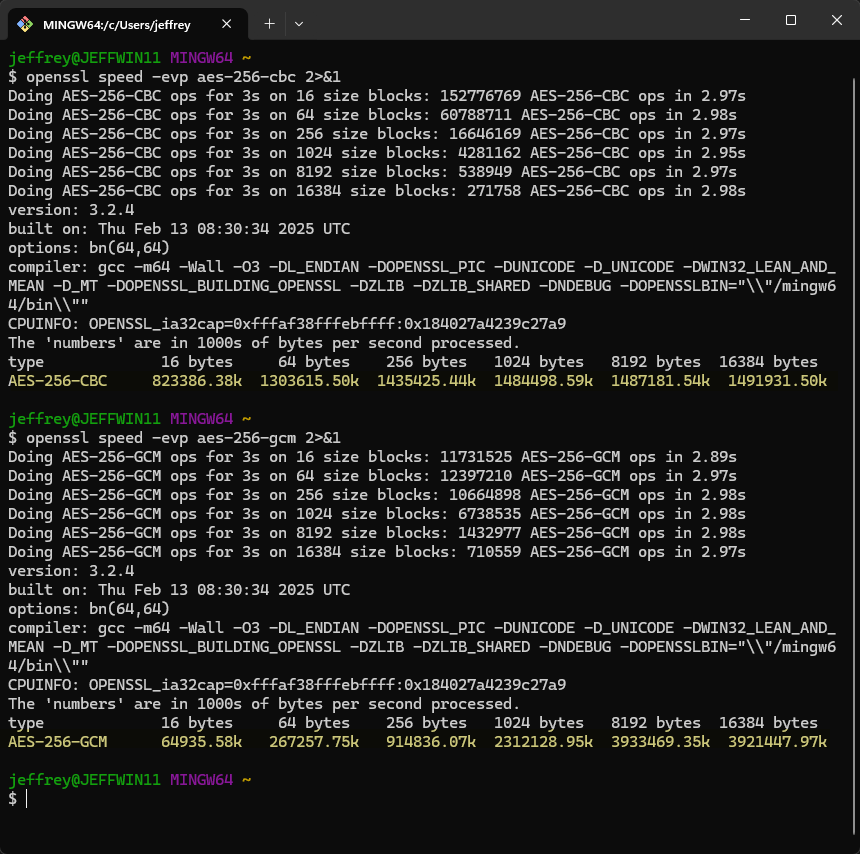
openssl-speed 可用於測試理想值上限,跟理想油耗一樣,真的開上路是另一回事。故我設計了一個 200MB 文字檔加解密測試,實測硬體加速跟純軟體運算差多少。
程式碼如下,我用 PowerShell 在 Linux 環境跑測試。.ps1 加上 Shebang 並 chmod u+x <script-name>.ps1 後,用 ./<scrpit-name>.ps1 即可執行腳本,讓我在 Linux 上沿用 Windows 與 .NET 的技能。檔案加解密我用 openssl enc -aes-267-cbc CLI 指令,原本想測 GCM 但 openssl CLI 未直接支援,就用 CBC 的結果去推估吧。
#!/usr/bin/env pwsh
# 上面這行叫 Shebang (或 Hashbang),在類 Unix 系統告訴系統用哪個解釋器來執行這個腳本
# /usr/bin/env 系統工具會在 $PATH 環境變數中搜尋指定的程式並執行
# /usr/bin/env pwsh 會找到 PowerShell Core 的執行檔並用它來執行這個腳本

# 設定測試檔案與密碼
$TEST_FILE   = "big_test_file.txt"
$ENC_FILE_HW = "encrypted_hw.enc"
$DEC_FILE_HW = "decrypted_hw.txt"
$ENC_FILE_SW = "encrypted_sw.enc"
$DEC_FILE_SW = "decrypted_sw.txt"
$PASSWORD    = "MySecretPassword123"

function Measure-AES {
    param(
        [string]$Label,
        [string]$EncFile,
        [string]$DecFile,
        [switch]$UseSoftware
    )
    if ($UseSoftware) { $env:OPENSSL_ia32cap = "~0x200000200000000" }
    else { Remove-Item Env:OPENSSL_ia32cap -ErrorAction SilentlyContinue }
    $sw = [System.Diagnostics.Stopwatch]::StartNew()
    & openssl enc -aes-256-cbc -salt -in $TEST_FILE -out $EncFile -pass "pass:$PASSWORD" -pbkdf2
    $sw.Stop()
    $encTime = $sw.Elapsed.TotalSeconds
    $sw.Restart()
    & openssl enc -d -aes-256-cbc -in $EncFile -out $DecFile -pass "pass:$PASSWORD" -pbkdf2
    $sw.Stop()
    $decTime = $sw.Elapsed.TotalSeconds
    # Compare the original and decrypted files to ensure correctness
    $origHash = Get-FileHash -Path $TEST_FILE -Algorithm SHA256
    $decHash  = Get-FileHash -Path $DecFile -Algorithm SHA256
    if ($origHash.Hash -ne $decHash.Hash) {
        Write-Host "錯誤: 解密結果與原始內容不符!" -ForegroundColor Red
    }
    return [PSCustomObject]@{ Label = $Label; EncTime = $encTime; DecTime = $decTime }
}

If (!(Test-Path $TEST_FILE)) {
    Write-Host "生成 200MB 測試文字檔案..."
    bash -c "base64 /dev/urandom 2>/dev/null | head -c 200000000 > '$TEST_FILE'"
}


function OpenSSL-SpeedTest {
    param(
        [string]$Label,
        [switch]$UseSoftware
    )
    if ($UseSoftware) { $env:OPENSSL_ia32cap = "~0x200000200000000" }
    else { Remove-Item Env:OPENSSL_ia32cap -ErrorAction SilentlyContinue }
    $opensslSpeed = bash -c "openssl speed -evp aes-256-cbc 2>&1 | tail -2"
    Write-Host "OpenSSL 內建效能測試 [$Label]:"
    Write-Host ($opensslSpeed -join "`n") -ForegroundColor Yellow
}

OpenSSL-SpeedTest -Label "硬體"
OpenSSL-SpeedTest -Label "軟體" -UseSoftware $true

for ($i = 1; $i -le 3; $i++) {

    Write-Host "第 $i 回合" -Foregroundcolor Cyan

    $hw = Measure-AES -Label "硬體 (AES-NI)" -EncFile $ENC_FILE_HW -DecFile $DEC_FILE_HW
    $sw = Measure-AES -Label "軟體 (SW)"     -EncFile $ENC_FILE_SW -DecFile $DEC_FILE_SW -UseSoftware

    # ==========================================
    # 輸出結果
    # ==========================================
    Write-Host ""
    Write-Host "  - 硬體加密: $($hw.EncTime) 秒"
    $ENC_RATIO = [Math]::Round($sw.EncTime / $hw.EncTime, 2)
    Write-Host "  - 軟體加密: $($sw.EncTime) 秒" -NoNewline
    Write-Host " ($ENC_RATIO 倍)" -Foregroundcolor Green
    Write-Host ""
    Write-Host "  - 硬體解密: $($hw.DecTime) 秒"
    $DEC_RATIO = [Math]::Round($sw.DecTime / $hw.DecTime, 2)
    Write-Host "  - 軟體解密: $($sw.DecTime) 秒" -NoNewline
    Write-Host " ($DEC_RATIO 倍)" -Foregroundcolor Green
    Write-Host ""
    Write-Host "==========================================`n"

    # 清理測試產生的臨時檔案
    Remove-Item -Force -ErrorAction SilentlyContinue $ENC_FILE_HW, $DEC_FILE_HW, $ENC_FILE_SW, $DEC_FILE_SW
}

# 還原預設硬體加速
Remove-Item Env:OPENSSL_ia32cap -ErrorAction SilentlyContinue
在 Azure Debian VM (Intel(R) Xeon(R) Platinum 8171M CPU @ 2.60GHz) 測試結果如下:
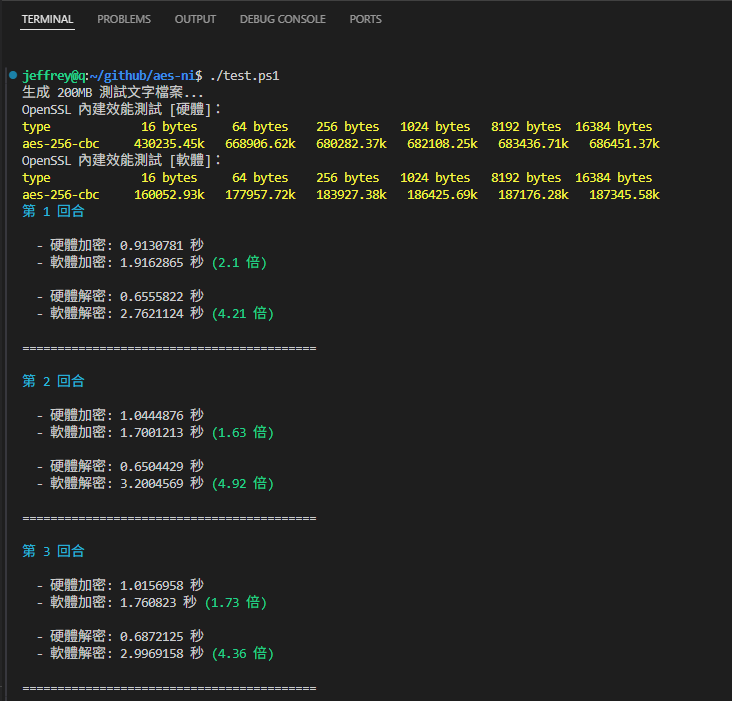
openssl-speed 純記憶體測試,硬體運算速度約為軟體的 3.7 倍。200MB 檔案測試加密為 1.6 ~ 2.1 倍,解密約 4 ~ 5 倍左右。
本機 WSL Ubuntu 22.04 (12th Gen Intel(R) Core(TM) i5-12500) 測試結果如下:
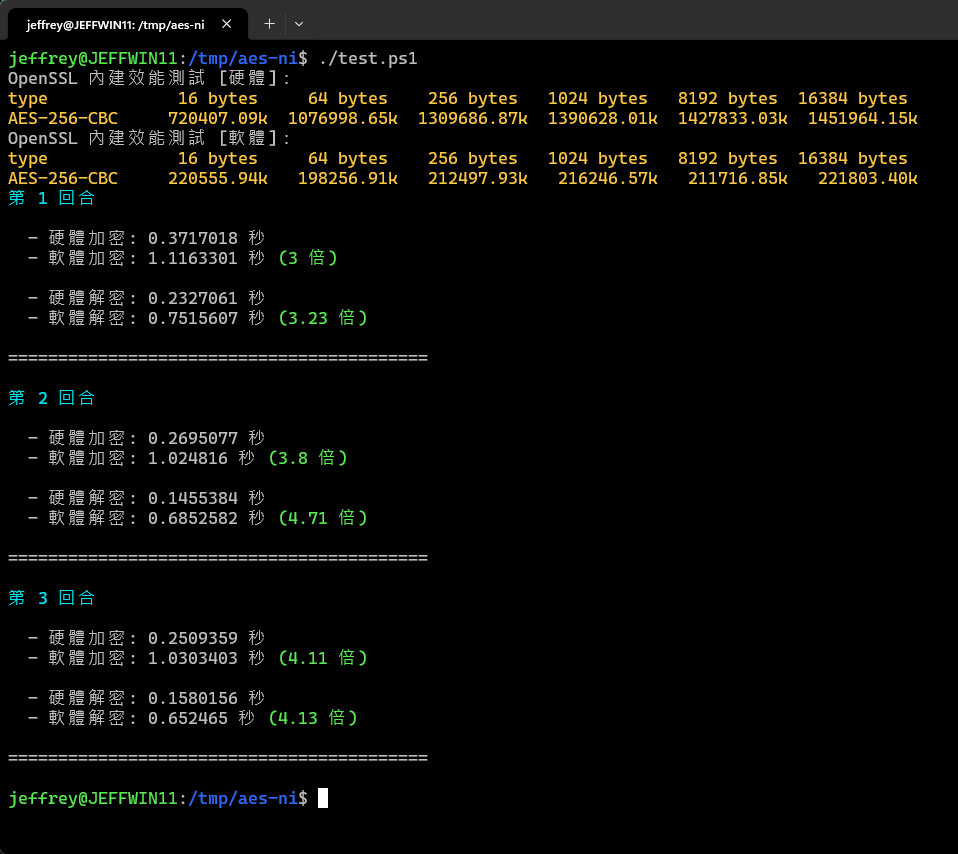
openssl-speed 硬體速度約為軟體的 6.6 倍。200MB 檔案測試加密為 3 ~ 4 倍,解密約 3.2 ~ 4.7 倍左右。
感謝讀者 Tien-Ren Chen 分享,AES 採用硬體運算除了速度快,還有資安面的額外好處:
- 硬體 Pipeline 執行指令時間較固定,可防止從計算過程的延遲時間推測明文或金鑰
- 不使用 T-Table,可消除 Cache Time Attack / Prime+Probe / Flush+Reload 等針對 AES Table 的攻擊手法
- 因採固定專用硬體線路,運算過程的功耗特徵比軟體指令組合規律且集中,難以藉由過觀察功耗變化進行攻擊
Comments
# by Python路過, 吾好錯過
#!/usr/bin/env python3 """ AES-256-CBC 硬體加速 vs 軟體加密 效能基準測試 =============================================== 此程式比較 OpenSSL AES-256-CBC 在硬體加速 (AES-NI) 與純軟體模式下的 加密/解密效能差異。 S3D 規範驅動設計: Phase 1 - 意圖: 量化 AES-NI 硬體加速的效能收益 Phase 2 - 規範: 6項功能(F1-F6)、4項約束(C1-C4)、5項原則(P1-P5) Phase 3 - 細化: 6層模組架構 Phase 4 - 實現: 本檔案 使用方式: python3 aes_benchmark.py 需求: - Python 3.6+ - OpenSSL 命令列工具 (openssl) """ import os import sys import time import shutil import hashlib import subprocess from dataclasses import dataclass from typing import List # ============================================================ # Step 1: 常數與設定層 # ============================================================ # --- 檔案與密碼設定 (對應 P2: 可配置性) --- TEST_FILE = "big_test_file.txt" ENC_FILE_HW = "encrypted_hw.enc" DEC_FILE_HW = "decrypted_hw.txt" ENC_FILE_SW = "encrypted_sw.enc" DEC_FILE_SW = "decrypted_sw.txt" PASSWORD = "MySecretPassword123" # --- 測試參數 --- ROUNDS = 3 FILE_SIZE = 200 * 1024 * 1024 # 200 MB # --- AES-NI 遮罩 (對應 C1) --- AES_NI_DISABLE_MASK = "~0x200000200000000" ENV_CAP_NAME = "OPENSSL_ia32cap" # --- ANSI 顏色碼 (對應 P5: 進度可見) --- class Color: RED = "\033[91m" GREEN = "\033[92m" YELLOW = "\033[93m" CYAN = "\033[96m" BOLD = "\033[1m" RESET = "\033[0m" # ============================================================ # Step 2: 環境控制層 (對應 C1) # ============================================================ def set_hw_mode(): """切換至硬體加速模式:移除 OPENSSL_ia32cap 環境變數""" os.environ.pop(ENV_CAP_NAME, None) def set_sw_mode(): """切換至軟體模式:設定 OPENSSL_ia32cap 以停用 AES-NI""" os.environ[ENV_CAP_NAME] = AES_NI_DISABLE_MASK def restore_mode(): """還原環境變數至預設狀態""" os.environ.pop(ENV_CAP_NAME, None) # ============================================================ # Step 3: 測試檔案管理層 (對應 F1, F6) # ============================================================ def ensure_test_file(filepath: str, size: int) -> None: """ 確保測試檔案存在,不存在則生成指定大小的隨機資料。 對應 F1: 測試檔案管理 """ if os.path.exists(filepath) and os.path.getsize(filepath) >= size: return print(f"生成 {size // (1024*1024)}MB 測試檔案...") # 使用 openssl rand 生成隨機資料 (跨平台相容) # 若 openssl 不可用,回退到 Python 的 os.urandom try: with open(filepath, "wb") as f: result = subprocess.run( ["openssl", "rand", str(size)], stdout=f, stderr=subprocess.PIPE ) if result.returncode != 0: raise RuntimeError("openssl rand 失敗") except Exception: # 回退方案:使用 Python os.urandom 分段寫入 print(" (使用 Python os.urandom 回退方案)") chunk_size = 1024 * 1024 # 1MB chunks written = 0 with open(filepath, "wb") as f: while written < size: to_write = min(chunk_size, size - written) f.write(os.urandom(to_write)) written += to_write print(f" 完成: {filepath} ({os.path.getsize(filepath) // (1024*1024)} MB)") def cleanup_files(*filepaths: str) -> None: """ 清理臨時檔案,刪除失敗不中斷程式。 對應 F6: 清理 / P3: 錯誤容忍 """ for fp in filepaths: try: if os.path.exists(fp): os.remove(fp) except OSError: pass # 對應 P3: 臨時檔案刪除失敗不應中斷程式 # ============================================================ # Step 4: 核心測試層 (對應 F2, F3, F4) # ============================================================ @dataclass class BenchmarkResult: """單次測量結果的資料結構""" label: str enc_time: float dec_time: float verified: bool = True @dataclass class RoundResult: """一個完整回合的結果(硬體+軟體)""" round_num: int hw: BenchmarkResult sw: BenchmarkResult def sha256_file(filepath: str) -> str: """ 計算檔案的 SHA256 雜湊值。 對應 F4: 正確性驗證 """ h = hashlib.sha256() with open(filepath, "rb") as f: while chunk := f.read(8192 * 1024): # 8MB chunks h.update(chunk) return h.hexdigest() def openssl_speed_test(label: str, use_software: bool) -> str: """ 執行 OpenSSL 內建 speed 測試。 對應 F2: OpenSSL Speed 測試 Returns: speed 測試輸出的最後 2 行 """ if use_software: set_sw_mode() else: set_hw_mode() try: result = subprocess.run( ["openssl", "speed", "-evp", "aes-256-cbc"], capture_output=True, text=True ) lines = result.stdout.strip().split("\n") output = "\n".join(lines[-2:]) if len(lines) >= 2 else result.stdout except Exception as e: output = f" speed 測試失敗: {e}" return output def measure_aes(label: str, enc_file: str, dec_file: str, use_software: bool) -> BenchmarkResult: """ 執行一次完整的加密+解密計時測量。 對應 F3: 加密/解密計時測試 + F4: 正確性驗證 """ # 設定硬體/軟體模式 if use_software: set_sw_mode() else: set_hw_mode() # --- 加密計時 --- t0 = time.perf_counter() subprocess.run( ["openssl", "enc", "-aes-256-cbc", "-salt", "-in", TEST_FILE, "-out", enc_file, "-pass", f"pass:{PASSWORD}", "-pbkdf2"], check=True, capture_output=True ) enc_time = time.perf_counter() - t0 # --- 解密計時 --- t0 = time.perf_counter() subprocess.run( ["openssl", "enc", "-d", "-aes-256-cbc", "-in", enc_file, "-out", dec_file, "-pass", f"pass:{PASSWORD}", "-pbkdf2"], check=True, capture_output=True ) dec_time = time.perf_counter() - t0 # --- 正確性驗證 (F4) --- orig_hash = sha256_file(TEST_FILE) dec_hash = sha256_file(dec_file) verified = (orig_hash == dec_hash) if not verified: print(f"{Color.RED}錯誤: 解密結果與原始內容不符!{Color.RESET}") return BenchmarkResult( label=label, enc_time=enc_time, dec_time=dec_time, verified=verified ) # ============================================================ # Step 5: 報告輸出層 (對應 F5) # ============================================================ def print_speed_result(label: str, output: str) -> None: """輸出 OpenSSL speed 測試結果""" print(f"OpenSSL 內建效能測試 [{label}]:") print(f"{Color.YELLOW}{output}{Color.RESET}") print() def print_round_result(result: RoundResult) -> None: """ 輸出單回合測試結果,含效能倍率。 對應 F5: 結果輸出 """ hw = result.hw sw = result.sw # 計算倍率 (軟體時間 / 硬體時間) enc_ratio = round(sw.enc_time / hw.enc_time, 2) if hw.enc_time > 0 else float('inf') dec_ratio = round(sw.dec_time / hw.dec_time, 2) if hw.dec_time > 0 else float('inf') print() print(f" - 硬體加密: {hw.enc_time:.4f} 秒") print(f" - 軟體加密: {sw.enc_time:.4f} 秒", end="") print(f" {Color.GREEN}({enc_ratio} 倍){Color.RESET}") print() print(f" - 硬體解密: {hw.dec_time:.4f} 秒") print(f" - 軟體解密: {sw.dec_time:.4f} 秒", end="") print(f" {Color.GREEN}({dec_ratio} 倍){Color.RESET}") print() print("=" * 42) print() def print_summary(all_results: List[RoundResult]) -> None: """ 輸出所有回合的匯總統計。 增強功能:原始 PowerShell 腳本未有的匯總分析 """ print() print(f"{Color.BOLD}{'='*50}{Color.RESET}") print(f"{Color.BOLD} 匯總統計 (共 {len(all_results)} 回合){Color.RESET}") print(f"{Color.BOLD}{'='*50}{Color.RESET}") print() # 計算平均值 hw_enc_avg = sum(r.hw.enc_time for r in all_results) / len(all_results) sw_enc_avg = sum(r.sw.enc_time for r in all_results) / len(all_results) hw_dec_avg = sum(r.hw.dec_time for r in all_results) / len(all_results) sw_dec_avg = sum(r.sw.dec_time for r in all_results) / len(all_results) enc_ratio_avg = round(sw_enc_avg / hw_enc_avg, 2) if hw_enc_avg > 0 else float('inf') dec_ratio_avg = round(sw_dec_avg / hw_dec_avg, 2) if hw_dec_avg > 0 else float('inf') # 表格輸出 header = f" {'項目':<12} {'硬體 (AES-NI)':>16} {'軟體 (SW)':>16} {'倍率':>8}" print(header) print(f" {'─'*56}") print(f" {'加密平均':<12} {hw_enc_avg:>14.4f}s {sw_enc_avg:>14.4f}s {Color.GREEN}{enc_ratio_avg:>6}x{Color.RESET}") print(f" {'解密平均':<12} {hw_dec_avg:>14.4f}s {sw_dec_avg:>14.4f}s {Color.GREEN}{dec_ratio_avg:>6}x{Color.RESET}") print(f" {'─'*56}") print() # 逐回合明細 print(" 逐回合明細:") print(f" {'回合':>4} | {'HW加密':>10} {'SW加密':>10} {'HW解密':>10} {'SW解密':>10}") print(f" {'─'*52}") for r in all_results: print(f" {r.round_num:>4} | {r.hw.enc_time:>8.4f}s {r.sw.enc_time:>8.4f}s " f"{r.hw.dec_time:>8.4f}s {r.sw.dec_time:>8.4f}s") print() # 正確性檢查 all_verified = all(r.hw.verified and r.sw.verified for r in all_results) status = f"{Color.GREEN}✓ 全部通過{Color.RESET}" if all_verified else f"{Color.RED}✗ 有失敗{Color.RESET}" print(f" 正確性驗證: {status}") print() # ============================================================ # Step 6: 主流程編排層 # ============================================================ def check_openssl() -> bool: """檢查 openssl 是否可用""" return shutil.which("openssl") is not None def main(): """ 主流程:對應架構設計的資料流 ensure_test_file → openssl_speed_test → [N回合 measure_aes] → print_summary """ # --- 前置檢查 --- if not check_openssl(): print(f"{Color.RED}錯誤: 找不到 openssl 命令列工具,請先安裝。{Color.RESET}") sys.exit(1) print(f"{Color.BOLD}AES-256-CBC 硬體加速 vs 軟體加密 效能基準測試{Color.RESET}") print(f"測試檔案: {TEST_FILE} ({FILE_SIZE // (1024*1024)} MB)") print(f"測試回合: {ROUNDS}") print(f"{'='*50}") print() # --- Step A: 確保測試檔案存在 (F1) --- ensure_test_file(TEST_FILE, FILE_SIZE) print() # --- Step B: OpenSSL 內建 speed 測試 (F2) --- print(f"{Color.CYAN}--- OpenSSL 內建效能測試 ---{Color.RESET}") print() hw_speed = openssl_speed_test("硬體", use_software=False) print_speed_result("硬體", hw_speed) sw_speed = openssl_speed_test("軟體", use_software=True) print_speed_result("軟體", sw_speed) # --- Step C: 多回合加密/解密計時測試 (F3, F4, F5) --- print(f"{Color.CYAN}--- 加密/解密計時測試 ({ROUNDS} 回合) ---{Color.RESET}") all_results: List[RoundResult] = [] for i in range(1, ROUNDS + 1): print(f"\n{Color.CYAN}第 {i} 回合{Color.RESET}") # 硬體模式測試 hw_result = measure_aes( label="硬體 (AES-NI)", enc_file=ENC_FILE_HW, dec_file=DEC_FILE_HW, use_software=False ) # 軟體模式測試 sw_result = measure_aes( label="軟體 (SW)", enc_file=ENC_FILE_SW, dec_file=DEC_FILE_SW, use_software=True ) round_result = RoundResult(round_num=i, hw=hw_result, sw=sw_result) all_results.append(round_result) # 輸出本回合結果 print_round_result(round_result) # 清理臨時檔案 (F6) cleanup_files(ENC_FILE_HW, DEC_FILE_HW, ENC_FILE_SW, DEC_FILE_SW) # --- Step D: 匯總輸出 --- print_summary(all_results) # --- Step E: 還原環境 (F6) --- restore_mode() print(f"{Color.GREEN}測試完成,環境已還原。{Color.RESET}") # ============================================================ # 入口點 # ============================================================ if __name__ == "__main__": main()