.NET AI 應用練習 1 - 整合 MCP
 |  | 0 |  |
雖說現在寫程式有 AI,程式語言不一定要綁死開發者(或者該說使用者)本身的技能,但只要還需要「人」參與協作(包含 Code Review、修改及除錯),選開發者擅長的語言多半還是利多於弊。基於這個理念,這系列文章我會以 C# 開發者視角,整理 .NET 開發 AI 應用程式範例,打算留在這個航道上的同學可以參考。
微軟針對 AI 應用開發有提供了一系列 .NET 官方框架或程式庫(MAF/MEAI/ONNX... 還不認識的同學可看這篇:.NET 開發 AI 應用程式之新手指南),本系列也會以其為基礎出發。
第一個練習來試試用 .NET 整合 MCP 服務,輔助 AI 執行作業或回答問題,我選的練習對象是為 AI Coding 提供微軟官方文件的 MS Learn MCP。
程式運作概念很簡單,用 MEAI 建立 IChatClient,開啟自動調用工具功能(.UseFunctionInvocation()),生成回應時一併傳入 MS Learn MCP 提供的工具清單,MEAI 程式庫呼叫 AI 模型時,模型將視需要使用 MS Learn MCP 提供的工具查詢官方文件或程式範例,據以生成回答。
Microsoft Learn 為遠端 HTTP MCP Server,故用 McpClient.CreateAsync() 傳入 URL 即可建立 McpClient 物件,不需特別在本機跑網站或服務,而 McpClient 型別有個 .ListToolsAsync() 方法可傳回 McpClientTool 型別的工具清單,將其列為聊天時傳入的工具項目,MEAI 便會在背後幫我們搞定呼叫工具、將執行結果餵給 AI 模型... 等繁瑣細節,輕鬆整合 MCP。
範例程式是透過 LiteLLM 存取 gpt-5.6-luna 模型,專案有用到以下套件:DotNetEnv、Microsoft.Extensions.AI、Microsoft.Extensions.AI.OpenAI、ModelContextProtocol、OpenAI。複雜的部分 MEAI 已包辦,要寫的程式不多,不到 100 行搞定。
using System.ClientModel;
using System.Diagnostics;
using DotNetEnv;
using Microsoft.Extensions.AI;
using ModelContextProtocol.Client;
using OpenAI;

Env.Load();

// 以 LiteLLM Azure Provider 為例
var apiKey = Environment.GetEnvironmentVariable("LITELLM_KEY") ??
    throw new InvalidOperationException("LITELLM_KEY environment variable is not set.");
var liteLlmUrl = Environment.GetEnvironmentVariable("LITELLM_URL") ??
    throw new InvalidOperationException("LITELLM_URL environment variable is not set.");
var endpoint = liteLlmUrl.TrimEnd('/') + "/v1";

// Microsoft Learn 是遠端 HTTP MCP Server,不需要跑本機程序
await using var learnMcpClient = await McpClient.CreateAsync(
    new HttpClientTransport(
        new HttpClientTransportOptions
        {
            Endpoint = new Uri(
                "https://learn.microsoft.com/api/mcp")
        }));

// 呼叫 MCP 方法取得所有工具列表
IList<McpClientTool> learnTools = await learnMcpClient.ListToolsAsync();
// 觀察 MCP 之工具列表
if (args.Any(o => o == "--list-mcp-tools"))
{
    Console.WriteLine("Microsoft Learn MCP 工具列表:");
    foreach (var tool in learnTools)
    {
        Console.ForegroundColor = ConsoleColor.Cyan;
        Console.WriteLine($"- {tool.Name}");
        Console.ResetColor();
        Console.WriteLine($"  {tool.Description}");
        Console.ForegroundColor = ConsoleColor.Yellow;
        Console.WriteLine($"{tool.JsonSchema}");
        Console.ResetColor();
    }
    return;
}

IChatClient chatClient = new OpenAIClient(
    new ApiKeyCredential(apiKey),
    new OpenAIClientOptions { Endpoint = new Uri(endpoint) })
    .GetChatClient("gpt-5.6-luna")
    .AsIChatClient().AsBuilder()
    // 啟用自動化調用工具功能。自動解析 AI 回應工具請求,執行相應工具呼叫,並將結果返回給 AI。
    .UseFunctionInvocation()
    .Build();

const string systemPrompt = """
你是 Microsoft 技術文件助理。回答時請優先使用 Microsoft Learn MCP 工具搜尋官方文件與程式碼範例。

遵循以下規則:
1. 使用繁體中文。
2. 不要捏造 API。
3. 明確列出參考文件的標題與 URL。
4. 如果文件內容不足,請直接說明。
""";
const string userQuery = "查詢 Microsoft 官方文件,提供以 MEAI 連接 OpenAI API 回答問題的最精簡範例及參考網址。";

var sw = new Stopwatch();
sw.Start();

var response = await chatClient.GetResponseAsync(
    new List<ChatMessage>
    {
        new(ChatRole.System, systemPrompt),
        new(ChatRole.User, userQuery)
    },
    new ChatOptions
    {
        // 將 MCP 提供工具清單設為聊天的可用工具
        Tools = [.. learnTools]
    });

sw.Stop();
Console.WriteLine($"Response time: {sw.ElapsedMilliseconds} ms");
Console.WriteLine(response.Text);
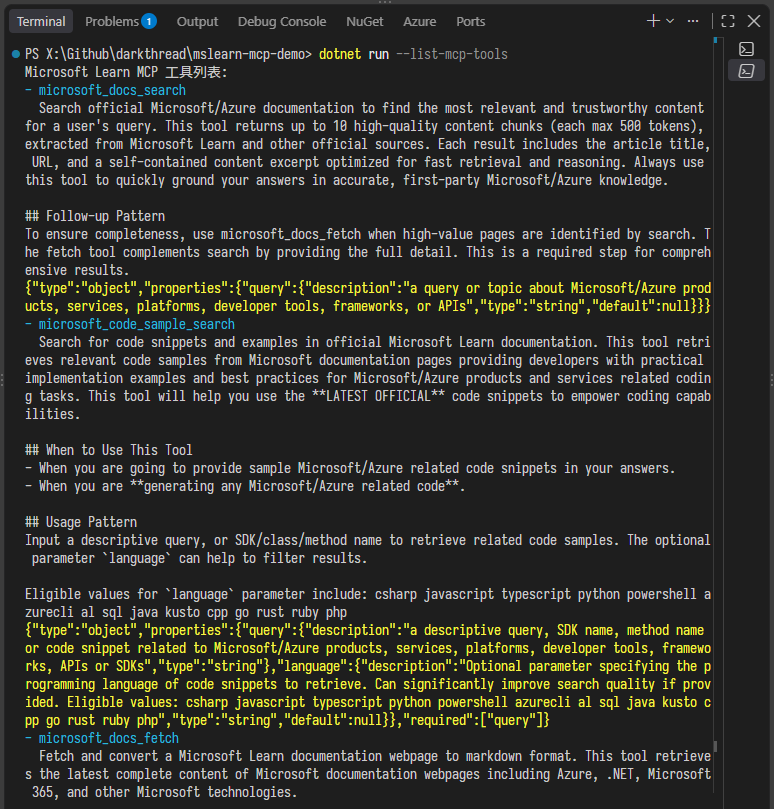
程式多加了一個 --list-mcp-tools 參數可用來偷看 MS Learn MCP 是如何定義 microsoft_docs_search、microsoft_code_sample_search、microsoft_docs_fetch 這幾個工具函式。
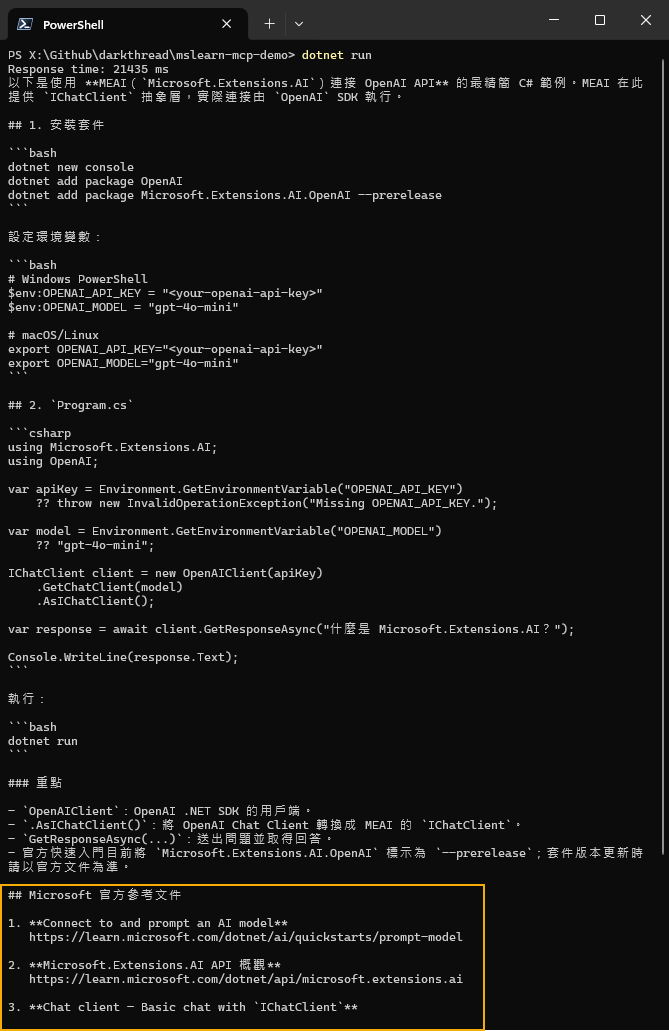
實測 gpt-5.6-luna 模型確實調用了 MS Learn MCP 取得程式範例及參考連結生成回答,成功!
Build a .NET AI application using MEAI and Microsoft Learn MCP. The C# example automatically invokes remote MCP tools to search official documentation and code samples, enabling an OpenAI-compatible model to generate reliable, referenced answers.
Comments
Be the first to post a comment