使用程式讀取 Windows 無線網路訊號品質
 |  | 2 |  |
昨天從 RDP 連線瞬斷問題追出是無線路由器的 Smart Connect 機制觸發網卡自動切換 2.4G/5G 頻段造成,而 Smart Connect 在臉書貼文留言被刷了不少負評,我目前的結論是「除非是走 WiFi 7 有 MLO,不然還是 2.4G 跟 5G 切成不同 SSID 較好」。
不過會自動切換頻段應也源於訊號品質不佳,讓我開始關注工作機的 WiFi 訊號品質是否太差?
我的無線路由器位置位於房子中央,工作機則在房間邊角中間還隔了牆,訊號確實可能會差一些,我想寫個程式長期觀測 WiFi 品質確認這點,看看白天晚上、不同時段是否有差別。
研究了一下,查看 WiFi 品質數字最簡單的做法是用 CLI netsh wlan show intefaces,顯示結果中的 Signal (訊號) 百分比即為訊號品質:
PS D:\> netsh wlan show interfaces

There is 1 interface on the system:

    Name                   : Wi-Fi AX210
    Description            : Intel(R) Wi-Fi 6E AX210 160MHz
    GUID                   : 4dba6ce4-dc0f-49dd-5a4e-66626be68720
    Physical address       : f4:7b:09:ab:cd:ef
    Interface type         : Primary
    State                  : connected
    SSID                   : M-WiFi-SSID
    AP BSSID               : 12:34:56:78:90:ab
    Band                   : 5 GHz
    Channel                : 157
    Connected Akm-cipher   : [ akm = 00-0f-ac:08, cipher =  00-0f-ac:04 ]
    Network type           : Infrastructure
    Radio type             : 802.11ax
    Authentication         : WPA3-Personal  (H2E)
    Cipher                 : CCMP
    Connection mode        : Auto Connect
    Receive rate (Mbps)    : 216
    Transmit rate (Mbps)   : 144
    Signal                 : 60%
    Rssi                   : -72
    Profile                : My-WiFi-SSID
    QoS MSCS Configured         : 0
    QoS Map Configured          : 0
    QoS Map Allowed by Policy   : 0
程式要取得品質數據,無腦寫法是呼叫 netsh 並解析輸出結果,但呼叫外部程序偏笨重,解析文字則要考慮語系,我覺得不甚理想。netsh 可以查到資料代表背後有對映的 Windows API,我很快找到 Native Wifi API。
描述無線網卡介面的資料結構 WLAN_ASSOCIATION_ATTRIBUTES 有個 WLAN_SIGNAL_QUALITY wlanSignalQuality 表示網路訊號品質百分比值,其值介於 0 到 100 之間。0 表示實際 RSSI 訊號強度 -100 dbm、100 表示實際 RSSI 訊號強度 -50 dbm。用線性插補可計算 wlanSignalQuality 值介於 1 到 99 之間的 RSSI 訊號強度值。
找到方法,就可以寫個共用函式。完整程序是先 WlanOpenHandle() 與無線自動設定服務(WLAN AutoConfig Service)建立連線,WlanEnumInterfaces() 列舉使用中的無線網卡,從清單取得第一個介面的識別碼 Guid,接著呼叫 WlanQueryInterface() 取得該介面包含 WiFi 訊號品質的即時資料。考量 WlanOpenHandle() 建立本機 RPC 連線會耗用較多資源,而網卡不會三不五時異動,故每次重複列舉介面純屬多餘,故我決定重複使用連線及記憶介面識別 ID,定期查詢直接呼叫 WlanQueryInterface(),如此程式較省資源、執行效率更好。
using System.Runtime.InteropServices;

static class PInvokeHelper
{
    static IntPtr _hClient = IntPtr.Zero;
    static Guid _ifGuid;
    static string _ssid = string.Empty;
    const uint ERROR_SUCCESS = 0;
    const uint WLAN_INTF_OPCODE_CURRENT_CONNECTION = 7;

    [DllImport("wlanapi.dll")]
    static extern uint WlanOpenHandle(uint dwClientVersion, IntPtr pReserved,
        out uint pdwNegotiatedVersion, out IntPtr phClientHandle);

    [DllImport("wlanapi.dll")]
    static extern uint WlanEnumInterfaces(IntPtr hClientHandle, IntPtr pReserved,
        out IntPtr ppInterfaceList);

    [DllImport("wlanapi.dll")]
    static extern uint WlanQueryInterface(IntPtr hClientHandle, ref Guid pInterfaceGuid,
        uint OpCode, IntPtr pReserved, out uint pdwDataSize, out IntPtr ppData,
        out uint pWlanOpcodeValueType);

    [DllImport("wlanapi.dll")]
    static extern void WlanFreeMemory(IntPtr pMemory);

    [DllImport("wlanapi.dll")]
    static extern uint WlanCloseHandle(IntPtr hClientHandle, IntPtr pReserved);

    [StructLayout(LayoutKind.Sequential, CharSet = CharSet.Unicode)]
    struct WLAN_INTERFACE_INFO
    {
        public Guid InterfaceGuid;
        [MarshalAs(UnmanagedType.ByValTStr, SizeConst = 256)]
        public string strInterfaceDescription;
        public uint isState;
    }

    [StructLayout(LayoutKind.Sequential)]
    struct DOT11_SSID
    {
        public uint uSSIDLength;
        [MarshalAs(UnmanagedType.ByValArray, SizeConst = 32)]
        public byte[] ucSSID;
    }

    [StructLayout(LayoutKind.Sequential)]
    struct WLAN_ASSOCIATION_ATTRIBUTES
    {
        public DOT11_SSID dot11Ssid;
        public uint dot11BssType;
        [MarshalAs(UnmanagedType.ByValArray, SizeConst = 6)]
        public byte[] dot11Bssid;
        public uint dot11PhyType;
        public uint uDot11PhyIndex;
        public uint wlanSignalQuality; // 0–100; RSSI (dBm) = (quality / 2) - 100
        public uint ulRxRate;
        public uint ulTxRate;
    }

    [StructLayout(LayoutKind.Sequential)]
    struct WLAN_SECURITY_ATTRIBUTES
    {
        public int bSecurityEnabled;
        public int bOneXEnabled;
        public uint dot11AuthAlgorithm;
        public uint dot11CipherAlgorithm;
    }

    [StructLayout(LayoutKind.Sequential, CharSet = CharSet.Unicode)]
    struct WLAN_CONNECTION_ATTRIBUTES
    {
        public uint isState;
        public uint wlanConnectionMode;
        [MarshalAs(UnmanagedType.ByValTStr, SizeConst = 256)]
        public string strProfileName;
        public WLAN_ASSOCIATION_ATTRIBUTES wlanAssociationAttributes;
        public WLAN_SECURITY_ATTRIBUTES wlanSecurityAttributes;
    }

    static void EnsureInitialized()
    {
        if (_hClient != IntPtr.Zero) return;

        uint err = WlanOpenHandle(2, IntPtr.Zero, out _, out _hClient);
        if (err != ERROR_SUCCESS)
        {
            _hClient = IntPtr.Zero;
            throw new InvalidOperationException($"WlanOpenHandle failed: {err}");
        }

        err = WlanEnumInterfaces(_hClient, IntPtr.Zero, out IntPtr pIfList);
        if (err != ERROR_SUCCESS)
        {
            Reset();
            throw new InvalidOperationException($"WlanEnumInterfaces failed: {err}");
        }

        uint count = (uint)Marshal.ReadInt32(pIfList);
        if (count == 0)
        {
            WlanFreeMemory(pIfList);
            Reset();
            throw new InvalidOperationException("No WLAN interfaces found.");
        }

        // dwNumberOfItems, dwIndex 各 4 bytes,+8 取得第一個 WLAN_INTERFACE_INFO 結構
        var ifInfo = Marshal.PtrToStructure<WLAN_INTERFACE_INFO>(pIfList + 8);
        _ifGuid = ifInfo.InterfaceGuid;
        WlanFreeMemory(pIfList);
    }

    static void Reset()
    {
        if (_hClient == IntPtr.Zero) return;
        WlanCloseHandle(_hClient, IntPtr.Zero);
        _hClient = IntPtr.Zero;
        _ssid = string.Empty;
    }

    public static ulong GetWifiQuality()
    {
        EnsureInitialized();

        uint err = WlanQueryInterface(_hClient, ref _ifGuid,
            WLAN_INTF_OPCODE_CURRENT_CONNECTION, IntPtr.Zero,
            out _, out IntPtr pConnAttr, out _);

        if (err != ERROR_SUCCESS)
        {
            // Wlan Hander 或 ifGuid 失效,重新查詢網卡介面
            Reset();
            EnsureInitialized();

            err = WlanQueryInterface(_hClient, ref _ifGuid,
                WLAN_INTF_OPCODE_CURRENT_CONNECTION, IntPtr.Zero,
                out _, out pConnAttr, out _);

            if (err != ERROR_SUCCESS)
                throw new InvalidOperationException($"Not connected (error {err})");
        }

        var attr = Marshal.PtrToStructure<WLAN_CONNECTION_ATTRIBUTES>(pConnAttr);
        WlanFreeMemory(pConnAttr);
        _ssid = System.Text.Encoding.UTF8.GetString(attr.wlanAssociationAttributes.dot11Ssid.ucSSID, 0,
            (int)attr.wlanAssociationAttributes.dot11Ssid.uSSIDLength);
        return attr.wlanAssociationAttributes.wlanSignalQuality;
    }

    public static string GetWifiSsid() => _ssid;
}
搞定上述關鍵,寫幾行 C# 就能做到定期監測 WiFi 訊號品質囉~
Console.WriteLine("Press Ctrl+C to stop.");

using var cts = new CancellationTokenSource();
Console.CancelKeyPress += (_, e) => { e.Cancel = true; cts.Cancel(); };

var timer = new PeriodicTimer(TimeSpan.FromSeconds(1));
while (await timer.WaitForNextTickAsync(cts.Token))
{
    try
    {
        ulong quality = PInvokeHelper.GetWifiQuality();
        int rssi = (int)(quality / 2) - 100;
        Console.WriteLine($"[{DateTime.Now:HH:mm:ss}] Quality: {quality}%  RSSI: {rssi} dBm");
    }
    catch (Exception ex)
    {
        Console.WriteLine($"[{DateTime.Now:HH:mm:ss}] {ex.Message}");
    }
}
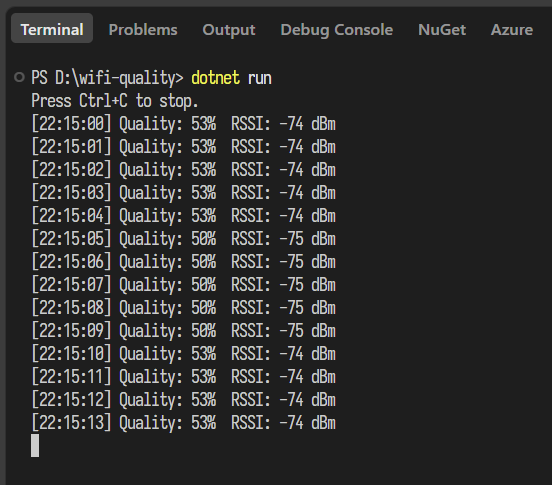
補充,跟 AI 學到 async 時代的非同步定期輪詢寫法,建立 PeriodicTimer,用 WaitForNextTickAsync() 等待下次觸發,如此可透過 CancellationTokenSource 即時中止程序,比傳統 while 迴圈加 Thread.Spleep() 寫法更符合非同步精神。
Build a C# WiFi signal monitor using Windows Native Wifi API instead of parsing netsh, retrieving quality/RSSI efficiently via cached WLAN handles and interface IDs, with async periodic polling using PeriodicTimer.
Comments
# by Ike
不少負評的 留言區 連結…是否有誤?
# by Jeffrey
to lke, 對,貼錯了,謝謝提醒。