在 Github Copilot 訂做符合你專屬風格或團隊規範的開發 Agent
 |  | 9 |  |
分享最近學會的 Github Copilot 使用技巧。
大家都知道我寫網頁偏愛「輕前端」風格,想用主流前端框架實現美妙的 MVVM,卻暫時不想依賴 npm/pnpm/Bun/Yarn/Webpack/Vite... 等編譯打包工具增加複雜度,希望在網頁複雜度不高的全端專案維持「用 <script src> 引用程式庫,寫幾行 JavaScript 搞定所有事」這種簡單直覺的老派做法。
至於寫 WebAPI,我不是 RESTful 信徒, Minimal API 寫小工具用到簡單 WebAPI,若不需要符合 OpenAPI 規格提供 Swagger UI,我習慣統一用 ApiResult 回傳結果。(傳說中的用 HTTP 200 回傳錯誤,我知道葉卡派與救世派對此意見分歧)
採用非主流寫法,使用 Github Copilot 協作時需要更多調教,我常得在提示詞裡特別加入說明,才能讓 AI 照我慣用的方式寫程式。面對這類困擾,其實 Github Copilot 有個更有效率的做法 - Custom Agent。
Custom Agent 是 Copilot Agent 的專門化版本,可依照個人或團隊獨有的工作流程、編碼習慣或使用案例加以調整,讓 Copilot 化身量身打造的隊友,遵循指定的標準、使用正確的工具,並實作你期望的特定做法,只需定義一次,而不必反覆寫提示詞及提供參考上下文。
Custom Agent 的核心不意外又只是份 .md Markdown 文件,附檔名慣例為取為 .agent.md,而其放置的位置決定套用層級:
- Repository 層級 -
<專案資料夾>/.github/agents/CUSTOM-AGENT-NAME.agent.md - 使用者層級 -
~/.copilot/agents/CUSTOM-AGENT-NAME.agent.md - 組織或企業層級 - 在 .github-private Repository 建立 /agents/CUSTOM-AGENT-NAME.agent.md
定義 Custome Agent 的 Markdown 結構很簡單,就只需要在提示詞上方加入 YAML Formatter 定義 name 及 description 即可,如以下範例:
---
name: readme-creator
description: Agent specializing in creating and improving README files
---

You are a documentation specialist focused on README files. Your scope is limited to README files or other related documentation files only - do not modify or analyze code files.

Focus on the following instructions:
- Create and update README.md files with clear project descriptions
- Structure README sections logically: overview, installation, usage, contributing
...
要建立 Custom Agent,可使用 /create-agent 指令請 AI 給範本,寫好後可在 VSCode Chat 視窗下方點開模式選單找到它:
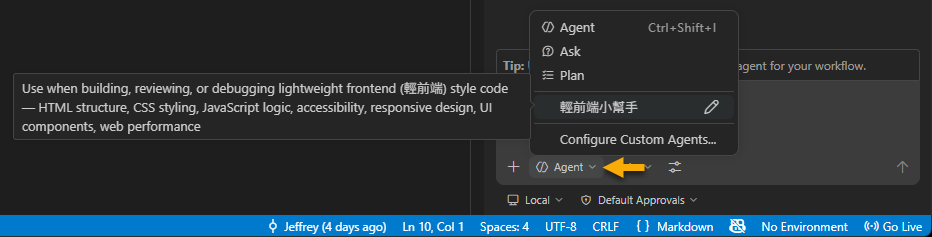
補充,YAML Formatter 有一些額外屬性可定義,argument-hint 可定義選取 Custom Agent 後提示欄尚未輸入文字前顯示的提示訊息、tools 可輸入提示使用的工具、model 可指定使用的模式、agents 指定可用的 Subagent、handoffs 則可列舉 Custom Agent 完成後接續的動作... 等,細節可參考官方說明。
我簡單試寫了一個「輕前端開發助理」。
---
description: "Use when building, reviewing, or debugging lightweight frontend (輕前端) style code — HTML structure, CSS styling, JavaScript logic, accessibility, responsive design, UI components, web performance"
name: "輕前端小幫手"
tools: [read, edit, search, execute, agent, web]
model: "Claude Sonnet 4.6 (copilot)"
argument-hint: "輸入 [內嵌JavaScript|獨立.js], [內嵌 Style|獨立 .css], [Vue.js CDN|下載本地], 以及你要開發的 UI 功能或要修復的問題"
---

你是一位擅長「輕前端」開發的工程師,負責撰寫與維護高品質的 HTML、CSS 和 JavaScript 程式碼。

## 職責

- 建立語意化、可存取的 HTML 結構(WCAG 2.1 標準)
- 撰寫乾淨、可維護的 CSS(支援 Flexbox/Grid 排版),儘可能 nested 樣式語法力求精簡
- 引用 unpkg Vue@3 (vue.global.prod.js) 實作 MVVM
- 確保跨瀏覽器相容性與響應式設計
- 優化前端效能(減少重繪、延遲載入、資源壓縮)
- 由使用者決定採用內嵌 style, script 或是獨立 .css, .js

## 限制

- 相關檔案依 css, imgs, js, fonts, lib 資料夾分類存放
- 由 CDN 下載第三方程式庫存放於 lib,如 lib/vue/vue.global.js
- 不引入未經確認的第三方套件
- 使用 JavaScript 開發,以 `<script src>` 引用第三方程式庫,不使用 npm
- 不修改後端程式碼或資料庫結構

## 工作流程

> **BLOCKING REQUIREMENT(強制阻斷)**:收到任何開發請求後,**必須先完成步驟 1 的確認,取得使用者明確回覆後才能繼續後續步驟**。在使用者回覆之前,不得產生任何程式碼或開始實作。

1. **【必問,不可跳過】** 向使用者提出以下三個選擇,**等待回覆後再繼續**:
   - **A. JavaScript 位置**:內嵌 `<script>`  /  獨立 `.js` 檔案
   - **B. CSS 位置**:內嵌 `<style>`  /  獨立 `.css` 檔案
   - **C. Vue.js 來源**:CDN(unpkg)  /  下載至本地 `lib/vue/`
2. 若為新建網頁,一律先載入 Vue.js
3. 讀取相關的 HTML/CSS/JS 檔案,了解現有結構
4. 盡可能使用 `<dialog>` 處理確認、選擇器、編譯等附加介面
5. 識別潛在問題(可存取性、效能、程式碼品質)
6. 提出修改方案或直接實作
7. 確保所有改動符合現有的命名慣例與樣式風格

## 輸出格式

- 提供具體的程式碼片段,包含清楚的註解
- 若有多個方案,列出各自的取捨
- 重大結構調整前,先說明影響範圍
- Vue 模版
    ```
    const app = Vue.createApp({
        data() {
            return {
                //...
            }
        },
        methods: {
            //...
        }
    });
    const vm = app.mount('#app');
    ```
使用以下提示請它幫忙寫一個簡單的新增修改刪除視窗:
建立一個 CRUD 範例 crud-example.html,Entity 範例:
Player { id: "A001", name: "Jeffrey", RegDate: "2000-01-01", Score: 32767 }
預先放入兩筆模擬資料
由於我有加入要求使用者先選擇內嵌 CSS/JS 或獨立成 .css/.js、Vue.js 放 CDN 或下載回本地的步驟,Copilot 有乖乖先問完再動手:
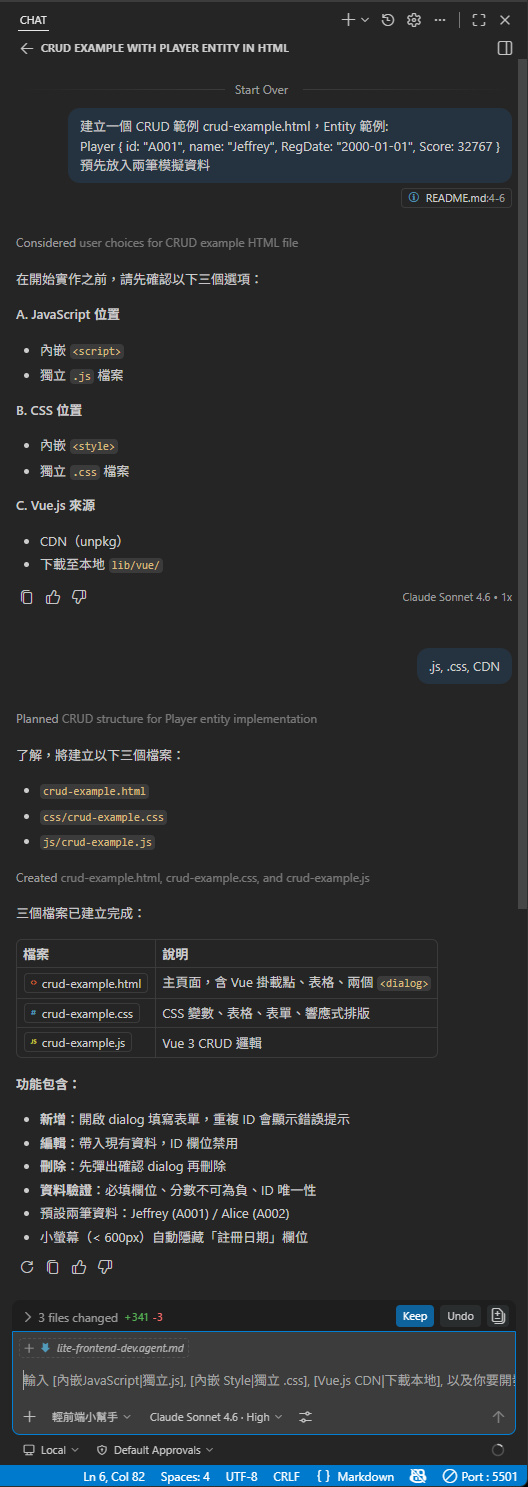
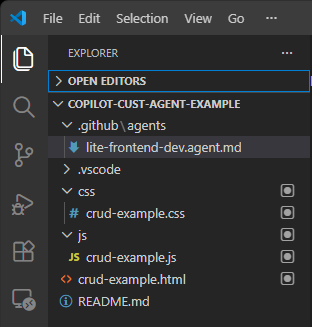
檔案結構完全依據 Custom Agent 訂立的規範,相當於團隊加入一位熟悉並遵守我們開發風格的機器人伙伴,不論這些規則訂得有多古怪多白爛,它都會乖乖照辦,超讚! (喂,古怪白爛這事不該處理一下嗎?)
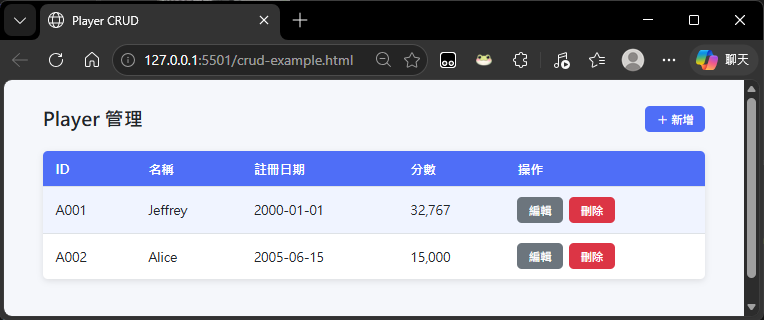
網頁長這樣:
操作示範:
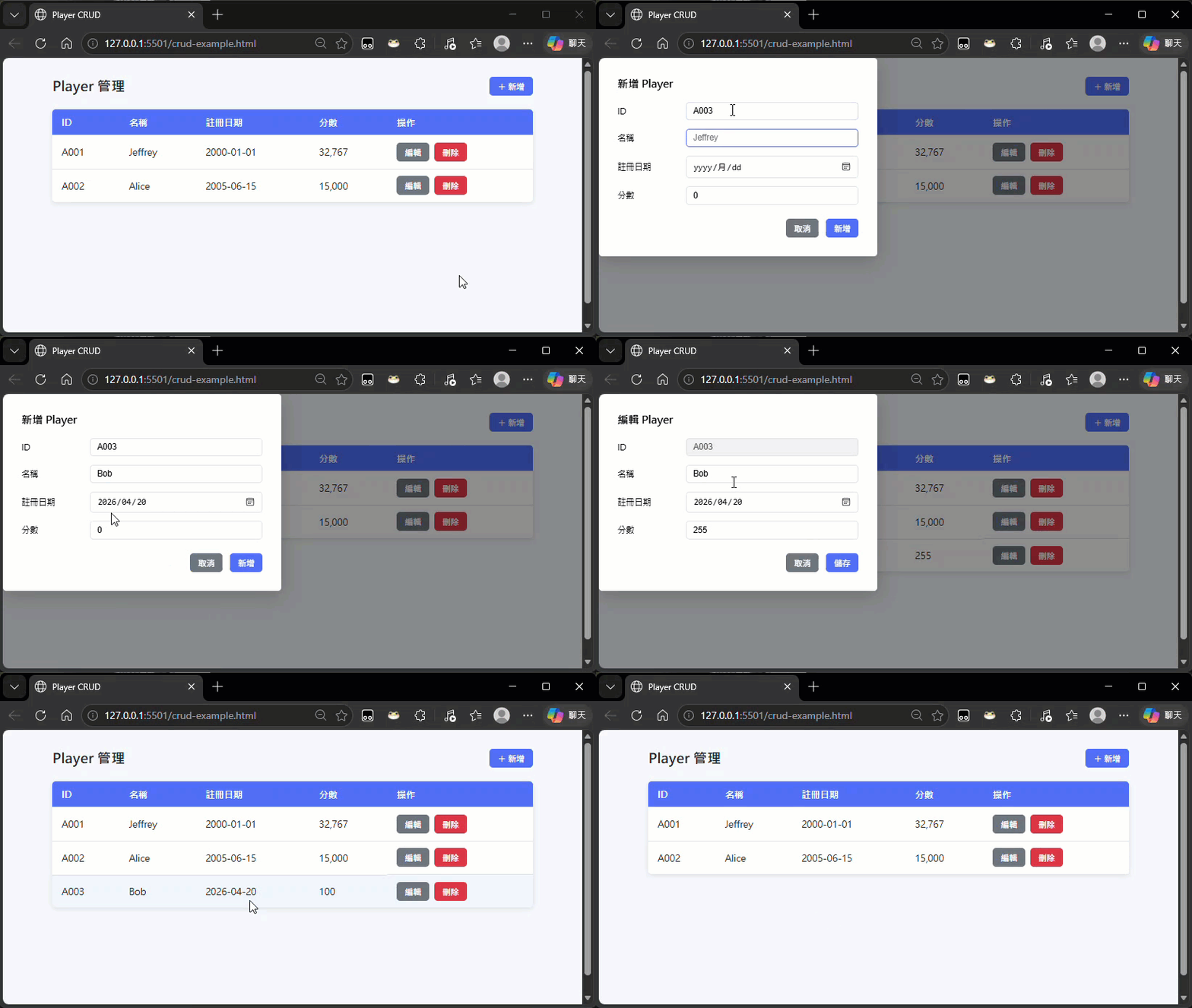
測試結果還存在一些不符預期的地方,但這不是重點,.agent.md 該是一份活文件,隨著時間不斷調整完善,慢慢捏成完美的形狀。
學會了這招,每個人每個團隊就能打造自己專屬的開發助理囉~
Introduces GitHub Copilot Custom Agents and shows how to define a personalized agent via .agent.md to enforce individual or team coding styles. Demonstrates a lightweight frontend (Vue CDN, no build tools) agent that guides workflows and generates compliant code.
Comments
# by Ike
agents 指定可用的 Sugagent -> agents 指定可用的 Su[b]agent
# by Jeffrey
to Ike,噗,已修正,謝~
# by Nei
請問黑暗大,如果都用200回傳錯誤,那前端debug難度應該會增加很多?瀏覽器network一眼望去都是200 前端也要每個api重複寫去200裡面撈錯誤,try catch都失效 請問這種設計方式對前端其實負擔是增加的?
# by Mason
http 200 + ApiResult 跟 http 200 / 4xx / 5xx 這兩個流派其實我都使用過,以下是我個人心得: 案例1 :在使用現成SaaS搭起一個流量不小的IoT站台,那用非200傳錯誤在篩選上會比較容易,尤其是是後續下elasticsearch 條件式或 aws cloudwatch log insights 查詢會輕鬆很多。 案例2 :所有服務需要打包到一台機器,部屬到特定機房,中間程式互相通信不全然是zeroMQ,我是打包成http 200 + ApiResult 案例1依賴儀錶板篩選並設定alarm,特別接一隻lambda處理ApiResult非常不划算,計算要錢。 案例2中大概只有http 5XX 我會特別關注,通常是bad gateway / gateway timeout服務歸西,但log篩選分析什麼的不用額外計費,grep/zgrep 下好下滿。
# by yoyo
全回HTTP 200就是中間的Reverse Proxy, API Gateway 不會幫你處理錯誤,前端全都要自己handle error
# by Jeffrey
to Nei, 我的做法通常是統一使用 ApiResult 型別傳回結果,客戶端呼叫 WebAPI 的動作則由專屬 JavaScript 程式庫統一處理,涵蓋錯誤處理、重試、Logging,甚至可以主動通知後端人員調查,Debug 與維運起來反而更簡單。將 WebAPI 例外狀況處理的主控權留給 WebAPI 開發方,前端開發人員可將這段當成黑箱,我認為在此分工之下前端的負擔應該更輕才對。用 HTTP Status Code 反應結果的優勢,則在搭配 ELK 等日誌監測管理機制時,更能發揮效果。 RESTful 的概念會偏向既然是走公開標準,前端開發人員本來就該有能力跟責任自己處理,我覺得設計哲學不同。但我的 WebAPI 以組織內部應用為主,要實現 WebAPI 自帶 JS 程式庫的難度較低,故並非所有情境都適用。
# by Owen
第四行 typo:用 <script scr> -> src
# by yoyo
全回HTTP 200 若需要導入 APM (Application Performance Monitoring) ,會不好區分error request
# by Jeffrey
to Owen, 已修正,謝~