取得 Windows 遠端桌面來源 IP - 高可攜性 .NET CLI 小工具
 |  | 1 |  |
我是個有資安潔癖,整天疑神疑鬼的人,所以我想寫個小工具,在有人遠端桌面登入我的 Windows 時 Call API、發 Email、Slack 或 Telegram 通知我,通知部分是小事,過去已有不少研究與應用(前面連結有相關文章),本次需求的重點是要能抓出目前遠端登入的來源 IP。這用 .NET 不難完成,但我還想挑戰編譯成原生執行檔,執行環境不用安裝 .NET Runtime 但程式只有幾 MB。
先補充 .NET 基礎知識:dotnet publish 打包 Console 程式執行檔時,我們可以選擇 --no-self-contained 或 --self-contained,前者編譯產生的輸出檔案較少,只有 .exe, .dll, .pdb 及有參照到的程式庫,但執行環境必須事先裝好 .NET Runtime 或 .NET SDK;後者則無此要求,因為它會將 .NET Runtime 程式庫也打包成部署項目。若嫌檔案太多,加上 -p:PublishSingleFile=true 可將所有東西拼成一個大 .exe 檔,如此要部署時只需 Copy 一個檔案,乾淨清爽許多。(延伸閱讀:使用 dotnet 命令列工具發行 .NET 6 專案)
若執行檔要在很多機器上跑,不要求預先裝好指定版本的 .NET 會讓事情簡單許多,故 --self-contained 是較好的選擇,但問題是包進 .NET Runtime 後 exe 異常肥大,往往超過 100MB。算算 10 支"小"工具就佔用 1GB 空間,而其中 90% 內容重複,空間利用率糟透了。
.NET 8 加入的 Native AOT 為改善這個問題帶來一絲曙光,它支援將 .NET 程式編成原生二進位檔,讓執行檔又小(不需要 Runtime)又快(啟動時不需 JIT 編譯),雖然 使用上有一些限制,像是不支援 Assembly.LoadFile、System.Reflection.Emit、C++/CLI、Built-in COM... 等,但若情境可適用就多一種好選擇。
程式很短,不到 60 行搞定,主要是透過 wtsapi32.dll 的 WTSQuerySessionInformation Windows 原生 API 取得 RDP 來源 IP 位址,傳回資料用 Marshal.PtrToStructure() 轉成 C# 端結構,用 [StructLayout(LayoutKind.Sequential)] 確保記憶體位置有正確對映,就一些 P/Invoke 技巧,AI 時代不確定大家還需不需要知道這些,但我有學過也沒必要忘掉,哈!
實測發現一個問題,WTSQuerySessionInformation 取得的 WTSClientAddress 是客戶端主動回報的,有可能是其所在 LAN 的內部 IP,因此我補上 netstat -n 抓連到本機 3389 Port 的來源 IP 當作參考。
using System.Diagnostics;
using System.Runtime.InteropServices;
using System.Text.RegularExpressions;

[DllImport("wtsapi32.dll", SetLastError = true)]
static extern bool WTSQuerySessionInformation(IntPtr hServer, int sessionId, int wtsInfoClass, out IntPtr ppBuffer, out uint pBytesReturned);
[DllImport("wtsapi32.dll")]
static extern void WTSFreeMemory(IntPtr pMemory);

var ip = Environment.GetEnvironmentVariable("COMPUTERNAME") ?? "Unknown";
if (WTSQuerySessionInformation(IntPtr.Zero,
    System.Diagnostics.Process.GetCurrentProcess().SessionId,
    14 /* WTS_INFO_CLASS.WTSClientAddress */ ,
    out IntPtr buffer, out var bytesReturned))
{
    var clientAddress = Marshal.PtrToStructure<WTS_CLIENT_ADDRESS>(buffer);
    WTSFreeMemory(buffer);
    if (clientAddress.AddressFamily == 2) // AF_INET (IPv4)
    {
        ip = $"{clientAddress.Address[2]}.{clientAddress.Address[3]}.{clientAddress.Address[4]}.{clientAddress.Address[5]}";
    }
    else if (clientAddress.AddressFamily == 23) // AF_INET6 (IPv6)
    {
        ip = string.Join(":", Enumerable.Range(0, 8).Select(i => $"{clientAddress.Address[2 + i * 2]:X2}{clientAddress.Address[3 + i * 2]:X2}"));
    }
    Console.WriteLine($"{Environment.UserName}@{ip}");
    // 以上 IP 來自客戶端回報 (可能是 LAN),補充 netstat 3389 Port 連線來源 IP 清單
    var proc = new Process
    {
        StartInfo = new ProcessStartInfo
        {   // run netstat -n 再過濾 3389
            FileName = "netstat", Arguments = "-n",
            RedirectStandardOutput = true,
            UseShellExecute = false, CreateNoWindow = true
        }
    };
    proc.Start();
    Regex regex = new Regex(@":3389\s+(?<remoteIp>[.0-9]+):[0-9]+\s+ESTABLISHED$");
    var remoteIps = new HashSet<string>();
    while (!proc.StandardOutput.EndOfStream)
    {
        var line = proc.StandardOutput.ReadLine();
        if (string.IsNullOrEmpty(line)) continue;
        var m = regex.Match(line);
        if (!m.Success) continue;
        remoteIps.Add(m.Groups["remoteIp"].Value);
    }
    proc.WaitForExit();
    Console.WriteLine($"RDPCientIPs={string.Join(",", remoteIps)}");
}

[StructLayout(LayoutKind.Sequential)]
struct WTS_CLIENT_ADDRESS
{
    public uint AddressFamily;
    [MarshalAs(UnmanagedType.ByValArray, SizeConst = 20)]
    public byte[] Address;
}
另外是 .csproj 要記得加上 PublishAot = true 指定編譯成 Native AOT,設 DebugType = none 告知不需產生 .pdb:
<Project Sdk="Microsoft.NET.Sdk">

  <PropertyGroup>
    <OutputType>Exe</OutputType>
    <TargetFramework>net10.0</TargetFramework>
    <ImplicitUsings>enable</ImplicitUsings>
    <Nullable>enable</Nullable>
    <PublishAot>true</PublishAot>
    <DebugType>none</DebugType>
  </PropertyGroup>

</Project>
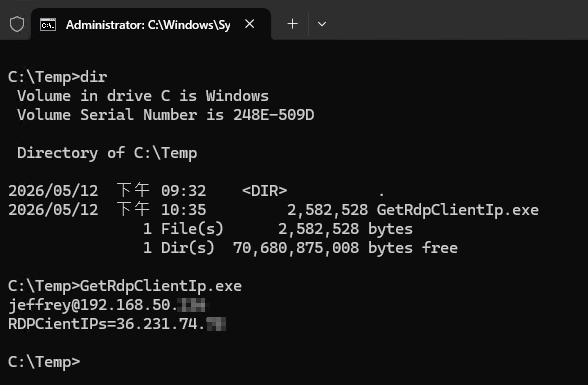
Native AOT 版大約 2.5MB,在沒有裝 .NET 的機器上也能直接執行,順利抓到登入使用者與 IP (使用者回報的 LAN IP 及 RDP 伺服器看到的來源 IP):
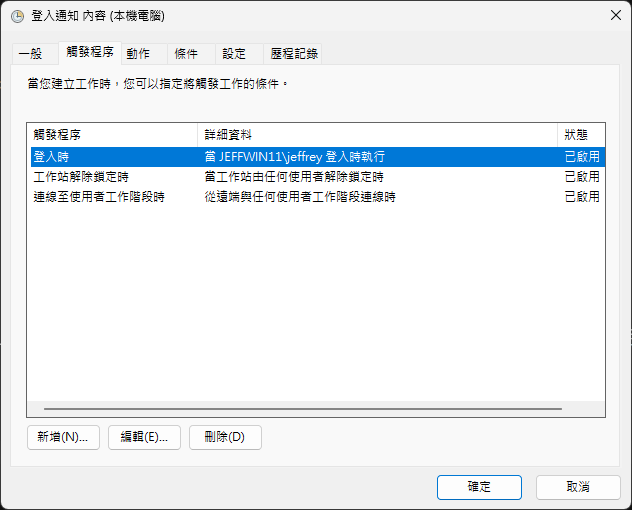
用工作排程器設定使用者登入活動時觸發執行它,再將結果用 Mail 或 Telegram 發出通知,一個簡單遠端登入通報就實現。
最後,分享一個今天在新環境編譯 Native AOT 遇到的問題。Native AOT 需要 Visual Studio 的 C++ 編譯套件,缺少時會冒出以下錯誤:
PS D:\GitHub\GetRdpClientIp> dotnet publish -r win-x64
GetRdpClientIp net10.0 win-x64 失敗,有 1 個錯誤 (0.5 秒) → bin\Release\net10.0\win-x64\GetRdpClientIp.dll
C:\Users\11456.nuget\packages\microsoft.dotnet.ilcompiler\10.0.0\build\Microsoft.NETCore.Native.Windows.targets(142,5): error
Platform linker not found. Ensure you have all the required prerequisites documented at https://aka.ms/nativeaot-prerequisites,
in particular the Desktop Development for C++ workload in Visual Studio. For ARM64 development also install C++ ARM64 build tools.
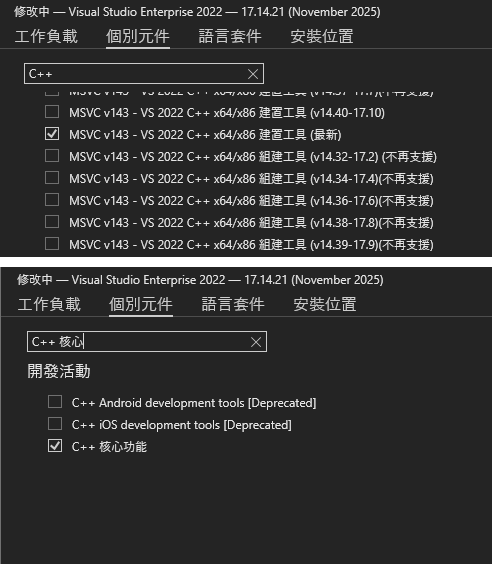
試了一下,安裝這底下這兩個套件,就可以成功編譯了。完整專案範例已放上 Github,有需要的同學請自取。
Builds a tiny Native AOT .NET tool to detect RDP logins and source IPs on Windows using WTS APIs and netstat. Achieves a ~2.5 MB standalone executable without .NET runtime, enabling easy deployment and login notifications.
Comments
# by Wilson Shen
我的想法是不要只看 RDP , 應該是要查所有從遠端異常連入的 IP