把 22 年部落格文章塞進向量資料庫 - 使用 MEVD
 |  | 0 |  |
Microsoft Agent Framework(簡稱 MAF) 已於 4/3 正式發佈 1.0,實際開發體感,仍有不少配套程式庫需使用 prerelease 版本,但它是目前 .NET 開發 AI 應用的官方主流框架,值得花點時間玩一下。
雖然當代 AI 模型可容納的上下文愈來愈長,甚至可 1M Token,但實務上參考來源的資料量常遠大於此,RAG 仍是不可或缺的做法。先前兩分鐘做出 RAG 文件檢索 AI 應用網站有玩過用現成專案模版搭建以 SQLite 資料庫作為向量資料儲存來源的網站,背後有用到 .NET 開發 AI 應用程式之新手指南一文提到的 Microsoft.Extensions.VectorData (簡稱 MEVD),我有件想做很久的事 - 把部落格所有文章塞進向量資料庫,結合向量查詢及 LLM 模型,試著提供比關鍵字更精準的查詢效果。(延伸閱讀:向量資料庫概念科普)
為了方便反覆測試,我先將文章資料轉成以下 Entity 型別轉成 JSON 檔案:
public class Post
{
    [VectorStoreKey]
    public ulong Id { get; set; }
    [JsonIgnore]
    public string FileName =>
        $"[{PubDate:yyyyMMdd-HHmm}]{Regex.Replace(Title,
            $"[{Regex.Escape(new string(Path.GetInvalidFileNameChars()))}]", "_")}.md";
    [VectorStoreData]
    public string Title { get; set; } = string.Empty;
    public string Slug { get; set; } = string.Empty;
    [VectorStoreData]
    public DateTime PubDate { get; set; }
    [JsonIgnore]
    public string Content { get; set; } = string.Empty;
    [JsonIgnore]
    public string CatgList { get; set; } = string.Empty;
    public string[] Catgs => Regex.Matches(CatgList,
        @"\[(?<c>.+?)\]").Select(m => m.Groups["c"].Value).ToArray();
    [VectorStoreData]
    public string Markdown { get; set; } = string.Empty;
    [VectorStoreVector(1536, DistanceFunction = DistanceFunction.CosineSimilarity)]
    [JsonConverter(typeof(FloatMemoryBase64Converter))]
    public ReadOnlyMemory<float> ContentEmbedding { get; set; }

    [VectorStoreData]
    public string Summary { get; set; } = string.Empty;
    [VectorStoreVector(1536, DistanceFunction = DistanceFunction.CosineSimilarity)]
    [JsonConverter(typeof(FloatMemoryBase64Converter))]
    public ReadOnlyMemory<float> SummaryEmbedding { get; set; }
}
我的部落格文章內文 (Content 屬性) 目前是存成 HTML 格式,前置處理過程我選擇用 ReverseMarkdown 轉成 Markdown (Markdown 屬性),Summary 屬性則為使用 LLM 總結後的較短版本,用以比較原始內文 vs 精簡化版本的向量比對效果。而屬性有以下 MEVD 專用 Attribute:
- VectorStoreKeyAttribute:儲存向量資料時需要一個鍵值,支援型別視 VectorStore 而定,以 Qdrant 為例,只能用 ulong 或 Guid。
- VectorStoreDataAttribute:將屬性標記為資料,表示該屬性不是鍵值也不是向量,但可以選擇性地關聯一個向量欄位,其中包含此資料的 Embedding,此定義會影響 VectorStore 如何處理該屬性。
- VectorStoreVectorAttribute:定義此屬性用於儲存 Embedding 資料。
另外,FloatMemoryBase64Converter 用來將 Embedding 的 ReadOnlyMemory<float> 型別的 JSON 表示格式由 [0.004457849,-0.03937525, ... -0.0073611066, 0.015777944] (1536 個 float 的陣列,約 19,238 字元) 轉成 Base64 編碼 (約 8,214 字元),減少為 42%。
"Base64EmbeddingJson": "JhOSO/F...QIE8", // 長度 8,214
"OrigEmbeddingJson": [0.004457849,-0.03937525, /* 1536 個 */ -0.0073611066, 0.015777944] // 長度 19,238
以下是我本次測試成功的套件版本,Console Application 專案使用 .NET 10,Azure.AI.OpenAI 及 Microsoft.SemanticKernel.Connectors.* 會用到 prerelease 版本。
  <ItemGroup>
    <PackageReference Include="Azure.AI.OpenAI" Version="2.9.0-beta.1" />
    <PackageReference Include="Microsoft.Extensions.AI" Version="10.5.0" />
    <PackageReference Include="Microsoft.Extensions.AI.OpenAI" Version="10.5.0" />
    <PackageReference Include="Microsoft.Extensions.VectorData.Abstractions" Version="10.1.0" />
    <PackageReference Include="Microsoft.SemanticKernel.Connectors.InMemory" Version="1.74.0-preview" />
    <PackageReference Include="Microsoft.SemanticKernel.Connectors.Qdrant" Version="1.74.0-preview" />
  </ItemGroup>
我先使用 InMemoryVectorStore 測試,將字串屬性轉成 ReadOnlyMemory<float> 有兩種做法,第一種建立 VectorStore 時指定 EmbeddingGenerator,呼叫 UpsertAsync() 或 SearchAsync() 時自動將字串轉向量 參考,由於我想一次轉好向量儲存起來,未來切換不同 VectorStore 時不需每次算算,故程式會預先算好 Embedding 一起存入 JSON。
以下為包含建立 InMemoryVectorStore、讀入 JSON、建立摘要及 Embedding、將物件寫入 VectorStoreCollection,輸入搜尋文字,分別比對 ContentEmbedding、SummaryEmbedding 找出最相關的文章... 等一連串作業:(順便得到統計數字,從 2004-01-10 到 2026-04-25,我已經寫了 4025 篇文章,廢話真不是普通的多啊~~~)
using Microsoft.Extensions.AI;
using Microsoft.SemanticKernel.Connectors.InMemory;
using Azure.AI.OpenAI;
using System.ClientModel;
using BlogRag;
using Microsoft.Extensions.VectorData;
using System.Text.Json;
using System.Text.Encodings.Web;
using Microsoft.SemanticKernel.Connectors.Qdrant;
using Qdrant.Client;

var endPoint = Environment.GetEnvironmentVariable("AOAI_EndPoint") ??
    throw new InvalidOperationException("AOAI_EndPoint environment variable is not set.");
var key = Environment.GetEnvironmentVariable("AOAI_Key") ??
    throw new InvalidOperationException("AOAI_Key environment variable is not set.");
var chatDepName = "gpt-5.2-chat";

// 建立 AOAI LLM 模型
var azureOpenAIClient = new AzureOpenAIClient(new Uri(endPoint), new ApiKeyCredential(key));
var chatClient = azureOpenAIClient.GetChatClient(chatDepName);

// 設定 Embedding 模型(以 Azure OpenAI 為例)
var embGen = azureOpenAIClient.GetEmbeddingClient("text-embedding-3-small").AsIEmbeddingGenerator();

// 建立 In-Memory Vector Store
VectorStore vectorStore;
vectorStore = new InMemoryVectorStore(
    // 指定 Embedding Generator,可在 Upsert 時自動生成向量,或在 Search 時自動將查詢轉成向量
    new InMemoryVectorStoreOptions() { EmbeddingGenerator = embGen }
);

// 建立 VectorStore
var collection = vectorStore.GetCollection<ulong, Post>("blogposts");
await collection.EnsureCollectionExistsAsync();

var jsonOptions = new JsonSerializerOptions { Encoder = JavaScriptEncoder.UnsafeRelaxedJsonEscaping };
// 使用 LLM 生成摘要,限定長度不要超過 8K Token,並保持由作者陳述語氣
Func<string, Task<string>> Summerize = async (content) =>
{
    var messages = new List<OpenAI.Chat.ChatMessage> {
        new OpenAI.Chat.SystemChatMessage("You are a helpful assistant that summarizes blog posts."),
        new OpenAI.Chat.UserChatMessage(
            $"""
            Concentrate and summarize the following blog post in zh-tw and keep it less than 8K tokens.
            Write in author's voice, make it comprehensive without skipping any essentials,
            only content, no extra wording:
            {content}
            """)
    };
    var resp = await chatClient.CompleteChatAsync(messages);
    return resp.Value.Content[0].Text;
};
// 生成 Embedding 的 Func,因 Embedding 模型有 8K Token 限制,若超過限制則先生成摘要再轉 Embedding
Func<string, Task<ReadOnlyMemory<float>>> EmbedContent = async (content) =>
{
    try
    {
        return await embGen.GenerateVectorAsync(content);
    }
    catch (Exception ex)
    {
        // TODO:Embedding 模型有 8K 限制,良好做法應 Chunking,此處僅轉成 8K- 摘要粗暴搞定
        if (ex.Message.Contains("maximum context length"))
        {
            var summary = await Summerize(content);
            return await embGen.GenerateVectorAsync(summary);
        }
        else throw;
    }
};
// 逐一讀取 JSON,產生摘要及向量,更新至 VectorStore
var sw = System.Diagnostics.Stopwatch.StartNew();
int count = 0;
foreach (var file in Directory.GetFiles("..\\Posts", "*.json"))
{
    var json = await File.ReadAllTextAsync(file);
    var post = System.Text.Json.JsonSerializer.Deserialize<Post>(json);
    if (post is null) continue;
    if (string.IsNullOrEmpty(post.Summary)) // 使用 LLM 生成摘要
    {
        Console.WriteLine($"Generating summary for {Path.GetFileName(file)}...");
        post.Summary = await Summerize(post.Markdown);
        Console.WriteLine($" - Summary reduced content from {post.Markdown.Length:n0} to {post.Summary.Length:n0} characters.");
        File.WriteAllText(file, System.Text.Json.JsonSerializer.Serialize(post, jsonOptions));
    }
    if (post.SummaryEmbedding.IsEmpty) // 生成摘要向量
    {
        Console.WriteLine($"Generating embedding for summary of {file}...");
        post.SummaryEmbedding = await embGen.GenerateVectorAsync(post.Summary);
        File.WriteAllText(file, System.Text.Json.JsonSerializer.Serialize(post, jsonOptions));
    }
    if (post.ContentEmbedding.IsEmpty) // 生成內容向量
    {
        Console.WriteLine($"Generating embedding for {file}...");
        post.ContentEmbedding = await EmbedContent(post.Markdown);
        File.WriteAllText(file, System.Text.Json.JsonSerializer.Serialize(post, jsonOptions));
    }
    // 將物件上傳到 VectorStore
    await collection.UpsertAsync(post);
    count++;
}
sw.Stop();
Print($"載入 {count:n0} 篇文章,耗時:{sw.Elapsed.TotalSeconds:F2} 秒", ConsoleColor.Green);

// 每次查詢分別用 ContentEmbedding 和 SummaryEmbedding 搜索,看哪個效果好
var dictSrchMethod = new Dictionary<string, VectorSearchOptions<Post>>()
{
    { "ContentEmbedding", new VectorSearchOptions<Post>() { VectorProperty = p => p.ContentEmbedding } },
    { "SummaryEmbedding", new VectorSearchOptions<Post>() { VectorProperty = p => p.SummaryEmbedding } }
};

while (true)
{
    // 使用者輸入搜索關鍵字
    Console.Write("請輸入搜索關鍵字:");
    var query = Console.ReadLine()!;
    if (query == "/exit") break;
    if (string.IsNullOrWhiteSpace(query)) continue;
    // 預先將查詢轉成向量
    var queryEmbedding = await embGen.GenerateVectorAsync(query);

    VectorSearchOptions<Post> searchOptions;
    foreach (var kv in dictSrchMethod)
    {
        searchOptions = kv.Value; // 切換不同向量屬性進行搜索
        Console.WriteLine($"使用 {kv.Key} 進行向量搜索...", ConsoleColor.Cyan);
        // 如有設 EmbeddingGenerator,SearchAsync 會自動將 query 字串轉成向量
        var results = collection.SearchAsync(queryEmbedding, 10, searchOptions);
        // 輸出結果
        await foreach (var result in results)
        {
            Print($"[{result.Score:F4}] {result.Record.Title}", ConsoleColor.Yellow);
        }
    }
}

void Print(string msg, ConsoleColor? color = null)
{
    if (color.HasValue) Console.ForegroundColor = color.Value;
    Console.WriteLine(msg);
    Console.ResetColor();
}
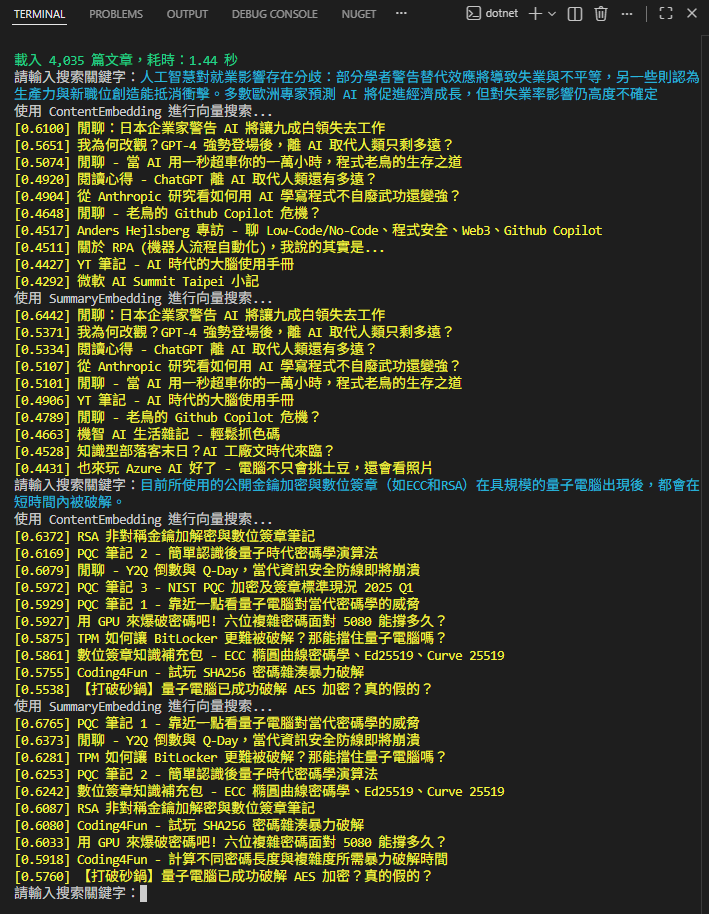
簡單實測一下,由於我是用整篇文章計算 Embedding,丟入一段文字找相關文章最能展現向量相似度搜尋的威力。例如:我分別丟入一段 「AI 影響就業」以及「量子電腦威脅密碼學」的描述,搜尋結果的相關度極佳,這是傳統全文檢索很難辦到的:
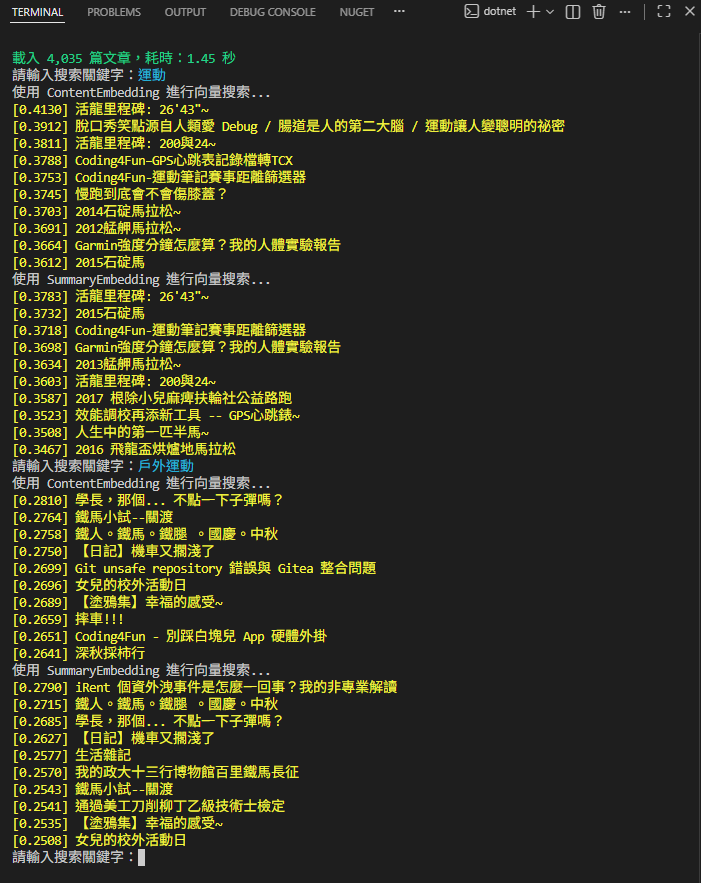
但反過來,若只丟關鍵字,用向量相似度搜尋的結果就不盡理想,畢竟關鍵字只佔內文或摘要的一小部分,很難影響整個 Embedding 使其具備特徵。
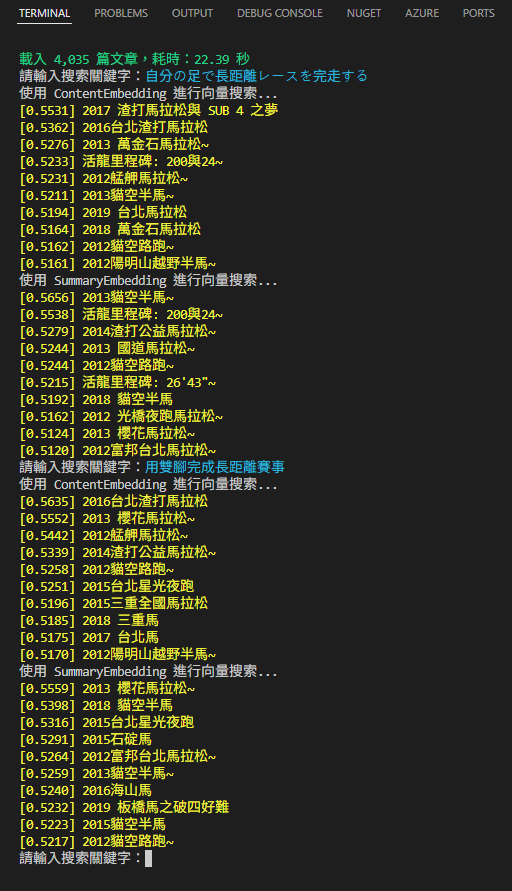
最後這個測試完美展現傳統全文檢索難以實現的效果,我輸入一段日文「自分の足で長距離レースを完走する」(中文意思是「用雙腳完成長距離賽事」),用另一種語言又換句話說的方式,仍能成功查到馬拉松文:
值得一提的是,MEVD 提供一個抽象層,將實作與介面隔離得很好,在使用 InMemoryVectorStore 測試成功後,我們只需修改以下這幾行,就能改用之前研究過的 Qdrant 向量資料庫作為向量儲存提供者:
/*
var vectorStore = new InMemoryVectorStore(
    new InMemoryVectorStoreOptions() { EmbeddingGenerator = embGen }
);
*/
var qdrantClient = new QdrantClient("localhost");
var vectorStore = new QdrantVectorStore(qdrantClient, ownsClient: true, new() {
    EmbeddingGenerator = embGen,
    HasNamedVectors = true
});
就這麼簡單!
不過,向量相似度有其侷限性,相似度最高未必是最相關的內容,實務上常需結合 TFIDF/BM25 等關鍵字匹配演算法較能獲得理想結果,這部分留待下一篇再來研究。
Explores building a RAG blog search using MAF and MEVD. Demonstrates embedding full posts and summaries into a vector store to achieve semantic, cross-language search far beyond traditional keyword retrieval.
Comments
Be the first to post a comment