吃米知米價 - 製作 AOAI (Foundry) 模型 Token 成本日報表
 |  | 0 |  |
我的工作與生活愈來愈離不開 AI,可以想像,未來語言模型的 Token 費用也會跟水電瓦斯手機一樣,變成日常開銷的一部分。我對於「現在這種 AI 使用方式要花多少錢」特別興趣,想要培養「吃米知米價」的直覺,而我主要是玩 AOAI (Foundry) 模型,Azure Portal 的成本分析功能做得挺不錯,設好日期區間及篩選條件,可以簡單查到昨天模型使用量與費用:
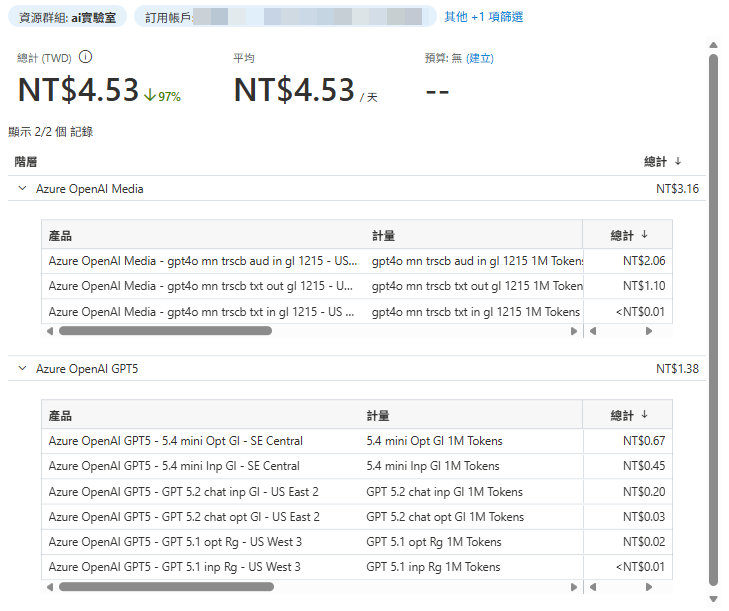
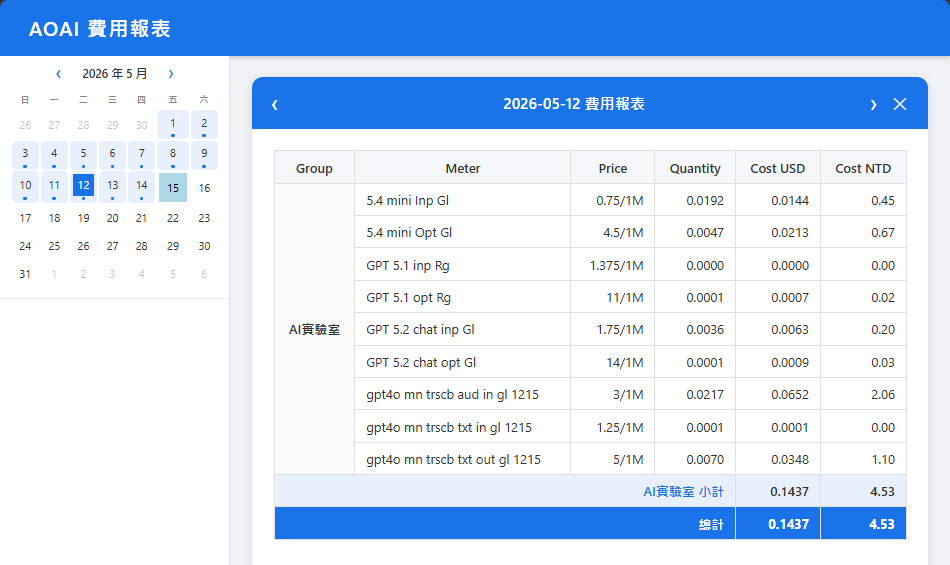
但人工查詢步驟繁瑣、Azure 雖有內建報表訂閱功能但無法完全符合我的需求,想想,不如寫程式把明細資料抓回來,未來不管想怎麼查怎麼應用都行,例如:複合條件圖表分析、日報表... 等,類似以下這樣:
研究了一下,Azure 有個 RSET API Generate Cost Details Report,能產生極其詳細的明細資料,細到連 GPT 的輸入、輸出與 Cache 型輸入三種 Token 費用都分項列舉。由於執行時間較長,它採用做法是先送出請求拿到一個狀態查詢 URL,之後定期輪詢取得處理狀態直到 Compted 或 Failed 為止,若成功則可取得另一個 Blob URL,下載得到一個 CSV 檔,其中包含所有資源的每一筆費用明細。
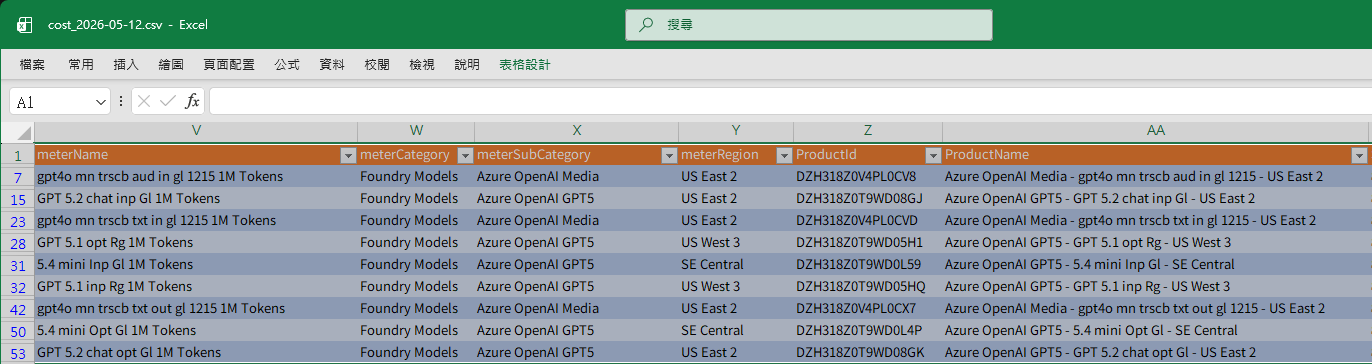
以下是查詢特定日期所有 Foundry 模型成本轉為 JSON 的 PowerShell 程式範例:
$ErrorActionPreference = "Stop"
$subscriptionId = (az account show --query id -o tsv)
$token = (az account get-access-token --query accessToken -o tsv)
function GetModelCost([string]$date) {

    $headers = @{
        "Authorization" = "Bearer $token"
        "Content-Type"  = "application/json"
    }

    $body = @{
        metric     = "ActualCost"
        timePeriod = @{
            start = $date
            end   = $date
        }
    } | ConvertTo-Json -Compress

    # Step 1: 建立報告請求
    Write-Host "Requesting cost report for $date..."
    $postUrl = "https://management.azure.com/subscriptions/$subscriptionId/providers/Microsoft.CostManagement/generateCostDetailsReport?api-version=2024-08-01"
    $response = Invoke-WebRequest -Method POST -Uri $postUrl -Headers $headers -Body $body
    $pollUrl = $response.Headers["Location"][0]

    # Step 2: 輪詢直到完成
    do {
        Start-Sleep -Seconds 5
        $status = Invoke-RestMethod -Method GET -Uri $pollUrl -Headers $headers
    } while ($status.status -notin @("Completed", "Failed"))

    # Step 3: 下載 CSV
    $downloadUrl = $status.manifest.blobs[0].blobLink
    $tmpCsvFile = [System.IO.Path]::GetTempFileName()
    Invoke-WebRequest -Uri $downloadUrl -OutFile $tmpCsvFile
    $csv = Get-Content -Path $tmpCsvFile
    Remove-Item -Path $tmpCsvFile

    # Step 4: 解析 CSV 並過濾資料
    $data = $csv | ConvertFrom-Csv
    $data | Where-Object { $_.meterCategory -eq "Foundry Models" } |
    Sort-Object -Property resourceGroupName, meterName |
    ForEach-Object {
        $resGrp = $_.resourceGroupName
        $meter = $_.meterName
        $price = $_.effectivePrice + '/' + $_.unitOfMeasure
        [float]$qty = $_.quantity
        [float]$costUsd = $_.costInUsd
        [float]$costNtd = $_.costInBillingCurrency
        return [PSCustomObject]@{
            Group = $resGrp
            Meter        = $meter.Replace(" 1M Tokens", "")
            Price        = $price
            Quantity     = $qty.ToString('n4')
            CostUSD      = $costUsd.ToString('n4')
            CostNTD      = $costNtd.ToString('n2')
        }
    }
}
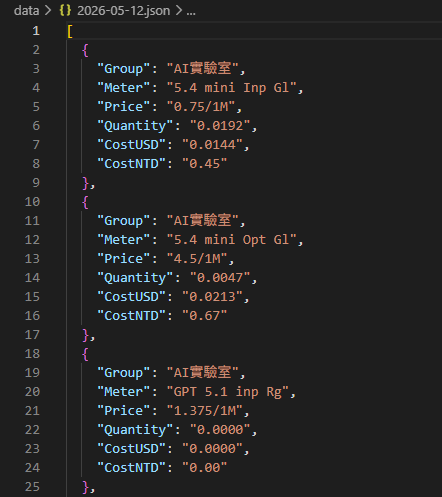
利用這種方式,我們可以輕鬆取得原始明細,再複雜的統計分析需求都不用怕。
最後分享實戰遇到的小問題:Azure REST API 有流量限制,呼叫太頻繁會噴出錯誤:Error 429,Too many requests. Please retry after [N] minute(s) and [N] second(s)。
速率控管有兩層,第一層是 Azure Resource Management (ARM) 的[速率上限]](https://learn.microsoft.com/en-us/azure/azure-resource-manager/management/request-limits-and-throttling#regional-throttling-and-token-bucket-algorithm),採 Token Bucket 演算法,依訂閱帳號及租用戶(Tenant)各有其上限:
| 範圍 | 操作類型 | Bucket 上限 | 每秒補充速率 |
|---|---|---|---|
| Subscription | Reads (GET) | 250 | 25 req/sec |
| Subscription | Writes (PUT/POST) | 200 | 10 req/sec |
| Subscription | Deletes | 200 | 10 req/sec |
| Tenant | Reads | 250 | 25 req/sec |
| Tenant | Writes | 200 | 10 req/sec |
| Tenant | Deletes | 200 | 10 req/sec |
每秒查詢 25 次更新 10 次相當寬裕,非多人環境的報表查詢從幾乎不可能踩到上限,報表查詢多半會卡在第二層。generateCostDetailsReport 這種產生大型 CSV 檔案的非同步重量級操作,每次呼叫需消耗 QPU(Query Processing Unit),日期區間愈大使用的 QPU 愈多,而每個 Tenant 的 QPU 消耗速率有以下限制:
- 2 QPU / 10 秒
- 60 QPU / 分鐘
- 600 QPU / 小時
一開始不知道,開發過程連測十來次,很快就收到 Error 429 告知我查太兇了,請冷靜 31 分鐘後再玩,哈。除此之外,就沒什麼特別的地方了,祝大家查帳單愉快。
Shows how to programmatically analyze Azure OpenAI (Foundry) token costs using the Cost Management REST API. Automates detailed daily cost reports via PowerShell, enabling fine‑grained analysis while noting API throttling and QPU limits.
Comments
Be the first to post a comment