【茶包射手日記】VS2022 MSBuild Tools 無法離線安裝
 |  | 3 |  |
比照過往經驗準備離線安裝 VS2022 MSBuild Tools,使用指令 vs_BuildTools.exe --layout D:\OfflineBuildTools --lang en-us --add Microsoft.VisualStudio.Workload.ManagedDesktopBuildTools --add Microsoft.VisualStudio.Workload.MSBuildTools --add Microsoft.VisualStudio.Workload.VCTools --add Microsoft.VisualStudio.Workload.WebBuildTools --includeOptional --includeRecommended 下載好安裝檔複製到斷網環境,將 certificates 下的三張憑證安裝到本機電腦的「受信任的根憑證授權單位」憑證儲存區,執行 vs_buildtools.exe --noWeb 理應可無腦裝完卻觸礁了...
安裝程式卡以下畫面的驗證關卡,進度條全滿後幾秒程式閃退,啥訊息也沒講。事件檢視器出現「Windows Error Reporting」事件,追進 C:\ProgramData\Microsoft\Windows\WER\ReportQueue\NonCritical_1_..... 資料夾,確認是安裝程式崩潰,但看不出線索。
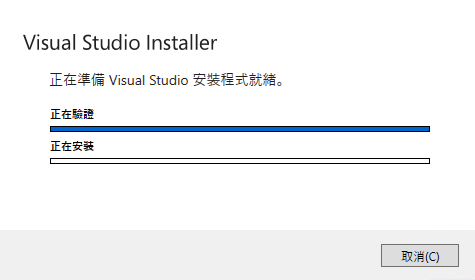
爬文查到該安裝程式有 Log 在 C:\Users\<USER>\AppData\Local\Temp\dd_bootstrapper_yyyyMMddHHmmss.log,從中找到錯誤原因 - 是憑證驗證失敗!
Using Offline package: D:\software\OfflineMSBuildTools\vs_installer.opc
Saving Certificates to layout folder
Certificate is invalid: D:\software\OfflineMSBuildTools\vs_installer.opc
Error: Unable to verify the certificate: InvalidCertificate
Error 0x80131509: Signature verification failed.
Error: Unable to verify the integrity of the installation files: the certificate could not be verified.
   於 Microsoft.VisualStudio.Setup.OpcVerifier.Verify(Stream packageStream, String layoutLocation,
   Boolean skipSavingCertificate)
   於 Microsoft.VisualStudio.Setup.Bootstrapper.Bootstrapper.VerifyLayoutPackage(Stream packageStream)
Bootstrapper failed with known error.
再三確認 certficates 的兩張憑證已匯入(manifestCounterSignRootCertificate.cer 跟 vs_installer_opc.RootCertificate.cer 相同,是 2010 那張、manifestRootCertificate.cer 是 2011 那張),為什麼還會認不得憑證?

為了找出原因,我又長了一些見識。學到 .opc 是 OPC (Open Packaging Convension) 封裝格式的封裝檔,裡面有個 .psdsxs XML 文件儲存數位簽名,而微軟程式庫 System.IO.Packaging 有函式可驗證及檢視 .opc 的簽名。於是我寫了一小段 .NET Framework 4.8 程式(註:關鍵類別PackageDigitalSignatureManager目前不支援 .NET 5+)檢查 vs_installer.opc 的數位簽章,有了重大發現!!
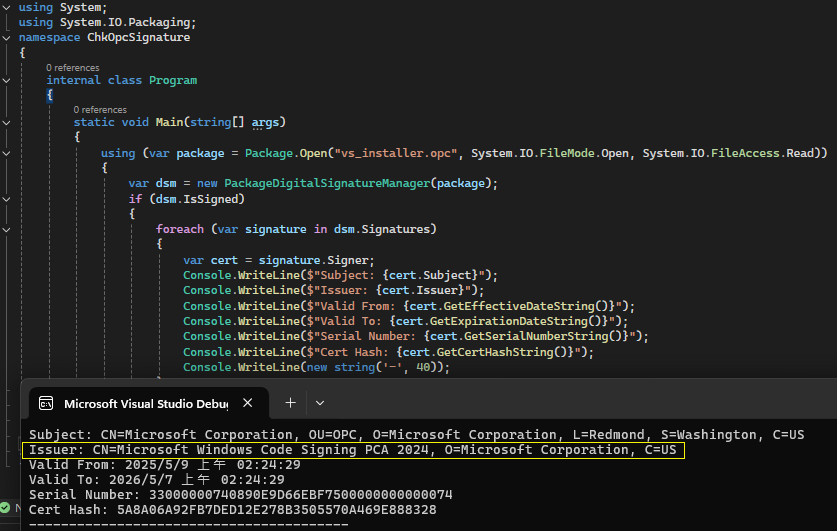
vs_installer.opc 的數位簽章來自一張署名為 Microsoft Windows Code Signing PCA 2024 的憑證,而非 certificates 目錄下的任何一張 (更嚴格來說,根本不是 vs_installer_opc.RootCertificate.cer 所說的那張),花惹發?
用 System.IO.File.WriteAllBytes("Microsoft Windows Code Signing PCA 2024.cer", cert.Export(System.Security.Cryptography.X509Certificates.X509ContentType.Cert)); 另存 .cer 檔,真正要用的憑證就現身了。
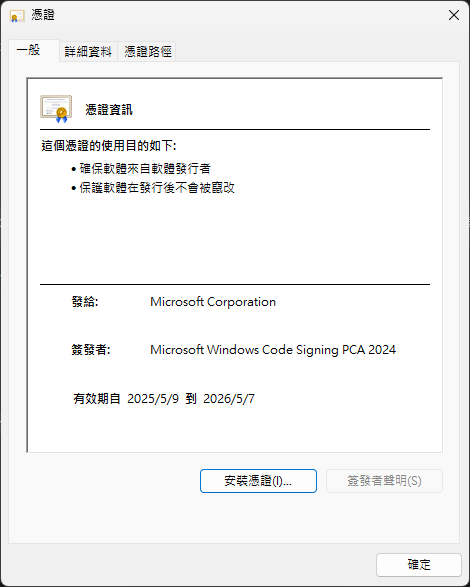
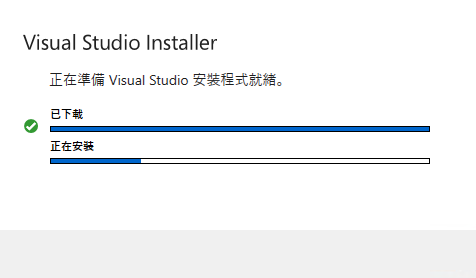
將憑證安裝在離線環境的主機上,解開原本卡住的關卡,已下載前方出現綠勾勾,推進到安裝階段,順利完成 MSBuild Tools 安裝...
最後,由關鍵字查到 Visual Studio 問題回報區的相關討論,有網友在六月下旬報案,VS RD Team 表示已經知道這個問題,並提供了那張 Microsoft Windows Code Signing PCA 2024 憑證的下載網址(連結相關說明如下),在產品未更新前可先手動下載安裝做為 Workaround。
After checking with my escalation team:
We are currently aware of a situation related to the expiration of a Microsoft chaining certificate. A new certificate has been generated and is being used to sign files; however, it does not yet appear to be available through Microsoft Update.
In the meantime, for environments with offline machines, the recommended action is to manually download and deploy the following certificate alongside the other three certificates in the layout:
http://www.microsoft.com/pkiops/certs/Microsoft Windows Code Signing PCA 2024.crt
We are actively working with the relevant teams to explore options for automating this process and updating the related documentation accordingly.
同場加映,若必須用 .NET 8+ 開發,要如何驗證 .opc 簽章?.opc 的概念跟 .docx/.xlsx 相近,骨子裡ZIP 壓縮打包的是一堆 XML 跟 Metadata 檔,從中找出儲存簽章的 XML 就能拿到憑證。2025 年,寫程式解析 .opc 這等蒜皮小事當然是交給 Github Copilot 想,連爬文都免了。(只是這樣下去大腦會退化吧?)
using System.IO.Packaging;
using System.Security.Cryptography.X509Certificates;
using System.Xml;

using var package = Package.Open("vs_installer.opc", System.IO.FileMode.Open, System.IO.FileAccess.Read);

var signatureParts = package.GetParts()
    .Where(part => part.Uri.ToString().Contains("_xmlsignatures") ||
                   part.ContentType == "application/vnd.openxmlformats-package.digital-signature-xmlsignature+xml")
    .ToList();

if (signatureParts.Any())
{
    foreach (var signaturePart in signatureParts)
    {
        using var stream = signaturePart.GetStream();
        var xmlDoc = new XmlDocument();
        xmlDoc.Load(stream);

        // Look for X.509 certificates in the signature
        var certNodes = xmlDoc.GetElementsByTagName("X509Certificate");

        foreach (XmlNode certNode in certNodes)
        {
            var certData = Convert.FromBase64String(certNode.InnerText);
            var cert = new X509Certificate2(certData);

            Console.WriteLine($"Subject: {cert.Subject}");
            Console.WriteLine($"Issuer: {cert.Issuer}");
            Console.WriteLine($"Valid From: {cert.NotBefore}");
            Console.WriteLine($"Valid To: {cert.NotAfter}");
            Console.WriteLine($"Serial Number: {cert.SerialNumber}");
            Console.WriteLine($"Thumbprint: {cert.Thumbprint}");
            Console.WriteLine(new string('-', 40));

            var fileName = $"Certificate_{cert.SerialNumber}.cer";
            System.IO.File.WriteAllBytes(fileName, cert.Export(X509ContentType.Cert));
            Console.WriteLine($"Certificate saved as: {fileName}");
        }
    }
}
解決問題花了點時間,但認識了 .opc 檔案格式並學會用 .NET 解析及驗證簽章,也算小有收獲,收隊。
Comments
# by Evaon
hi, 回饋一下。 我用大大請AI寫的程式碼,去萃取我的OPC裡面的憑證,是真的有萃取出來,也可以安裝,但是安裝之後一樣是 憑證驗證失敗。 我有去憑證管理裡面,看過受信任的跟憑證,剛剛萃取出來的憑證,是有在那兒的 所以我回頭去您給的連結,developercommunity.visualstudio.com/t/Visual-Studio-2022-Build-Tools:-Offline/10925898 這邊,往下挖,後來是看到有人說,要去下載另一個憑證。 那個憑證我另存出來,去離線環境安裝憑證之後,就可以安裝vs了,我也搞不是很清楚原理,就是分享一下經驗看能不能幫到人。 那個從網站上下載下來的憑證,檔名是 Microsoft Windows Code Signing PCA 2024.crt
# by GGer
Evaon 的方法有用,謝謝
# by Zion
太帅了博主