HTML5上傳作業進度條-SignalR進階版
 |  | 3 |  |
【前情提要】利用File API與XHR2 onprogress事件,我們成功做出檔案上傳進度條。但我在工作上常遇到另一種情境 -- 內部系統的上傳轉檔作業。營運資料檔案一般不大,加上在Intranet裡傳輸,上傳只在彈指間,Server端解析資料、塞入資料庫才是重頭戲,常得耗上幾十秒到幾分鐘。這種狀況下,用XHR2做進度條的意義不大,咻! 一秒不到就從0%到100%,但上傳資料何時能處理完只有天知道? 使用者終究又陷入無法得知系統還在跑或者已經當掉的焦慮。我想起了"SignalR",不如結合SignalR來打造一個由Server端回報的作業進度條吧~
SignalR版會以上一篇的程式為基礎加以改良,重複部分將略過,如有需要請參考前文。
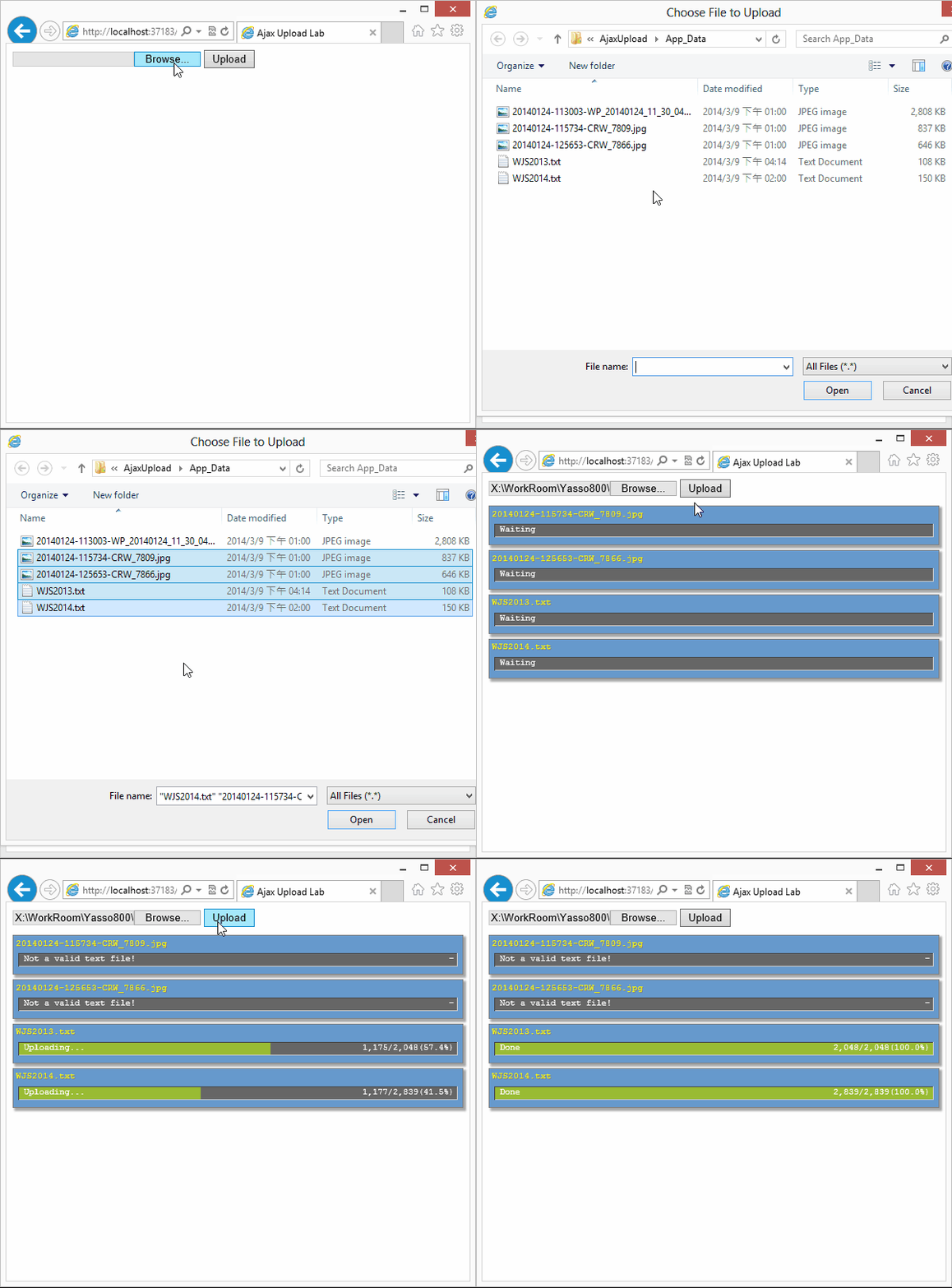
照慣例,先來看成品:
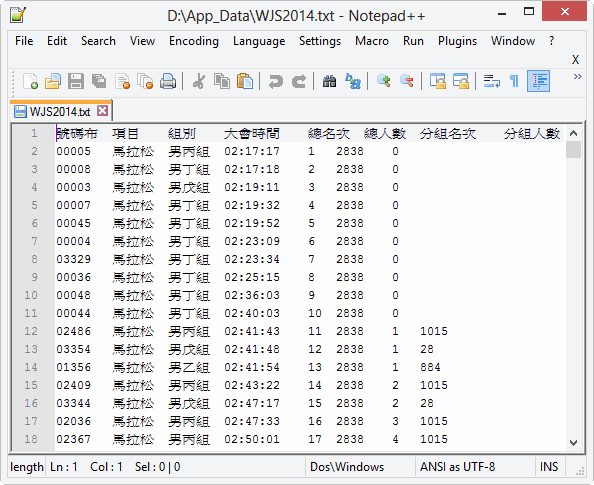
我虛擬了一個馬拉松成績匯入作業,打算將如下格式的大會成績文字檔(以\t分隔)上傳到ASP.NET MVC,模擬解析後逐筆寫入資料庫的上傳作業。
ASP.NET MVC接收資料的部分如下:
using AjaxUpload.Models; using System; using System.Collections.Generic; using System.IO; using System.Linq; using System.Threading; using System.Threading.Tasks; using System.Web; using System.Web.Mvc; namespace AjaxUpload.Controllers { public class HomeController : Controller
{ public ActionResult Index() { return View(); }
[HttpPost]
public ActionResult Upload(string file, string connId)
{ //註: 程式僅為展示用,實際開發時應加入更嚴謹的防錯防呆 string errMsg = null;
try { //取得檔案內容,解析為List<string> string content = new StreamReader(Request.InputStream).ReadToEnd();
var sr = new StringReader(content); List<string> lines = new List<string>();
string line = null;
while ((line = sr.ReadLine()) != null)
{ lines.Add(line);
}
//總筆數及目前處理筆數 int total = lines.Count, count = 0; //使用Task進行非同步處理 var task = Task.Factory.StartNew(() =>
{ Random rnd = new Random(); for (var i = 0; i < lines.Count; i++) { string[] p = lines[i].Split('\t');
if (p.Length != 8) throw new ApplicationException("Not a valid text file!");
//假裝將資料寫入資料庫,Delay 0-4ms Thread.Sleep(rnd.Next(5));
count++;
}
});
//透過SignalR float ratio = 0; Action updateProgress = () =>
{ ratio = (float)count / total; UploaderHub.UpdateProgress(connId, file, ratio * 100,
string.Format("{0:n0}/{1:n0}({2:p1})", count, total, ratio));
};
//每0.2秒回報一次進度 while (!task.IsCompleted && !task.IsCanceled && !task.IsFaulted) { updateProgress();
Thread.Sleep(200);
}
updateProgress();
//若正確完成,傳回OK if (task.IsCompleted && !task.IsFaulted) return Content("OK");
else errMsg = string.Join(" | ",
task.Exception.InnerExceptions.Select(o => o.Message).ToArray());
}
catch (Exception ex) { errMsg = ex.Message;
}
UploaderHub.UpdateProgress(connId, file, 0, "-", errMsg); return Content("Error:" + errMsg);
}
}
}
上傳時除了POST是二進位的檔案內容,還另外以QueryString傳入connId(SingalR的連線Id,當有多個網頁連線時才知道要回傳給哪一個Client)及file(檔案名稱)。Action內部先用StreamReader讀入上傳內容轉為字串,再用StringReader將字串解析成List<string>,接著逐行讀取。由於只是展示用途並不需要真的寫入資料庫,每讀一筆後用Thread.Sleep()暫停0-4ms(亂數決定),把處理兩千多筆的時間拉長到幾秒鐘方便觀察。至於回報進度部分,我決定採固定時間間隔回報一次的策略,故將處理資料邏輯放在Task裡非同執行,啟動後另外跑迴圈每0.2秒回報一次進度到前端。UploaderHub是這個專案自訂的SingalR Hub類別,它提供一個靜態方法UpdateProgress,可傳入connId、file、percentage(進度百分比)、progress(由於Client端不知道資料解析後的行數,故總行數及目前處理行數資訊全由Server端提供)、message(供錯誤時傳回訊息)。
安裝及設定SignalR的細節此處略過(基本上透過NuGet下載安裝並依Readme文件加上RouteTable.Routes.MapHubs();就搞定)。至於UploaderHub.cs,幾乎是個空殼子。繼承Hub之後,絕大部分的工作皆由父類別定義的方法搞定。唯一增加的UpdateProgress()靜態方式,在其中由GlobalHost.ConnectionManager.GetHubContext<UploaderHub>()取得UploaderHub執行個體,再經由Clients.Client(connId).updateProgress()呼叫JavaScript端的updateProgress函式。理論上這段程式可以寫在任何類別,因為UploaderHub太空虛怕引來其他類別抗議基於相關邏輯集中的考量,決定將它納為UploaderHub的方法。
using Microsoft.AspNet.SignalR; using System; using System.Collections.Generic; using System.Linq; using System.Web; namespace AjaxUpload.Models { public class UploaderHub : Hub
{ //從其他類別呼叫需用以下方法取得UploaderHub Instance static IHubContext HubContext = GlobalHost.ConnectionManager.GetHubContext<UploaderHub>();
public static void UpdateProgress(string connId, string name, float percentage,
string progress, string message = null)
{ HubContext.Clients.Client(connId)
.updateProgress(name, percentage, progress, message);
}
}
}
最後來看Client端。CSS與HTML部分完全沿用前文的範例,只有JavaScript部分做了小幅修改。
- 引用jquery.signalR-*.js(我的專案是.NET 4.0,故用1.2.1版,若是.NET 4.5可用2.x版)以及~/signalr/hubs
- percentage, progress改由Server端提供(XHR2版抓已上傳Byte數自行計算)
- 同時上傳多檔時,要由SignalR呼叫時傳回的file參數決定該更新哪個檔案的進度,故建立一個以檔名為Key的Dictionary資料結構便於尋找
- 加入建立SignalR連線的程式碼
- 宣告updateProgress函式,等待Server呼叫以更新進度資訊
<script src="~/Scripts/jquery-2.1.0.js"></script>
<script src="~/Scripts/jquery.signalR-1.2.1.js"></script> <script src="@Url.Content("~/signalr/hubs")"></script>
<script src="~/Scripts/knockout-3.1.0.debug.js"></script> <script>
$(function () { function viewModel() { var self = this;
self.files = ko.observableArray();
self.selectorChange = function (item, e) { self.files.removeAll();
$.each(e.target.files, function (i, file) { //加入額外屬性 file.percentage = ko.observable(0);
file.progress = ko.observable();
file.widthStyle = ko.computed(function () { return "right:" + (100 - file.percentage()) + "%";
});
file.message = ko.observable();
file.status = ko.computed(function () { var msg = file.message(), perc = file.percentage(); if (msg) return msg;
if (perc == 0) return "Waiting";
else if (perc == 100) return "Done";
else return "Uploading...";
});
self.files.push(file);
});
};
//以檔名為索引建立Dictionary,方便更新進度資訊 self.dictionary = {}; ko.computed(function () { self.dictionary = {}; $.each(self.files(), function (i, file) { self.dictionary[file.name] = file;
});
}).extend({ throttle: 100 }); self.upload = function () { $.each(self.files(), function (i, file) { var reader = new FileReader();
reader.onload = function (e) { var data = e.target.result; //以XHR上傳原始格式 $.ajax({ type: "POST", url: "@Url.Content("~/home/upload")" +
"?file=" + file.name + "&connId=" + connId,
contentType: "application/octect-stream", processData: false, //不做任何處理,只上傳原始資料
data: data
});
};
reader.readAsArrayBuffer(file);
});
};
}
var vm = new viewModel();
ko.applyBindings(vm);
//建立SignalR連線並取得Connection Id var connId; var hub = $.connection.uploaderHub; $.connection.hub.start().done(function () { connId = $.connection.hub.id;
});
//Server端傳回上傳進度時,更新檔案狀態 hub.client.updateProgress = function (name, percentage, progress, message) { var file = vm.dictionary[name]; if (file) { file.percentage(percentage);
file.progress(progress);
if (message) file.message(message); }
};
});
</script>
就這樣,一個會即時回報Server處理進度的網頁介面就完成囉! HTML5 File API + jQuery + ASP.NET MVC + SignalR + Knockout.js 合作演出大成功~
Comments
# by JB
感謝黑大分享!
# by 黑狗弟
若在 asp.net 環境下(沒有 MVC),有建議的解決嘗試方案嗎?
# by Jeffrey
to 黑狗弟,曾有人實作在WebForm上跑SignalR(http://www.codeproject.com/Articles/526876/AddingplusSignalRplustoplusanplusASP-NetplusWebFor),但瑣碎手動細節較多,也可能無法適用最新版。 但有一些方法可以讓ASP.NET專案同時包含WebForm與MVC(如果是.NET 4.5 ASP.NET專案,直接勾選項就可控制WebForm、MVC及WebAPI是否啟用),如果限定ASP.NET Web Site專案,另外架一台MVC跑SignalR再配合WebForm使用,也是種解法。 我的另一套解決方案是架設一台獨立SingalR Server(跑MVC)