使用原生 JavaScript + 瀏覽器內建 API 實作連動式文章目錄(TOC)
 |  | 0 |  |
這篇文章源自上回 Vibe Coding 踩坑經驗,Claude Sonnet 4 幫改程式時硬生生吃掉一個 </div>,最後回歸傳統除錯技巧,分析 Intersection Observer 運作原理,靠 F12 偵錯工具設中斷點查元素狀態才破案。
當時是我第一次認真研究 Intersection Observer API,便想寫篇筆記備忘。但文章起了個頭,就又忙其他事去了,依正常劇情發展,它應該會躺在草稿匣很久很久很久,甚至永遠沒有被發表的一天。
因此,大家今天會看到這篇文章,自然是因為某種機緣.... 薑薑薑講~~~~ 曬一下剛收到的作者簽名書:
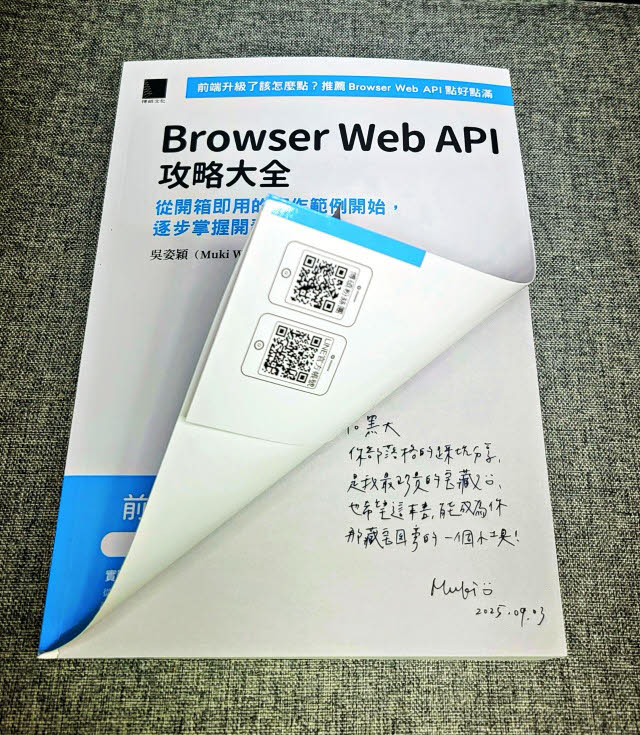
過去爬文查 CSS 用法常靠 MUKI 的部落格文章解惑,我心中的 CSS 與 HTML 網頁設計達人這幾年也一腳跨進前端程式設計領域,又多了一個學習前端程式設計的好來源。
自從微軟送走 IE,Edge 棄暗投明改用 Chromium 核心,前端再次進入大一統時代(上回是 IE 吃下 95% 市場),而 HTML / JavaScript 標準不斷演進革新,許多原本需要 jQuery、套件程式庫的功能,瀏覽器本身使已內建,這兩年加入 AI 助陣,用瀏覽器原生 API 完成各項任務常只在彈指之間。不過,縱使我們都很習慣凡事遇到再學,但事先知道有哪些武器可用,建構規劃網站的當下能善用瀏覽器內建功能巧妙解決,則又是另一種境界。這本書算是對當代瀏覽器內建 API 做了一次巡禮,從中可發現不少驚喜,像是瀏覽器居然內建持續追蹤使用者 GPS 位置的功能、可用子母畫面播影片、錄製並分享螢幕畫面、監聽某個 DOM 元素是否被更動,有沒有進入可視範圍... 最後的這一項,就是本次主題,讓我想起草稿匣還有一篇半成品。
我腦中想到的經典 Intersection Observer 應用,非連動式文章目錄莫屬,網路上有不少實際範例,而這篇將用原生 JavaScript 自己做一個。

程式不複雜,我把說明寫在註解了,線上展示已上傳到 Github Page,大家有興趣可玩看看。
<!DOCTYPE html>
<html lang="en">

<head>
    <meta charset="UTF-8">
    <title>TOC Demo with Intersection Observer</title>
    <style>
        body {
            display: flex;
            margin: 0;
            font-family: Arial, sans-serif;
        }

        nav {
            position: sticky;
            top: 0;
            width: 220px;
            height: 100vh;
            overflow-y: auto;
            background: #f4f4f4;
            border-right: 1px solid #ddd;
            padding: 1em;

            ul {
                list-style: none;
                padding: 0;
            }

            li {
                margin: 0.5em 0;
            }

            a {
                color: #333;
                text-decoration: none;
                transition: color 0.2s;
            }

            a.active {
                color: #1976d2;
                font-weight: bold;
            }
        }

        main {
            flex: 1;
            padding: 2em;
            max-width: 700px;
            margin: 0 auto;
        }

        section {
            margin-bottom: 3em;
            padding-top: 60px;
            /* Offset for sticky nav */
            margin-top: -60px;
        }

        header,footer {
            height: 100px;
        }
    </style>
</head>

<body>
    <nav>
        <h2>Table of Contents</h2>
        <ul id="toc"></ul>
    </nav>
    <main id="content">
        <header></header>
        <section id="section1">
            <h2>Introduction</h2>
            <p>Lorem ipsum dolor sit amet, 略...</p>
        </section>
        <section id="section2">
            <h2>Getting Started</h2>
            <p>Lorem ipsum dolor sit amet, 略...</p>
        </section>
        <section id="section3">
            <h2>Features</h2>
            <p>Lorem ipsum dolor sit amet, 略...</p>
        </section>
        <section id="section4">
            <h2>Usage</h2>
            <p>Integer nec odio. Vestibulum ante ipsum primis in faucibus 略...</p>
        </section>
        <section id="section5">
            <h2>Conclusion</h2>
            <p>Donec quam felis, ultricies nec, pellentesque eu, 略...</p>
        </section>
        <footer></footer>
    </main>
    <script>
        // 列舉 main section 從中找出 h2 在 #toc 建立 <li> <a>
        const toc = document.getElementById('toc');
        const sections = document.querySelectorAll('main section');
        sections.forEach(section => {
            const h2 = section.querySelector('h2');
            const li = document.createElement('li');
            const a = document.createElement('a');
            a.href = '#' + section.id;
            a.textContent = h2.textContent;
            // 設定 data-section Attribute
            // 註:.dataset.section = ... 相當於 .setAttribute('data-section', ...)
            a.dataset.section = section.id;
            li.appendChild(a);
            toc.appendChild(li);
        });

        // 設定 Observer 選項,準備監測 sections 中的 section 項目
        const tocLinks = document.querySelectorAll('#toc a');
        const observerOptions = {
            // 監測根元素(可視範圍的依據),null 代表以 HTML DOM 的 document 為準
            root: null,
            // 縮小觀察目標元素進入邊界與否的判定標準,第三個 -60% 代表把下緣向上提 60%,等同以 40% 高度當偵測線
            rootMargin: '0px 0px -60% 0px',
            // 設為 0 表示只要有一點點超過偵測線就觸發 (若 0.1 表示超過偵測線 10% 才觸發)
            threshold: 0
        };

        let activeId = null;
        // 建立 Intersection Observer 實例,觸發時傳入被觀察目標陣列,由 isIntersection 判斷是否進入可視範圍
        const observer = new IntersectionObserver((entries) => {
            entries.forEach(entry => {
                if (entry.isIntersecting) {
                    // 記錄當前進入可視範圍的 section ID
                    activeId = entry.target.id;
                    // 將進入可視範圍的 section ID 對應的 TOC 鏈結加上 active 樣式,其他移除
                    tocLinks.forEach(link => {
                        link.classList.toggle('active', link.dataset.section === activeId);
                    });
                }
            });
        }, observerOptions);
        // 設定 Observer 監測每個 section
        sections.forEach(section => observer.observe(section));

        // 點選 TOC 鏈結平滑滾動到對應 section
        tocLinks.forEach(link => {
            link.addEventListener('click', e => {
                e.preventDefault();
                const target = document.getElementById(link.dataset.section);
                window.scrollTo({
                    top: target.offsetTop - 50,
                    behavior: 'smooth'
                });
            });
        });
    </script>
</body>

</html>
A hands-on demo of the Intersection Observer API: dynamically highlight table of contents as you scroll, with background, code, and practical tips for front-end devs.
Comments
Be the first to post a comment