StringDictionary無法JSON反序列化
 |  | 1 |  |
接獲報案,使用Json.NET將WebService傳回物件序列化為JSON字串,過程順利,但反序列化發生錯誤:Cannot create and populate list type System.Collections.Specialized.StringDictionary. Path '', line 1, position 1.
問題物件包含StringDictionary型別,StringDictionary經JSON轉換後變成[{"Key":"…", "Value":"…"}, {"Key":"…","Value":"…"}…],以JavaScript角度相當於一堆具有Key及Value屬性物件所組成的陣列,故Json.NET解析時解析視為陣列,無法轉型為單一StringDictionary物件。
想起以前學過自訂Json.NET轉換邏輯,再次派上用場。我寫了一個StringDictionaryConverter搭配JsonConvet.DeserializeObject使用,就能成功將[{"Key":"…", "Value":"…"}, {"Key":"…","Value":"…"}…]轉為StringDictionary。
另外,順手測了BinaryFormatter(二進位序列化),發現「二進位序列化不一定比JSON序列化省空間」!
程式範例如下:
using Newtonsoft.Json; using Newtonsoft.Json.Converters; using Newtonsoft.Json.Linq; using System; using System.Collections.Generic; using System.Collections.Specialized; using System.IO; using System.Linq; using System.Runtime.Serialization.Formatters.Binary; using System.Text; using System.Threading.Tasks; namespace ConsoleApplication3 { class Program { class StringDictionaryConverter : CustomCreationConverter<StringDictionary> { public override StringDictionary Create(Type objectType)
{ throw new NotImplementedException();
}
public override object ReadJson(JsonReader reader, Type objectType,
object existingValue, JsonSerializer serializer) { JArray array = JArray.Load(reader);
StringDictionary dict = new StringDictionary(); foreach (var element in array)
{ dict.Add(element.Value<string>("Key"),
element.Value<string>("Value"));
}
return dict; }
}
static void Main(string[] args)
{ StringDictionary sd = new StringDictionary(); sd.Add("Jeffrey", "32767");
sd.Add("Darkthread", "65535");
//印出StringDicionary內容 Func<StringDictionary, string> dumpStringDictionary = (d) => { List<string> list = new List<string>();
foreach (string k in d.Keys)
list.Add(string.Format("{0}:\"{1}\"", k, d[k]));
return "{" + string.Join(",", list.ToArray()) + "}";
};
//JSON序列化沒問題 var json = JsonConvert.SerializeObject(sd);
Console.WriteLine("JSON({1}bytes)={0}", json, json.Length); //反序列化會出現錯誤 try { var test = JsonConvert.DeserializeObject<StringDictionary>(json);
}
catch (Exception ex) { Console.WriteLine("Error: {0}", ex.Message); }
//加上自訂StringDictionary轉換器後可成功反序列化 var restored = JsonConvert.DeserializeObject<StringDictionary>(json,
new StringDictionaryConverter()); Console.WriteLine("Restored={0}", dumpStringDictionary(restored)); //測試二進位序列化 BinaryFormatter bf = new BinaryFormatter(); byte[] data; using (MemoryStream ms = new MemoryStream())
{ bf.Serialize(ms, sd);
data = ms.ToArray();
Console.WriteLine("Binary({1}bytes)={0}", Encoding.UTF8.GetString(data), data.Length);
}
using (MemoryStream msRestore = new MemoryStream(data))
{ restored = bf.Deserialize(msRestore) as StringDictionary; Console.WriteLine("Restored={0}", dumpStringDictionary(restored)); }
Console.Read();
}
}
}
測試結果:
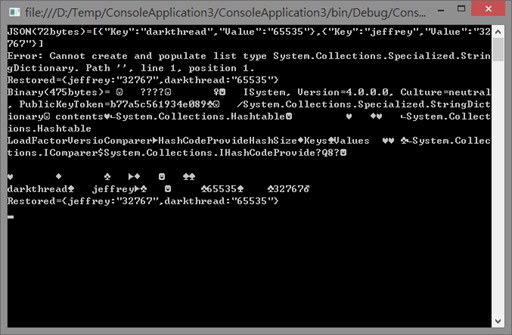
在這個案例中,二進位序列化由於包含了物件型別宣告資訊(上圖看到的那堆"System, Version=4.0.0.0…"、"System.Collections.Specialized.StringDictionary…"),其資料量(475bytes)反而是JSON(72bytes)的六倍有餘。但型別資訊屬固定Overhead,二進位序列化時資料部分不像JSON必須逐筆標示屬性名稱"Key"、"Value",才開始展現節省效果。由此推估,當資料筆數多到一定數量,省略屬性名稱的優勢將會超過標頭區的額外耗損,才會比JSON更省空間。
例如:我們將資料筆數提高到100筆。
StringDictionary sd = new StringDictionary(); for (int i = 0; i < 100; i++)
{ sd.Add("K" + i, "V" + i);
}
此時JSON字串長度為2,781bytes,而二進位序列化資料只有2,204bytes,情勢逆轉。
順便記錄此一特性提供參考。
Comments
# by Billy
StringDictionary 算是史前的.net 1.1 物件了,現在幾乎看不見它的身影,我一般只用Dictionary<string, string> generic class。 http://stackoverflow.com/questions/627716/stringdictionary-vs-dictionarystring-string