答客問 - SQLite WASM 資料庫如何長期保存?
 |  | 2 |  |
昨天介紹了可以在瀏覽器裡跑的 SQL 引擎 - SQLite WASM,部落格跟臉書留言都出現類似提問 - 這種做法的 SQL 資料庫只存在記憶體,分頁一關閉便化為烏有,要如何長期保存?
既然蠻多人有此疑惑,值得專門寫一篇講解。
簡單來說,SQLite WASM 提供了 .export() 方法可將資料庫檔案轉成 Uint8Array (相當於 byte[]),用 new Database(<Uint8Array-Data>) 可以讀入既有資料庫檔進行操作,有這兩項武器,永久保存就不是問題,端看大家的創意。
我寫了一個簡單的範例:線上展示
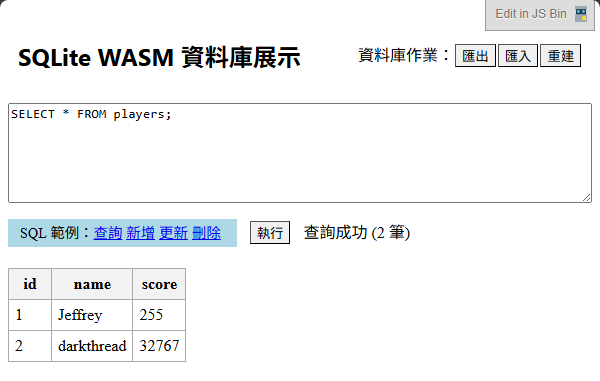
第一次執行時會新建一個 DB,塞入兩筆資料;每次退出網頁時會將資料表存到 localStorage,下次執行時再載入接續使用。
測試時可以嘗試新增、修改或刪除資料,重新整理網頁看上回的修改是不是存在。另外,左上的【匯出】鈕可以將資料庫檔案另存到本機備份,【匯入】鈕可以上傳資料庫檔。基本上這些功能已可滿足大部分資料庫操作的需求,不足之處再加點工即可。
上述動作的核心程式如下,完整程式碼則在這裡。
async initSqlJs() {
    if (!this.sqlLite) {
        // 傳入 .wasm 檔名,對應下載網址
        this.sqlLite = await initSqlJs({
            locateFile: file => `https://cdn.jsdelivr.net/npm/sql.js@1.13.0/dist/${file}`
        });
    }
    // 嘗試由 localStorage 讀取資料庫
    const dbData = localStorage.getItem(STORE_KEY);
    if (dbData) {
        // 如果有資料庫,則從 base64 解碼並載入
        const uint8Array = new Uint8Array(atob(dbData).split("").map(c => c.charCodeAt(0)));
        this.db = new this.sqlLite.Database(uint8Array);
    } else {
        // 初始化 SQLite 資料庫
        const db = new this.sqlLite.Database();
        // 建資料表
        db.run("CREATE TABLE players (id INTEGER PRIMARY KEY, name TEXT, score INTEGER)");
        // 插入樣本資料
        db.run("INSERT INTO players (name, score) VALUES ('Jeffrey', 255)");
        db.run("INSERT INTO players (name, score) VALUES ('darkthread', 32767)");
        this.db = db;
    }
},
saveDb() {
    const uint8Array = this.db.export();
    const base64String = btoa(String.fromCharCode(...uint8Array));
    localStorage.setItem(STORE_KEY, base64String);
},
exportDb() {
    const uint8Array = this.db.export();
    const blob = new Blob([uint8Array], { type: 'application/octet-stream' });
    const url = URL.createObjectURL(blob);
    const a = document.createElement('a');
    a.href = url;
    a.download = 'database.sqlite';
    document.body.appendChild(a);
    a.click();
    document.body.removeChild(a);
    URL.revokeObjectURL(url);
},
importDb() {
    const input = document.createElement('input');
    input.type = 'file';
    input.accept = '.sqlite,.db';
    input.onchange = async (event) => {
        const file = event.target.files[0];
        if (file) {
            const arrayBuffer = await file.arrayBuffer();
            const uint8Array = new Uint8Array(arrayBuffer);
            this.db = new this.sqlLite.Database(uint8Array);
            this.statusMessage = '資料庫匯入成功';
            this.statusType = 'success';
        } else {
            this.statusMessage = '未選擇檔案';
            this.statusType = 'error';
        }
    };
    input.click();
},
renewDb() {
    if (confirm('確定要重建資料庫嗎?現有資料將被清除。')) {
        localStorage.removeItem(STORE_KEY);
        this.initSqlJs();
        this.statusMessage = '資料庫已重建';
        this.statusType = 'success';
    }
},
提醒,範例為求簡單採用 localStorage 儲存資料,localStorage 有 5MB 上限,且易因清 Cache/Cookie 等動作消失,非可靠的儲存處所,應用時需留意前述特性。(也可考慮改用 IndexedDB 或 OPFS) 這類暫存在客戶端的資料,建議當成快取、不擔心竄改、可忍受遺失的資料情境,勿視為長期權威資料來源。
This blog post explains how to persist data using SQLite WASM in the browser. It describes saving the database to localStorage and exporting it for backup. The demo allows data modification, export, and import, showcasing how SQLite WASM can handle persistent data in a browser environment.
Comments
# by 路過
wa-sqlite+OPFS 呢
# by 早起的鳥兒肚子餓
長期保存到OPFS有https://github.com/subframe7536/sqlite-wasm 作法蠻簡單的 const { run, close } = await initSQLite( useOpfsStorage('demo.db') // 會存到 OPFS ); await run(`CREATE TABLE IF NOT EXISTS users (id INTEGER PRIMARY KEY, name TEXT);`); await run(`INSERT INTO users (name) VALUES ('Alice'), ('Bob'), ('Charlie');`);