【茶包射手筆記】SQLExpress 安裝發生找不到 MSOLEDBSQL.MSI 錯誤
 |  | 0 |  |
記錄最近遇到的茶包。
在 Windows 11 上安裝 SQL Express 2022,過程冒出找不到 Microsoft OLE DB Drivers for SQL Server 安裝檔 msoledbsql.msi的錯誤:
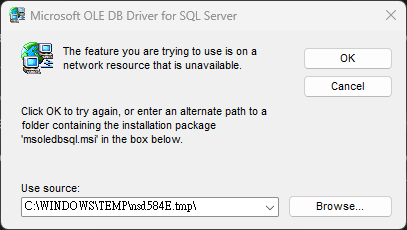
Error Description: An installation package for the product Microsoft OLE DB Driver for SQL server cannot be found, Try installing again using a valid copy of the installation pacakage 'msoledbsql.msi'
SQL Express 的安裝檔目錄就有 msoledbsql.msi,但就算選它仍會抱怨安裝套作不對:⚠️ The file ‘X:...\SQLEXPR_x64_ENU\1033_ENU_LP\x64\Setup\x64\MSOLEDBSQL.MSI’ is not a valid installation package for the product Microsoft OLE DB Driver for SQL Server. Try to find the installation package ‘msoledbsql.msi’ in a folder from which you can install Microsoft OLE DB Driver for SQL Server.
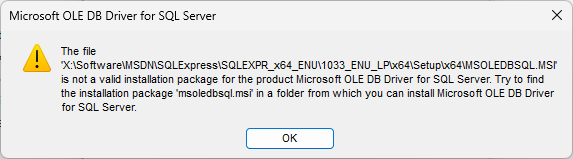
後來發現是因為 Windows 先前已裝過 Microsoft OLE DB Drivers for SQL Server 18.7.4 版,移除後再裝 SQL Express 就正常了。
Comments
Be the first to post a comment