為 SQL Agent Job 加上遠端操作 Web API
 |  | 0 |  |
維護古蹟系統時遇到一個挑戰:在 MSSQL Server 上有幾個 SQL Agent Job 排程,當需要查看執行歷史紀錄 [1] 或想手動重跑排程 [2],都必須用 SSMS 登入 SQL Server 操作:
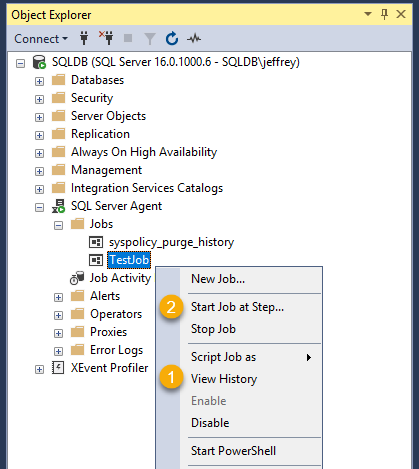
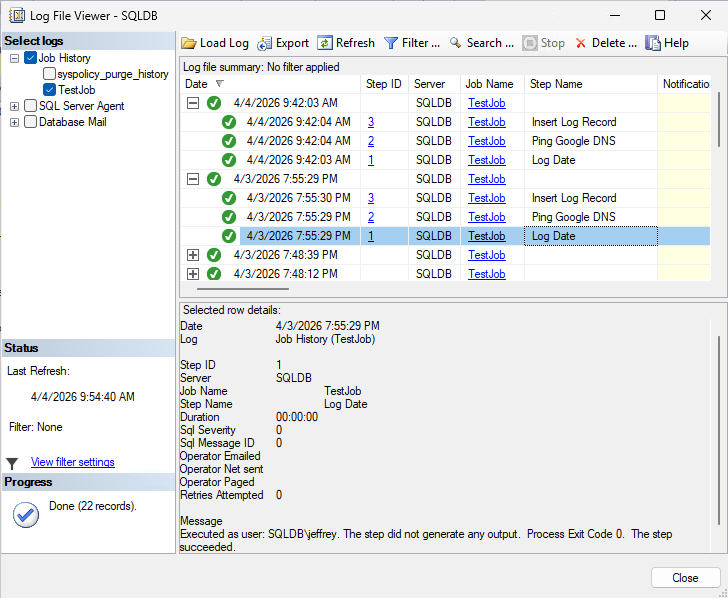
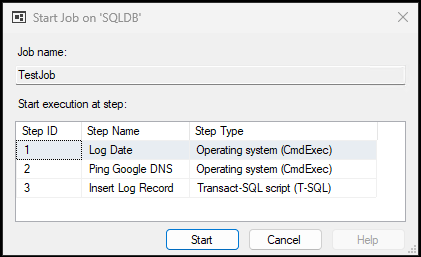
由於用 SSMS 登入 SQL 操作需要額外申請權限,勞師動眾又緩不濟急,不符日常維運作業的時效要求。因此,我想將 SQL Job 執行及紀錄查詢功能包成 WebAPI,允許從遠端查詢及重新執行,從而簡化維運流程、提高反應速度。
我的構想是找尋用 T-SQL 指令查詢 SQL Job 執行紀錄以及執行 SQL Job 的方法,申請專屬帳號並賦與權限以執行這兩種 SQL 指令。寫一個簡單的 ASP.NET Core Minimal API,將查詢 SQL Job 執行紀錄以執行 SQL Job 分別包成 MapGet("//history")、MapPost("//run") WebAPI,加上 API Key 及來源 IP,限定特定來源呼叫。如此,我們便可透過 curl、PowerShell 或管理網站呼叫這些 WebAPI 實現 SQL Job 的遠端操作。
補充一些技術細節:
- 要查詢 SQL Job 執行紀錄可使用以下查詢,執行帳號對 msdb.dbo.sysjobhistory 及 msdb.dbo.sysjobs 需有 SELECT 權限:
SELECT TOP (@limit)
    j.name        AS JobName,
    h.step_id     AS StepId,
    h.step_name   AS StepName,
    h.run_date    AS RunDate,
    h.run_time    AS RunTime,
    CASE h.run_status
        WHEN 0 THEN 'Failed'
        WHEN 1 THEN 'Succeeded'
        WHEN 2 THEN 'Retry'
        WHEN 3 THEN 'Cancelled'
        WHEN 4 THEN 'In Progress'
        ELSE 'Unknown'
    END AS Status,
    h.message     AS Message
FROM msdb.dbo.sysjobhistory h
JOIN msdb.dbo.sysjobs j ON j.job_id = h.job_id
WHERE j.name = @jobName
ORDER BY h.instance_id DESC;  -- latest first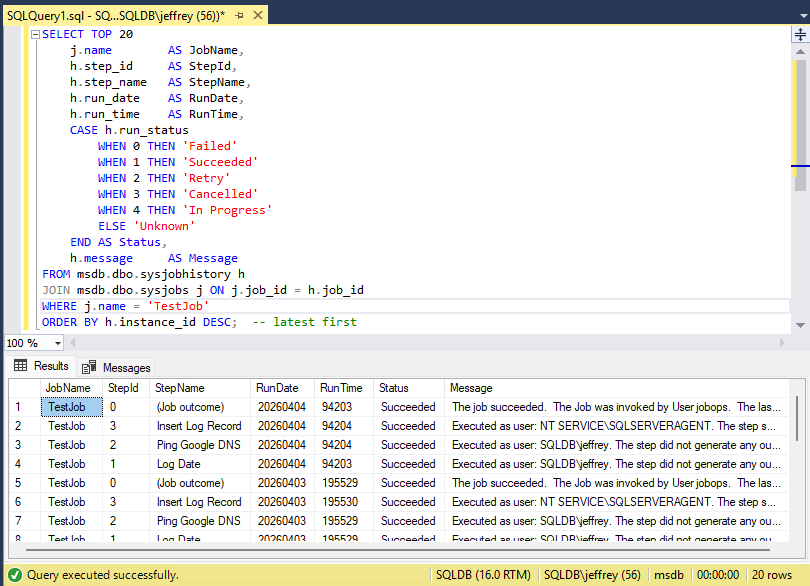
另一個更簡便的方法是使用內建系統 Stored ProcedureEXEC msdb.dbo.sp_help_jobhistory @job_name = 'TestJob', @mode = 'FULL'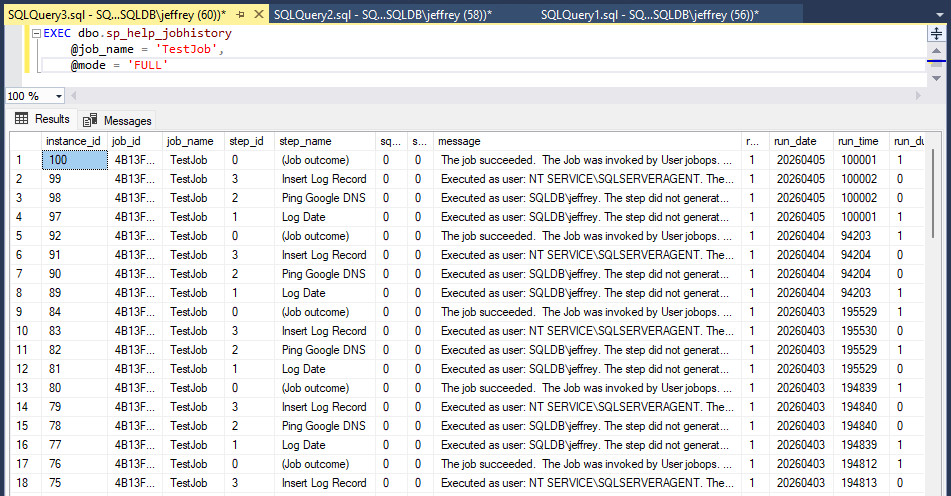
若使用sp_help_jobhistory,帳號只需加入 SQLAgentOperatorRole 或更高權限角色 即可藉此查詢歷史紀錄。此種做法可簡化 - 呼叫
EXEC msdb.dbo.sp_start_job @job_name = @jobName;可執行特定 SQL Job,執行帳號需為 SQLAgentOperatorRole 角色成員 - 綜和以上,我建立了一個 jobops SQL 帳號,在 msdb 為其加 LOGIN,加入 SQLAgentOperatorRole 角色
USE msdb; CREATE USER [jobops] FOR LOGIN [jobops]; -- or [DOMAIN\MACHINE$] for Windows auth / SYSTEM ALTER ROLE SQLAgentOperatorRole ADD MEMBER [jobops]; -- covers sp_start_job and view history - 用 Windows Service 跑 ASP.NET Core 可達成免 IIS + 背景長駐執行的目標,做法是用
dotnet new worker建立專案,相關介紹可參考 MS Learn 文件。 - 為求簡化部署複雜度,Windows Service 的執行身分我使用 LocalSystem,實務上建議的做法是建立專屬帳號且只授與必要權限。
- 我使用白名單限定 MapGet("//history") 與 MapPost("//run") 可操作的 SQL Job 對象,兩個方法出現重複的檢查,AI 提醒可以善用 MapGroup():
// 使用群組路由來集中處理與 SQL Job 相關的端點,並在群組層檢查 Job 名稱 var jobs = app.MapGroup("/{sqlJobName}") .AddEndpointFilter(async (ctx, next) => { var jobName = ctx.HttpContext.GetRouteValue("sqlJobName") as string ?? string.Empty; if (!sqlJobNames.Contains(jobName, StringComparer.OrdinalIgnoreCase)) return Results.NotFound($"Job '{jobName}' is not configured."); return await next(ctx); }); // GET /{sqlJobName}/history?limit=100 jobs.MapGet("/history", async ( ...) { ... }); - AI Code Review 時提醒我,我在比較 API Key 時用 string.Equals() 的寫法,可能受到 Timing-based Key Enumeration Side-Channel Attack,意思是攻擊者透過比對時間長短不同(微秒甚至奈秒等級的差異),從而推敲出密鑰,建議改用 CryptographicOperations.FixedTimeEquals() (這個技巧在 儲存密碼該用什麼雜湊演算法?一文的雜湊驗證有用到),評估我的蒜皮排程遭此等高規格手法攻擊機率不高,待未來應用在核彈發射相關應用時再加入。
var apiKeyEntry = _apiKeys.FirstOrDefault(k =>
    string.Equals(k.Key, providedKey, StringComparison.OrdinalIgnoreCase));
這次的專案我試了寫完 Spec 請 Copilot 產生 Plan 再一次生成網站的新玩法,Copilot 生成結果與我的要求相去不遠,只做了小幅修改就得到可用成品。用以下 PowerShell 驗證:
$BaseUrl = "http://127.0.0.1:7777"
$ApiKey  = "37878e55-d288-4eda-aed2-2970b92478fb"
$JobName = "TestJob"
$UnknownJob = "NonExistentJob_XYZ"

$Headers     = @{ "X-Api-Key" = $ApiKey }
$PassCount   = 0
$FailCount   = 0

function Assert-Pass([string]$label) {
    Write-Host "  [PASS] $label" -ForegroundColor Green
    $script:PassCount++
}

function Assert-Fail([string]$label, [string]$detail) {
    Write-Host "  [FAIL] $label — $detail" -ForegroundColor Red
    $script:FailCount++
}

function Invoke-Test([string]$label, [scriptblock]$test) {
    Write-Host "`nTest: $label"
    try { & $test }
    catch { Assert-Fail $label $_.Exception.Message }
}

# ── Test 1: POST run returns 200 ──────────────────────────────────────────────
$execTime = Get-Date
Invoke-Test "POST /$JobName/run returns 200" {
    $response = Invoke-WebRequest -Uri "$BaseUrl/$JobName/run" -Headers $Headers -Method Post -ErrorAction Stop
    if ($response.StatusCode -eq 200) {
        Assert-Pass "POST run returned 200"
        Write-Host "Executed job at $execTime" -ForegroundColor Cyan
    } else {
        Assert-Fail "POST run" "Unexpected status: $($response.StatusCode)"
    }
}

# ── Test 2: GET history returns an array ──────────────────────────────────────
Write-Host "Waiting for job to execute and appear in history..." -ForegroundColor Cyan
Start-Sleep -Seconds 5  # wait a moment for the job to execute and appear in history
Invoke-Test "GET /$JobName/history returns 200 with array" {
    $response = Invoke-RestMethod -Uri "$BaseUrl/$JobName/history" -Headers $Headers -Method Get
    if ($response -is [System.Array] -or $response -is [System.Collections.IEnumerable]) {
        Assert-Pass "GET history returned a collection"
        $response | Select-Object -First 10 | Format-Table -AutoSize
        # check if the first record execTime matches the run we just triggered (allowing for some delay)
        if ($response.Count -gt 0) {
            $latest = $response[0]
            $latestExecTime = $latest.ExecTime
            if ($latestExecTime -ge $execTime.AddSeconds(-5)) {
                Assert-Pass "Latest history record matches recent run (ExecTime: $latestExecTime)"
            } else {
                Assert-Fail "History record timing" "Latest ExecTime $latestExecTime is not recent $execTime"
            }
        } else {
            Write-Warning "History is empty, cannot verify recent run"
        }
    } else {
        Assert-Fail "GET history" "Response is not an array: $response"
    }

}
測試成功!
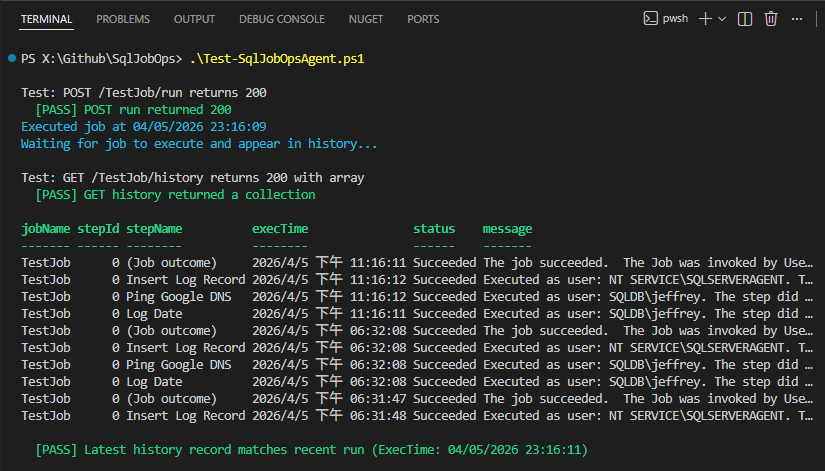
程式範例已放上 Github 了,想參考或研究的同學請自取。
Describes wrapping SQL Server Agent job execution and history queries into a secure ASP.NET Core Minimal API, avoiding SSMS access. Uses T‑SQL, proper SQL Agent roles, API keys, and Copilot Plan Mode to efficiently build and validate a lightweight job operations service.
Comments
Be the first to post a comment