【野外求生系列】離線環境編譯之 NuGet 套件管理兩三事
 |  | 1 |  |
看到標題的野外求生系列,就知這又是一個隨時能連網開發者不需煩惱的問題,有緣人限定。
若 .NET 程式必須在無法連上網際網路的離線環境編譯,要如何滿足 NuGet 套件下載安裝需求?我目前覺得較順手的做法是另外建一個 Git Repository 保存 .nupkg 檔,當專案參照新程式庫,在可上網環境下載 .nupkg (列舉專案需要的 .NET NuGet 依賴套件、自動補齊離線安裝 NuGet 套件),Commit 時則記得將本次增加的 .nupkg (包含依賴套件)一併 Commit 到 NuGet Repository。
在編譯主機上則要將 NuGet Repository 資料夾設為來源 (可用 dotnet nuget add source -n "NuGet Repository" D:\Git\NuGetRepository 設定,用 dotnet nuget list source 檢查),編譯前除了 Pull 專案更新,也一併 Pull NuGet Repository 取得新 .nupkg,如此 MSBuild 就能在 NuGet Repository 找到 .nupkg 檔安裝,順利完成編譯囉~
分享實戰遇到的兩個小問題:
沒裝 VS 只有 MSBuild 無法 restore
離線環境只有 Visual Studio Build Tools 2022,沒裝 Visual Studio,而實測 MSBuild -t:restore 並不會照 .NET Framework 專案的 packages.config 還原套件,而是顯示「沒有任何動作可以執行。指定的專案皆未包含可還原的套件」。
研究後,我找到的解法是從 NuGet 網站的 Windows x86 Commandline 下載 nuget.exe 回來用:
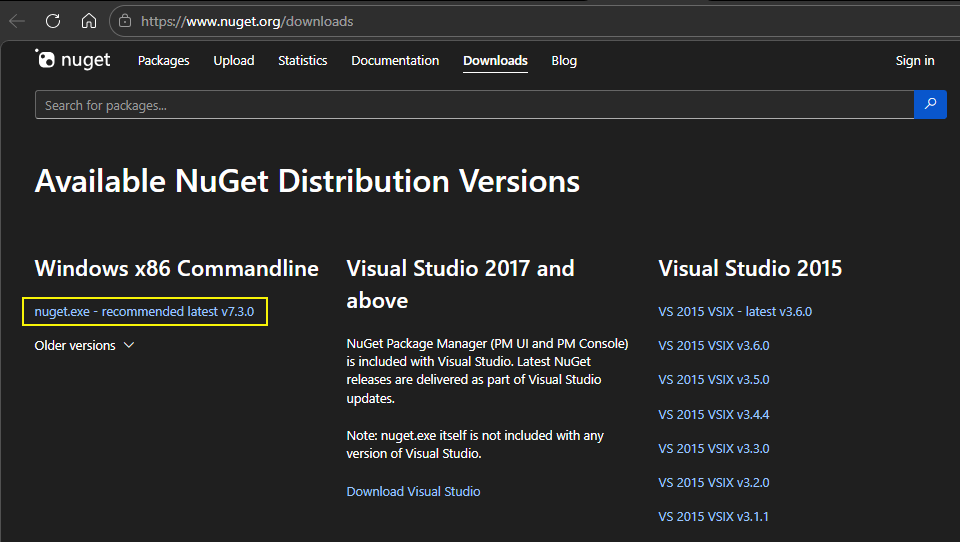
改執行 nuget restore 還原成功。
使用 .nupkg 資料夾當 NuGet 來源超慢
在資料夾放入 .nupkg 檔案即可當成 NuGet 來源,不一定要自建 NuGet Server,但這做法有個缺點 - 當 .nupkg 檔案數量累積到幾千個,瀏覽、搜尋及安裝套作的速度會慢到想殺人!
原因不難想像,NuGet 每次都要掃描資料夾所有檔案讀取 metadata,.nupkg 是個壓縮檔,幾千個檔逐一解壓讀取,不慢才有鬼。
一個簡單解法是用 nuget init <flat-folder> <structured-folder> 將扁平檔案清單轉成階層式結構:
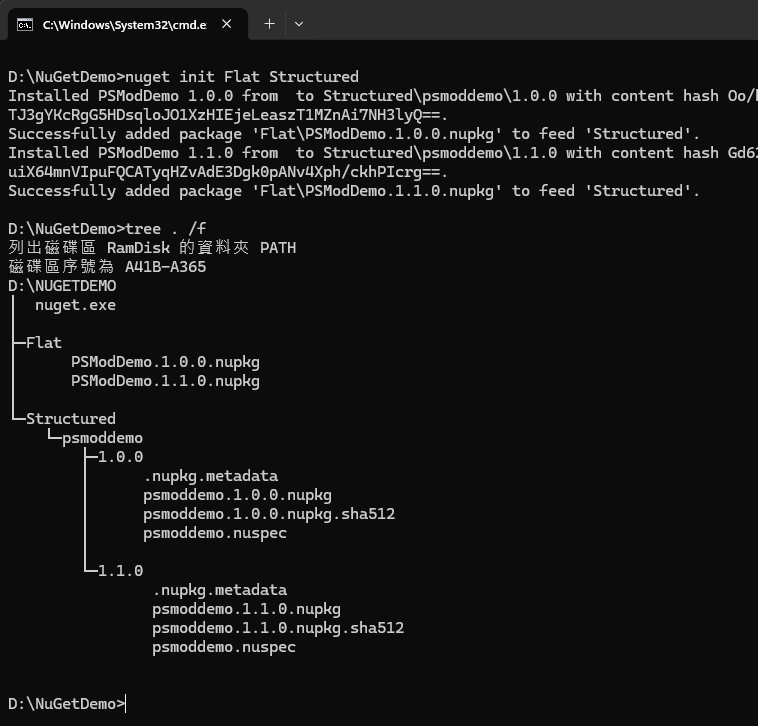
之後要再新增套件,則可執行 nuget add MyPackage.2.0.0.nupkg -Source <structured-folder> 展開單一套件。
我寫了一個 PowerShell 工具自動比對,找出扁平目錄新加入還沒展開到結構化目錄的 .nupkg,逐一執行 nuget add;另外,工具有個 -FullSync 旗標可以反向檢查,若源頭的 .nupkg 已消失,刪除其對映的展開資料夾,確保兩端內容完全對映。
param (
    # 扁平化 nupkg 資料夾路徑
    [Parameter(Mandatory = $true)]
    [string]$nupkgPath,
    # 展開後的結構化資料夾路徑
    [Parameter(Mandatory = $true)]
    [string]$expandedPath,
    # 是否完全同步?啟用時會刪除 expandedPath 無對應 nupkg 的資料夾
    [switch]$FullSync,
    # 是否不詢問直接刪除 expandedPath 無對應 nupkg 的資料夾
    [switch]$ForceClear
)
$ErrorActionPreference = "Stop"
$nugetExePath = ''
& cmd "/c where nuget.exe" | ForEach-Object {
    $nugetExePath = $_
    return
}
if (-not $nugetExePath) {
    Write-Error "找不到 nuget.exe"
    exit 1
}
Get-ChildItem -Path $nupkgPath -Filter *.nupkg | ForEach-Object {
    $nupkgFile = $_.Name
    # 解析 nupkg 套件名稱及版號
    if ($nupkgFile -match "^(?<name>.+)\.(?<version>\d+\.\d+\.\d+)\.nupkg$") {
        $name = $matches['name']
        $version = $matches['version']
        # 檢查 expandedPath 是否已存在對應的資料夾
        $expectedPath = Join-Path -Path $expandedPath -ChildPath "$name\$version"
        if (-not (Test-Path -Path $expectedPath)) {
            # Write-Host "找不到 $expectedPath" -ForegroundColor Yellow
            Write-Host "新增 $nupkgFile... " -NoNewline -ForegroundColor White
            & $nugetExePath add $_.FullName -Source $expandedPath | Out-Null
            Write-Host "OK" -ForegroundColor Green
        }
    }
    else {
        Write-Warning "無效套件名稱: $nupkgFile"
        return
    }
}
if (!$FullSync) {
    return
}
Get-ChildItem -Path $expandedPath -Directory | ForEach-Object {
    $name = $_.Name
    Get-ChildItem -Path $_.FullName -Directory | ForEach-Object {
        $version = $_.Name
        $nupkgFile = "$name.$version.nupkg"
        $nupkgFilePath = Join-Path -Path $nupkgPath -ChildPath $nupkgFile
        if (-not (Test-Path -Path $nupkgFilePath)) {
            if (-not $ForceClear) {
                $response = Read-Host "找不到來源 Nupkg 檔:$nupkgFile,是否要移除資料夾? (Y/N)"
                if ($response -ne 'Y') {
                    return
                }
            }
            Remove-Item -Path $_.FullName -Recurse -Force
            Write-Host "移除套件資料夾: $name\$version" -ForegroundColor Cyan
            # 若上層資料夾已無任何子資料夾,則一併移除
            $parentDir = Split-Path -Path $_.FullName -Parent
            if (-not (Get-ChildItem -Path $parentDir -Directory)) {
                Remove-Item -Path $parentDir -Recurse -Force
                Write-Host "移除套件資料夾: $name" -ForegroundColor Cyan
            }
        }
    }
}
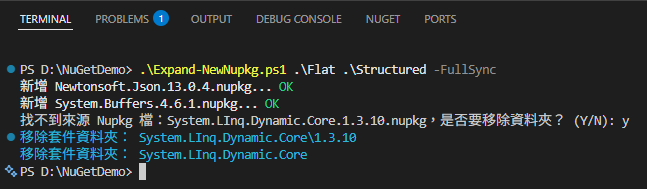
展開後,經實測,將 .nupkg 轉為層級結構預先解出 .nuspec 檔,體感速度有從散步提到騎機車的差別,想再更快下一步再考慮架 NuGet Server,用複雜度換速度。
Explains practical strategies for building .NET projects in offline environments by maintaining a local NuGet repository. Covers restoring packages without Visual Studio, improving performance with structured package folders, and automating sync using PowerShell.
Comments
# by yoyo
以資安治理的角度看,組織內還是要有統一的Package Server來管理較符合規範,不過對開發者就變得麻煩 版控系統 (ex: Azure DevOps, GitLab, Gitea) 大多附有Package Registry功能,可統一管理套件