打造安全的 SignalR 跨網路 P2P 即時通訊
 |  | 1 |  |
講到網頁即時通訊,解決方案很多,從 setInterval()、Long Polling、Server-Sent Events 到 WebSockets,只需幾行程式就能做個雛形。
但回歸到實務應用,若需求複雜一點,想深一點,一般得考慮程式效率與即時性、連線斷線自動重連機制、群組廣播需求、WebSockets 不通時自動換用 SSE/Long Polling,若全部自己刻,測到穩定無錯命都去掉半條了。
因此,要用 .NET 搞定複雜即時通訊,微軟官方的網頁即時通訊開源框架 - SignalR,便是首選中的首選。離我上次玩 SignalR超過十年,對象是網站整合應用。如今,.NET 網站主流已換成 ASP.NET Core,.NET 版本來到 10.0,是時侯重新會一會老朋友,順便試試不同玩法 - 與 CLI 程式整合。
起了個 Side Project,練習用最新版 Microsoft.AspNetCore.SignalR.Core 1.2.0 (2025/1)、Microsoft.AspNetCore.SignalR.Client 10.0.0 (2025/11) 讓兩個不相通網段的 CLI 程式建立安全 P2P 通訊。專案構想如下:
- 範例的兩位主角為 Console Application,跟過往網頁應用以網站為中心不同,更偏向用 SignalR 實現 P2P 即時通訊。實際寫完,發現 Microsoft.AspNetCore.SignalR.Client 程式庫把底層運作包得很好,上手容易,寫起來毫不費力。
- 兩支 Console 程式位於被防火牆保護,無法直接存取對方 IP 的兩個網段,二者透過主動連上 SignalR Hug,建立一條可雙向即時通訊的管道。
- 「安全性」是本次練習的一大重點! 一方面要防止資料被竊聽,也要防止有人假冒傳輸對象。最正統解法走 X.509 憑證身分驗證 / TLS / SSH... 先不要搞到太複雜,就先採「雙方事先約定金鑰,所有訊息 AES256 E2E 加密」意思一下,除非偷到金鑰,基本上第三者無法竊聽及冒充身分。
- SignalR Hub 部分,則實作簡單 IP 白名單管控及 Access Key Header 檢查,進一步強化安全性。
透過這個小練習,為日後實際用 SignalR 戰鬥預做準備。
這個 PoC 專案分為三部分,完整原始碼已放上 Github,這裡只簡要說明:
SignalR-P2P-Hub
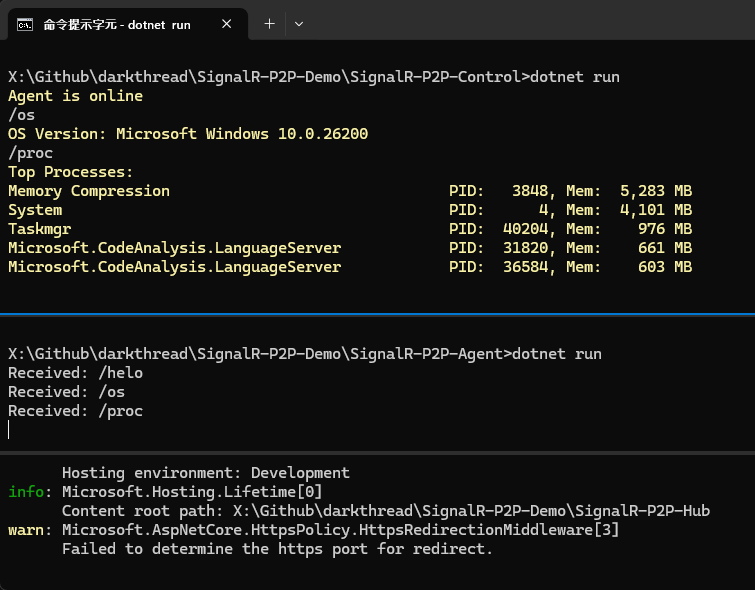
ASP.NET Core Web Razor 專案,安裝 Microsoft.AspNetCore.SignalR.Core 套件,依官方教學 Program.cs 加上 builder.Services.AddSignalR(); 及 app.MapHub 為了增加安全性,一方面也為實戰預做準備,順手加上兩層安全管控:IP 白名單及 Access Key 檢查。 IP 白名單部分是在 appsettings.json 列舉可連線的 IP 清單:(若不要限制來源 IP,可加入 *) Program.cs 則要插入檢查 IP 的中介層: IpWhitelistMiddleware 寫法如下: 至於 Access Key,我採取的做法是要求連線時加入 X-Access-Key Header。ChatHub 則在 OnConnectedAsync() 時檢查,若未附上 Header 或與 appsettings.json 設定不同則拒絕連線。來源 IP 的檢查也可以寫在這裡,甚至可以指派不同 Access Key 給不同 IP 進一步提高安全性。上面選擇用 Middleware 實作的一項重要理由是我想多練習一種寫法。:D 若排除 Access Key 檢查,ChatHub 本體超級簡單,只有 JoinGroup 與 SendGroupMessage 兩個方法,在 SendGroupMessage() 中,則是利用 Clients.OthersInGroup(groupName).SendAsync(..) 傳送訊息給自己以外的群組成員。 這個展示範例是讓 SignalR-P2P-Control 連上 SignalR Hub 加入指定名稱的群組,與也連上 SignalR Hub 加入同一群組的 SignalR-P2P-Agent 建立即時通訊管道。Control 端從 Console.ReadLine() 讀取指令,共有 /helo、/os、/proc 三種指令,分別用來測試 Agent 回應、取得 Agent OS 版本、查詢 Agent 上吃 RAM 前五名的程序資訊,沒啥營養,但用來驗證機制可行性很夠了。 前面提到要實作 E2E 加密,加解密部分用 System.Security.Cryptography.Aes 實作即可,由於不是本次重點,我把它包成獨立 Class Library。Control 端的 Program.cs 長這樣: Agent 端需實作收到 /helo、/os、/proc 指令時的處理,程式碼稍多,但倒也沒什麼深奧之處。 最後,分別把三者執行起來,從 Control 端下指令,順利收到 Agent 端回應,測試成功! 完整程式碼在 Github,需要的同學可自取。 Demonstrates using SignalR in .NET for secure, end-to-end encrypted P2P communication between CLI apps across networks, with IP and Access Key controls. "AllowedClientIPs": [
"127.0.0.1",
"::1",
"192.168.1.100"
]
var app = builder.Build();

// 以 appsettings.json AllowedClientIPs 限定客戶端 IP
app.UseMiddleware<IpWhitelistMiddleware>();

// ... 略 ...
public class IpWhitelistMiddleware
{
    private readonly RequestDelegate _next;
    private readonly string[] _allowedIPs;

    public IpWhitelistMiddleware(RequestDelegate next, IConfiguration configuration)
    {
        _next = next;
        _allowedIPs = configuration.GetSection("AllowedClientIPs").Get<string[]>() ?? Array.Empty<string>();
    }

    public async Task InvokeAsync(HttpContext context)
    {
        if (!_allowedIPs.Contains("*")) // 若 AllowedClientIPs 有 *,則不限來源 IP
        {
            var remoteIp = context.Connection.RemoteIpAddress;

            if (remoteIp != null && !_allowedIPs.Contains(remoteIp.ToString()))
            {
                context.Response.StatusCode = StatusCodes.Status403Forbidden;
                await context.Response.WriteAsync("Forbidden: IP not allowed");
                return;
            }
        }
        await _next(context);
    }
}
using Microsoft.AspNetCore.SignalR;

namespace SignalR_P2P
{
    public class ChatHub : Hub
    {
        private readonly IConfiguration _configuration;
        public ChatHub(IConfiguration configuration)
        {
            _configuration = configuration;
        }
        // 連線時驗證 X-Access-Key 標頭需與 appsettings.json AccessKey 一致
        // TODO: 可設計管理機制,配發不同 AccessKey 給不同 IP 進一步提高安全性
        public override async Task OnConnectedAsync()
        {
            var accessKey = Context.GetHttpContext()?.Request.Headers["X-Access-Key"].ToString();
            var validAccessKey = _configuration["AccessKey"];

            if (string.IsNullOrEmpty(accessKey) || accessKey != validAccessKey)
            {
                // 比對失敗,中斷連線
                Context.Abort();
                return;
            }

            await base.OnConnectedAsync();
        }

        public async Task JoinGroup(string groupName)
        {
            // 將 ConnectionId 加入指定群組,而 SignalR 會在斷線時將連線退出群組
            await Groups.AddToGroupAsync(Context.ConnectionId, groupName);
        }

        public async Task SendGroupMessage(string groupName, string message)
        {
            await Clients.OthersInGroup(groupName).SendAsync("ReceiveMessage", message);
        }
    }
}
SignalR-P2P-Control
using Microsoft.AspNetCore.SignalR.Client;

class Program
{
    static readonly HttpClient httpClient = new();

    static async Task Main(string[] args)
    {
        var hubUrl = args.Length > 0 ? args[0] : "http://localhost:5566/chathub";
        var accessKey = Environment.GetEnvironmentVariable("SGRP2P_ACCESS_KEY") ??
            throw new Exception("SGRP2P_ACCESS_KEY not set.");
        var connection = new HubConnectionBuilder()
            .WithUrl(hubUrl, options =>
            {
                options.Headers.Add("X-Access-Key", accessKey); # 加上 X-Access-Key Header
            })
            .WithAutomaticReconnect()
            .Build();

        var sendMessage = async (string message) =>
            await connection.InvokeAsync("SendGroupMessage", CryptoLib.Cipher.GroupId, CryptoLib.Cipher.Encrypt(message));

        connection.On<string>("ReceiveMessage", async (message) =>
        {
            if (string.IsNullOrWhiteSpace(message)) return;
            try
            {
                message = CryptoLib.Cipher.Decrypt(message); // 收到訊息時先解密
                Console.ForegroundColor = ConsoleColor.Yellow;
                Console.WriteLine(message);
            }
            catch
            {
                Console.WriteLine("Failed to decrypt message.");
                return;
            }
            Console.ResetColor();
        });

        try
        {
            await connection.StartAsync();
            await connection.InvokeAsync("JoinGroup", CryptoLib.Cipher.GroupId);
            await sendMessage("/helo");
        }
        catch (Exception ex)
        {
            Console.WriteLine($"Error connecting to SignalR hub: {ex.Message}");
        }

        while (true)
        {
            var message = Console.ReadLine();
            if (string.IsNullOrEmpty(message)) continue;
            if (message == "/exit") break;
            await sendMessage(message);
        }
        await connection.StopAsync();
    }
}
SignalR-P2P-Agent
using System;
using System.Text.RegularExpressions;
using System.Threading.Tasks;
using Microsoft.AspNetCore.SignalR.Client;
using System.Diagnostics;

class Program
{
    static readonly HttpClient httpClient = new();
    static async Task Main(string[] args)
    {
        var hubUrl = args.Length > 0 ? args[0] : "http://localhost:5566/chathub";
        var accessKey = Environment.GetEnvironmentVariable("SGRP2P_ACCESS_KEY") ??
            throw new Exception("SGRP2P_ACCESS_KEY not set.");
        var connection = new HubConnectionBuilder()
            .WithUrl(hubUrl, options =>
            {
                options.Headers.Add("X-Access-Key", accessKey);
            })
            .WithAutomaticReconnect()
            .Build();

        var sendMessage = async (string message) =>
            await connection.InvokeAsync("SendGroupMessage", CryptoLib.Cipher.GroupId, CryptoLib.Cipher.Encrypt(message));

        // Register a handler for messages from the hub
        connection.On<string>("ReceiveMessage", async (message) =>
        {
            if (string.IsNullOrWhiteSpace(message)) return;
            try
            {
                message = CryptoLib.Cipher.Decrypt(message);
                Console.WriteLine("Received: " + message);
            }
            catch
            {
                Console.WriteLine("Failed to decrypt message.");
                return;
            }
            var m = Regex.Match(message, @"^/(?<cmd>[a-z]+)(?<args>.*)$");
            if (m.Success)
            {
                var cmd = m.Groups["cmd"].Value;
                switch (cmd)
                {
                    case "helo":
                        await sendMessage("Agent is online");
                        break;
                    case "os":
                        var osVer = System.Runtime.InteropServices.RuntimeInformation.OSDescription;
                        await sendMessage($"OS Version: {osVer}");
                        break;
                    case "proc":
                        var procList = ListProcesses(5);
                        await sendMessage($"Top Processes:\n{procList}");
                        break;
                    default:
                        await sendMessage("Unknown command.");
                        break;
                }
            }
            else
            {
                await sendMessage("Not a command.");
            }

        });

        try
        {
            await connection.StartAsync();
            await connection.InvokeAsync("JoinGroup", CryptoLib.Cipher.GroupId);
        }
        catch (Exception ex)
        {
            Console.WriteLine($"Error connecting to SignalR hub: {ex.Message}");
        }

        while (true)
        {
            var message = Console.ReadLine();
            if (string.IsNullOrEmpty(message)) continue;
            if (message == "/exit") break;
        }
        await connection.StopAsync();
    }

    static string ListProcesses(int topN = 10)
    {
        // ... 使用 Process.GetProcesses() 查詢吃 RAM 大戶 ...
    }

}
Comments
# by Joker
還可以做各種小遊戲,很好用。 不用自己從頭包,真的很方便啦。