Coding4Fun-試聽 16 進位字串表示的 MP3 內容
 |  | 0 |  |
鹹蝦專案(利用閒暇經營的 Side Project)遇到的需求,先前把 MP3 音效資料整進 SQL 資料表轉成 IMAGE 資料型別,查詢起來像這樣:
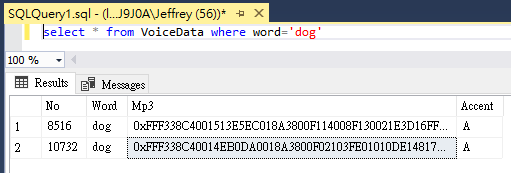
如果我想試聽這段聲音該怎麼辦? 網路上可以找到一些 T-SQL 範例,將 SQL 裡的二進位資料匯出成檔案。不過這樣子每次試聽的步驟有點麻煩: 用 SELECT 取得某一筆 IMAGE 內容 -> 以內容及檔名為參數呼叫 Stored Procedure -> 在檔案總管點選檔案試聽。
我心中理想的操作方式是: SELECT 選出數筆內容 -> 選出想試聽的內容貼到「試聽工具」輸入區 -> 試聽工具自動播放 MP3 內容。像這個樣子:
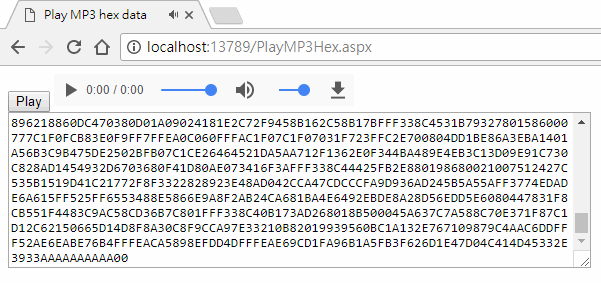
程式透過 jQuery paste 事件偵測 <textarea> 被貼上新內容,自動將 16 進位字串送到後端解析成 byte[] 存入 Cache,之後由前端 <audio> 取回 MP3 內容播放,一氣喝成,用 Inline ASPX Page寫 100 行內搞定,連我自己都覺得帥氣~ 特發文紀念。:P
<%@ Page Language="C#" %> <%@ Import Namespace="System.Runtime.Caching" %> <script runat="server">
protected void Page_Load(object sender, EventArgs e)
{ var mode = Request["mode"];
if (mode == "parse")
{ var hex = Request["hex"];
try { if (string.IsNullOrEmpty(hex) || hex.IndexOf("0x") != 0)
{ throw new ApplicationException("Invalid hex data");
}
hex = hex.Substring(2); //remove 0x var data = new byte[hex.Length / 2];
for (var i = 0; i < data.Length; i++)
{ data[i] = Convert.ToByte(hex.Substring(i * 2, 2), 16);
}
var token = Guid.NewGuid().ToString(); MemoryCache.Default.Add(token, data, new CacheItemPolicy() { AbsoluteExpiration = DateTime.Now.AddSeconds(30)
});
Response.Write($"OK:{token}&len={data.Length}"); }
catch (Exception ex) { Response.Write($"Error: {ex.Message}"); }
Response.End();
}
else if (mode == "download")
{ var data = MemoryCache.Default[Request["token"]] as byte[];
Response.ContentType = "audio/mpeg"; Response.BinaryWrite(data);
Response.End();
}
}
</script>
<!DOCTYPE html>
<html>
<head>
<meta charset="utf-8" /> <title>Play MP3 hex data</title>
</head>
<body>
<div>
<button>Play</button>
<audio controls="true" autoplay="true"></audio>
</div>
<textarea rows="10" cols="80"></textarea>
<script src="https://code.jquery.com/jquery-3.2.1.min.js"></script> <script>
$("button").click(function() {
$.post("PlayMP3Hex.aspx", { mode: "parse", hex: $("textarea").val() })
.done(function(res) { if (res.indexOf("OK:") === 0) {
$("audio").attr("src",
"PlayMP3Hex.aspx?mode=download&_t=" + Math.random() +
"&token=" + res.substr(3));
} else { alert(res);
}
});
});
//貼上內容後0.1秒自動解析試聽 $("textarea").bind("paste", function() {
setTimeout(function() { $("button").click(); },
100);
});
</script>
</body>
</html>
Comments
Be the first to post a comment