使用 POST 請求更新 IIS 端檔案 - 極簡做法
 |  | 6 |  |
先說我的需求:我在 IIS 有個 HTML 靜態網頁,任務是載入資料檔 JSON 提供統計資料互動式查詢。當資料有更新,受限於防火牆無法用 SFTP、SCP 或網路資料夾直接更新,需靠 RDP 登入再複製貼上,一來麻煩,二來無法自動化。
近期更新頻率變高,對重複手工操作忍耐度極低的我,就想在 IIS 上寫支小程式,支援以 HTTP POST 請求進行更新,讓更新作業可以自動化並從 1 分鐘縮短到 1 秒。
程式不難寫,重點在怎麼做到簡單又安全,以下是我想到的極簡版本,一個 .aspx 檔案打死,開箱即用,並提供最基本的安全防護:
<%@Page Language="C#"%>
<script runat="server">
    // 來源 IP 檢查
    static string[] allowedIPs = new string[] {
        "::1", "127.0.0.1"
    }
    // 警告:請確認路徑為資料區之非可執行檔案,且不會因覆寫惡意內容導致風險,若無法確認安全性,請勿使用
    // 註:Key 建議使用 GUID 等隨機唯一值,防止被暴力猜測覆寫
    string dataFolder() => Server.MapPath("~/PostUpdate/Data");
    static Dictionary<string, string> jsonPathMap = new Dictionary<string, string>() {
        { "93490a37-e6a0-4bf7-af75-2dfd882cd901", "test1.json" },
        { "a98589cc-cbe1-4ce4-8db7-0f2f292932f1", "test2.json" },
        { "3f47c425-e555-47a7-9022-debd6808ad12", "test3.json" }
    };
    protected void Page_Load(object sender, EventArgs e)
    {
        var key = Request["f"];
        if (!allowedIPs.Contains(Request.UserHostAddress) ||
            Request.HttpMethod != "POST" ||
            string.IsNullOrEmpty(key) || !jsonPathMap.ContainsKey(key))
        {
            // 非允許 IP、非 POST 請求、缺少或無效的 key 都返回 404,降低網址洩漏風險
            Response.StatusCode = 404; //
            return;
        }
        var jsonPath = jsonPathMap[key];
        try
        {
            System.IO.Directory.CreateDirectory(dataFolder()); // 確保資料夾存在
            var fullPath = System.IO.Path.Combine(dataFolder(), jsonPath);
            using (var reader = new System.IO.StreamReader(Request.InputStream))
            {
                var jsonContent = reader.ReadToEnd();
                System.IO.File.WriteAllText(fullPath, jsonContent);
            }
            Response.StatusCode = 200; // OK
        }
        catch (Exception ex)
        {
            Response.StatusCode = 500; // Internal Server Error
            Response.Write(ex.Message);
        }
    }
</script>
上面這個 UpdateJson.aspx 程式只有 50 行,不需要編譯及第三方程式庫,丟到 IIS 網站即可運行,用 PowerShell 或 curl 寫一行程式便能遠端更新資料檔。身為開發老鳥,知道這類上傳檔案寫入網站的方便功能,一旦被誤用極度危險,甚至有被滅門屠城的可能,所以我加了幾道安全防護:
- 限定上傳客戶端 IP 來源
- 限 POST 存取,防止即興修改瀏覽器 URL 探測網址
- 只能更新預先列舉路徑的檔案 (警告:此為開發天條,禁止客戶端自由指定讀寫路徑,一旦疏忽可能被屠城!)
- 需傳入 GUID 對映更新目標,防止暴力猜測
- 以上檢核未過時一律回傳 HTTP 404,降低更新介面曝露風險
以下是用 PowerShell 程式的驗證測試:
$data = Get-Date -Format "ssfff";
$f = New-Guid
try {
    Invoke-WebRequest -Uri "http://localhost/AspNet/PostUpdate/UpdateJson.aspx?f=$f" -Method GET
}
catch {
    # 使用 GET
    if ($_.Exception.Response.StatusCode -eq 404) {
        Write-Host "PASS: Not Found (404)" -ForegroundColor Green
    }
    else {
        Write-Error "An error occurred: $($_.Exception.Message)"
    }
}
try {
    Invoke-WebRequest -Uri "http://localhost/AspNet/PostUpdate/UpdateJson.aspx?f=$f" -Method POST -Body $data | Out-Null
}
catch {
    # GUID 不對
    if ($_.Exception.Response.StatusCode -eq 404) {
        Write-Host "PASS: Not Found (404)" -ForegroundColor Green
    }
    else {
        Write-Error "An error occurred: $($_.Exception.Message)"
    }
}
$f = '93490a37-e6a0-4bf7-af75-2dfd882cd901'
try {

    $data = $data + "-PS"
    Invoke-WebRequest -Uri "http://localhost/AspNet/PostUpdate/UpdateJson.aspx?f=$f" -Method POST -Body $data | Out-Null
    Write-Host "PASS: Successfully updated by Invoke-WebRequest" -ForegroundColor Green
    Get-Content ".\Data\test1.json" | Write-Host

    # 改用 curl.exe 測試
    $data = $data -replace "-PS", "-curl"
    $status = & 'curl.exe' -s -o NUL -w "%{http_code}" -X POST --data $data "http://localhost/AspNet/PostUpdate/UpdateJson.aspx?f=$f"
    $statusCode = [int]$status
    if ($statusCode -eq 200) {
        Write-Host "PASS: Successfully updated by curl.exe" -ForegroundColor Green
    }
    elseif ($statusCode -ge 400) {
        Write-Error "An error occurred: HTTP $statusCode"
    }
    Get-Content ".\Data\test1.json" | Write-Host
}
catch {
    Write-Error "An error occurred: $($_.Exception.Message)"
}
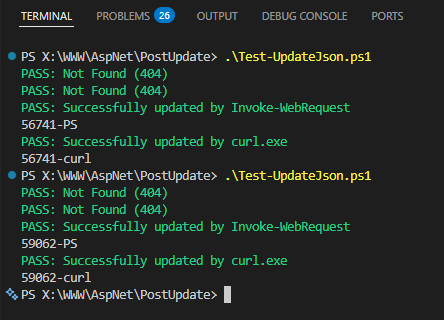
分享給有需要的朋友,大家若發現弱點或有強化建議,也歡迎回饋!
Describes a minimal, secure ASP.NET WebForms (.aspx) HTTP POST endpoint on IIS to automate JSON data updates behind a firewall. Uses IP filtering, POST-only access, GUID-based file mapping, and 404 responses to reduce exposure and enable safe automation.
Comments
# by 路過
怎麼不用公私鑰對內容加解密?
# by Jeffrey
to 路過,好奇增加非對稱加密可加強防堵的漏洞為何?
# by cs8425
To Jeffrey: 我想應該不是指非對稱"加密解密", 而是指簽名&驗證吧 沒有私鑰簽名的post請求不會通過公鑰驗證, 能被伺服端擋掉, 而且簽名能補上時間/亂數, 防止重放攻擊 To 路過: 想法不錯, 但根據我用asp.net framework想使用非對稱加密演算法的經驗, 加密相關的api不是超難用就是不存在, 不存在的只能靠第三方或者自己重新實作一次 這情況到.net 8以後才比較好轉, 雖然api還是挺難用的, 但至少常用的演算法都內建了 所以用無法預測的長字串當token算是合理的取捨
# by Jeffrey
to cs8425,留言說的是加解密,我不確定簽名驗證是否為其原意。 至於簽名驗證,要成功攻擊的前題是知道 GUID Key,具能在用主機 IP 發送請求,有高機率主機已淪陷,私鑰也失守,除非私鑰為使用時才插入的實體金鑰或有密碼等多因素驗證,否則意義不大。考慮實作成本與其效益,我認為很不值得。
# by 寫得長有跑得更快嗎???
import os from flask import Flask, request, abort app = Flask(__name__) # 設定儲存資料的資料夾(相對於此腳本的 Data 目錄) DATA_FOLDER = os.path.join(os.path.dirname(__file__), 'Data') # 允許的 IP 位址(本機 IPv4 與 IPv6) ALLOWED_IPS = {'127.0.0.1', '::1'} # 鍵值對映:GUID -> JSON 檔案名稱 KEY_TO_FILE = { '93490a37-e6a0-4bf7-af75-2dfd882cd901': 'test1.json', 'a98589cc-cbe1-4ce4-8db7-0f2f292932f1': 'test2.json', '3f47c425-e555-47a7-9022-debd6808ad12': 'test3.json', } @app.route('/update', methods=['POST']) def update_json(): # 1. IP 檢查 client_ip = request.remote_addr if client_ip not in ALLOWED_IPS: abort(404) # 回傳 404 隱藏端點存在性 # 2. 取得並驗證 key 參數 key = request.args.get('f') if not key or key not in KEY_TO_FILE: abort(404) # 3. 取得對應的檔案名稱 filename = KEY_TO_FILE[key] # 4. 確保資料夾存在 try: os.makedirs(DATA_FOLDER, exist_ok=True) except Exception as e: # 記錄錯誤(此處簡單回傳 500) app.logger.error(f"無法建立資料夾 {DATA_FOLDER}: {e}") abort(500, description="伺服器內部錯誤") # 5. 讀取請求主體並寫入檔案 try: # 從 request.get_data() 取得原始位元組資料,再解碼為字串 json_content = request.get_data(as_text=True) file_path = os.path.join(DATA_FOLDER, filename) with open(file_path, 'w', encoding='utf-8') as f: f.write(json_content) except Exception as e: app.logger.error(f"寫入檔案失敗 {file_path}: {e}") abort(500, description="伺服器內部錯誤") # 6. 成功回應 return '', 200 # 可選:處理未匹配的路由,一律回傳 404 避免資訊洩漏 @app.errorhandler(404) def handle_404(e): return '', 404 @app.errorhandler(500) def handle_500(e): return str(e), 500 if __name__ == '__main__': # 注意:僅用於開發測試,正式部署應使用生產級 WSGI 伺服器(如 Gunicorn) app.run(host='127.0.0.1', port=5000, debug=False)
# by cs8425
To Jeffrey: GUID Key也有可能被中間人拿到(原文走http), 指定IP是比較不容易的門檻, 但還是有可能主機沒淪陷但一樣能發請求, 那就是SSRF, 透過主機上其他AP的漏洞串連起來利用 總體來說, 以這種需求加上asp.net framework的各種限制, 搞那麼多, 效益不大, 不太值得花太多功夫...