偵測 Windows 11 快顯通知
 |  | 0 |  |
前一篇提到寫程式發送 Windows 快顯通知,我想到的另一個應用方向是寫程式去監測快顯通知。
許多程式會發送快顯訊息,像是 Outlook、Slack... 若我希望在收到信件或訊息時觸發特定動作,除了設定針對不同應用程式寫程式,若是只需標題文字的簡單需求,統一監測快顯通知則是另一種簡便的低成本做法。老樣子,武器必須要有,要不要用再說,Let's go!
上一篇用的 Microsoft.Toolkit.Uwp.Notifications 套件,也包含監聽通知的 API,但做法並不是每次有新通知時觸發事件,而是允許你定期查詢取得目前所有還在通知中心的快顯通知,不夠完美,但能滿足需求。
而這次,一樣照著官方教學通知接聽程式:存取所有通知做就對了,是個簡單任務。
注意事項相同,.csproj TFM 要加註 SDK,細節請參考前文
using Windows.Foundation.Metadata;
using Windows.UI.Notifications;
using Windows.UI.Notifications.Management;

// 檢查 UserNotificationListener 是否可用
if (!ApiInformation.IsTypePresent("Windows.UI.Notifications.Management.UserNotificationListener"))
{
    Console.WriteLine("UserNotificationListener not available.");
    return;
}

var listener = Windows.UI.Notifications.Management.UserNotificationListener.Current;

// 檢查存取權限
var accessStatus = await listener.RequestAccessAsync();
if (accessStatus != UserNotificationListenerAccessStatus.Allowed)
{
    Console.WriteLine("Access to notifications denied.");
    return;
}

// 開始監聽通知
Console.WriteLine("Listening for toast notifications. Press Ctrl+C to stop.");

// 每次都會拿到完整清單,使用 HashSet 記錄已顯示過的通知 ID,避免重複顯示
var seenNotificationIds = new HashSet<uint>();
while (true)
{
    var notifications = await listener.GetNotificationsAsync(NotificationKinds.Toast);
    foreach (var notification in notifications)
    {
        // 如果已經顯示過,跳過
        if (seenNotificationIds.Contains(notification.Id))
        {
            continue;
        }
        seenNotificationIds.Add(notification.Id); // 標記為已顯示

        Console.WriteLine($"ID: {notification.Id}");
        Console.WriteLine($"App: {notification.AppInfo.DisplayInfo.DisplayName}");
        var toastBinding = notification.Notification.Visual.GetBinding(KnownNotificationBindings.ToastGeneric);
        if (toastBinding != null)
        {
            var textElements = toastBinding.GetTextElements();
            string title = textElements.FirstOrDefault()?.Text ?? "(No Title)";
            string body = string.Join("\n", textElements.Skip(1).Select(t => t.Text)) ?? "(No Body)";
            Console.WriteLine($"Title: {title}");
            Console.WriteLine($"Body: {body}");
            Console.WriteLine("------");
        }
    }
    Thread.Sleep(1000); // 每秒檢查一次
}
執行結果如下:
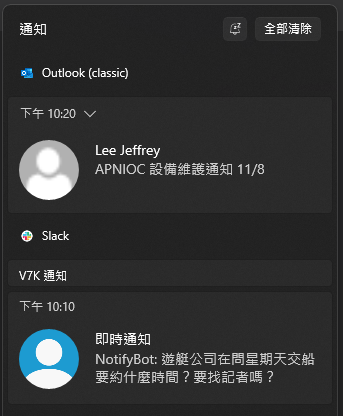
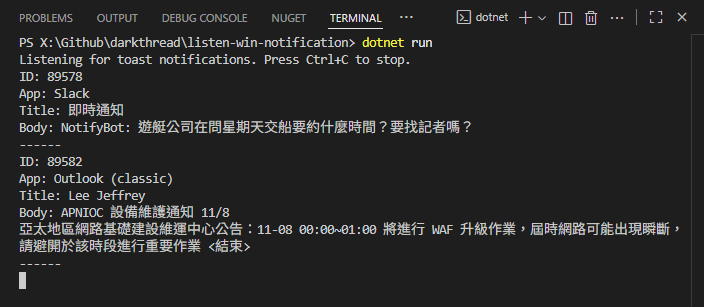
如有需要且權限允許,UserNotificationListener 也有 API 可刪除特定或所有通知,可視需要應用。
Demonstrates monitoring Windows toast notifications via UserNotificationListener API in .NET, enabling simple, unified notification tracking across apps.
Comments
Be the first to post a comment