CODE-以jQuery實現可編輯<td>
 |  | 4 |  |
跟同事討論到以下的UI應用情境:
網頁以<table>方式呈現數據矩陣,希望能做到在某一格(<td>)點兩下可以直接編輯格子文字內容,按Enter或點選其他格子結束編輯狀態,並將該格內容更新為剛才輸入結果。
介面如下圖所示,在<td>V11</td>上點兩下,V11就變成<input value=”V11”>,使用者可將<input>的值改成ZZZ,當按Enter或點其他<td>,該格內容就變成<td>ZZZ</td>。
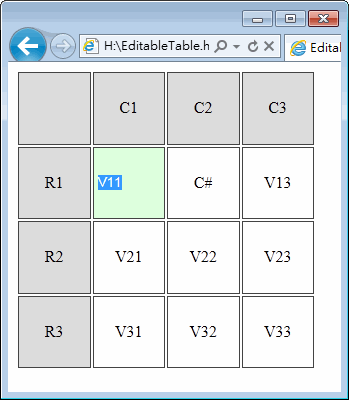
這個需求要用jQuery實現並不難: 在<td>上掛dblclick事件,將<input type=”text”>放入td中,val()就設成td原本的text();另外設定<input>的keydown及所有<td>的click事件,執行td.text(input.val())取input值寫成td內容就大功告成囉!
試寫了範例驗證jQuery是否有這麼威? 寫出這樣的功能用不到100行? 是否? 是否? 是否? (趕新聞熱潮,體驗一下當是否哥的感覺... 嘖嘖嘖,寫完感覺全身開始散發一股機車氣,好不習慣,看來是我沒有慧根~~~)
<!DOCTYPE html>
<html>
<head>
<title>Editable Table with jQuery</title>
<script src="http://ajax.aspnetcdn.com/ajax/jQuery/jquery-1.6.1.js"
type="text/javascript"></script>
<script type="text/javascript"> $(function () { var h = []; //建立一個3x3個欄位的Table,含標題列、欄為4x4 for (var r = 0; r <= 3; r++) {
h.push("<tr>"); for (var c = 0; c <= 3; c++) {
if (r == 0) { if (c == 0) h.push("<td class='rh ch'> </td>"); else h.push("<td class='ch'>C" + c + "</td>");
}
else if (c == 0)
h.push("<td class='rh'>R" + r + "</td>");
else h.push("<td class='cell'>V" + r + c + "</td>");
}
h.push("</tr>"); }
$("#tblEditor").html(h.join(''));
//加上點選進入編輯模式的事件 $("td.cell").live("dblclick", function () {
//若已有其他欄位在編輯中,強制結束 if (window.$currEditing) finishEditing($currEditing);
var $cell = $(this);
var $inp = $("<input type='text' />");
$inp.val($cell.text());
$cell.addClass("cell-editor").html("").append($inp);
$inp[0].select();
window.$currEditing = $inp;
}).live("click", function () {
//點選其他格子,強制結束目前的編輯欄 if (window.$currEditing //排除點選目前編輯欄位的情況 && $currEditing.parent()[0] != this) finishEditing($currEditing);
});
//加上按Enter/Tab切回原來Text的事件 $("td.cell-editor input").live("keydown", function (e) {
if (e.which == 13 || e.which == 9) finishEditing($(this)); });
//結束編輯模式 function finishEditing($inp) { $inp.parent().removeClass("cell-editor").text($inp.val()); window.$currEditing = null; }
});
</script>
<style type="text/css">
#tblEditor { width: 300px; height: 300px; } #tblEditor td { border: 1px solid #444444; text-align: center; width: 25%; } td.cell-editor { background-color: #ddffdd; } td.cell-editor input { width: 90%; border: 0px none black; background-color: #ddffdd;
}
.ch,.rh { background-color: #dddddd; } </style>
</head>
<body>
<table id="tblEditor"></table>
</body>
</html>
Comments
# by jain
真的很好用, 我們這種輸入模式克服了整批填寫問題。
# by deded
$currEditing是什麼啊?是jquery的用法嗎
# by Jeffrey
to deded, $currEditing只是一個變數名稱,相當於window.$currEditing,用來保存當下正在編輯的<input>包出的jQuery物件,以"$"起首是為了標明存入的是一個jQuery物件,可以直接$currEditing.find(), $currEdition.css()... 執行jQuery的各種方法。
# by Chan
真希望 HTML5 可以早點普及 這樣用 contentEditable="true" 這個屬性就可以搞定這件事情了 :)