與時俱進:.NET 版號加註 Git 版控資訊
 |  | 0 |  |
寫過 .NET 一段時間,多少該都知道 AssemblyVersion、AssemblyFileVersion、AssemblyInformationVersion、Deterministic 與程式版號的關係。
- AssemblyVersion 供載入組本識別版本用,格式為
[主版本].[次版本].[組建號].[修訂號],通常只需要主版號跟次版號。AssemblyVersion 可設成 1.0.* 自動跳號,而 Deterministic 設定可以停用之。 - AssemblyFileVersion 是檔案本身的實體版號,理論上每次建置版號都不同以利區別。
- AssemblyInformationalVersion 產品資訊,可加上自訂文字。
【延伸閱讀】
但如果你跟我一樣,對 .NET 版號的印象還停留在 3.5.23456.1234 這種四節數字,頂多加個 beta、preview 發佈階段註記,那可以趁著這篇了解一下當今的主流趨勢 - 在版本資訊加註 Git Commit Hash。
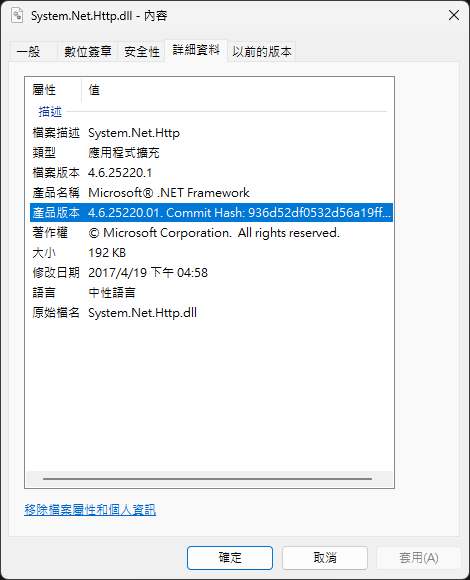
以 Git 為基礎的開發流程與自動化建置盛行之後,許多團隊會在組件、程式庫的的產品詳細資訊 (如 ProductVersion 或 AssemblyInformationalVersion 欄位) 嵌入 Git Commit Hash。這麼做的好處很明顯,當程式出錯要查問題,透過 Git Commit Hash 可精準找到編譯當下所用的原始碼,永遠不必擔心找錯版本。
從 .NET 8 開始,若專案有加入 Git 版控,SDK 在編譯組件時預設會自動在版號後方加上 Git Commit Hash。如下圖,我用 .NET 9 隨意建置一個 Console 程式,DLL/EXE 的產品版本欄位在版號數字後方會有一串 16 進位數字:
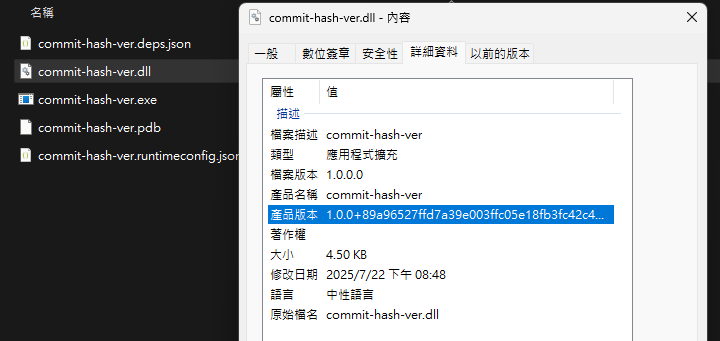
這串數字正是編譯時所在的 Git Commit:
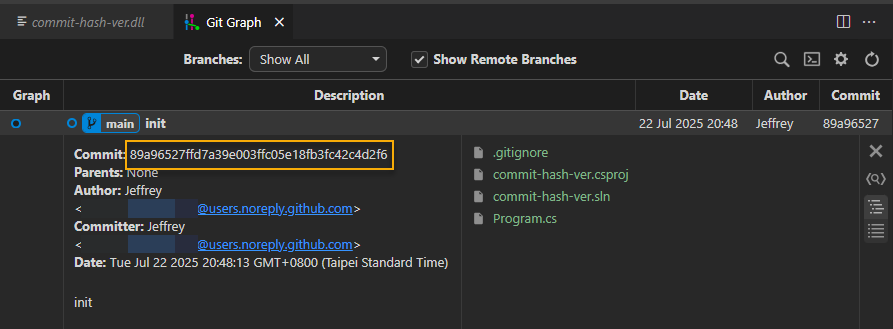
版號加入 Commit Hash 是微軟 Source Link 機制的一部分。.NET 8 SDK 會將 Commit 資訊嵌入到組件的 InformationalVersion,若專案原始碼是放在 Github/Azure Repos/GitLab 或 BitBucket,SDK 還可在 .pdb 加入原始碼在版控平台的路徑,讓開發者能從 Github 等平台下載原始碼回去偵錯,而 Commit Hash 則是確保版本正確的關鍵。
若你不想在版號加 Commit Hash (Why?加上不好嗎?),可修改 .csproj 停用 IncludeSourceRevisionInInformationalVersion:(順便一提,.NET 6+ 預設不會有 AssemblyInfo.cs,版號可以寫在 csproj)
<PropertyGroup>
  <Version>1.1.0</Version>
  <IncludeSourceRevisionInInformationalVersion>false</IncludeSourceRevisionInInformationalVersion>
</PropertyGroup>
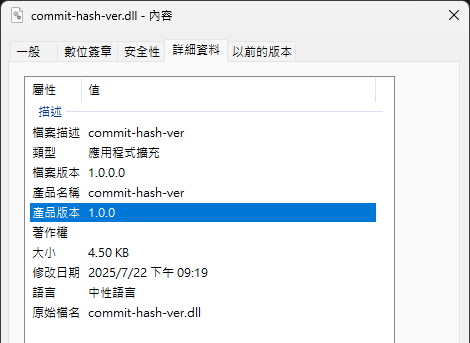
設為 false 再編譯,DLL 的產品版本只剩 1.0.0:
同場加映,想用程式取得產品版本可呼叫 System.Diagnostics.FileVersionInfo.GetVersionInfo():(若是在 PowerShell 使用,要小心 PowerShell 與 .NET 工作目錄不同的問題,建議將相對路徑轉為絕對路徑)
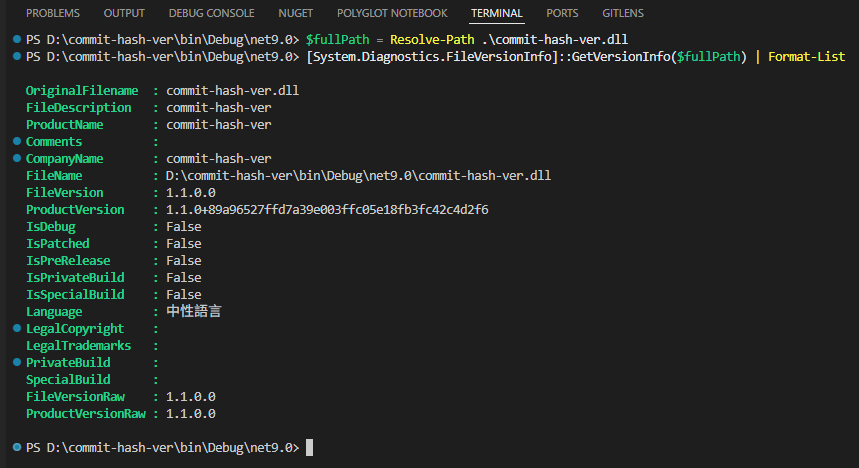
如果還在用 .NET Framework 也也想比照辦理在版號後方加 Git Commit Hash,可使用 MSBuildGitHash 套件,或是自己寫 MS Build Event,用 git rev-parse --short HEAD 抓 Commit Hash 再設法改掉 AssemblyInfo.cs。
學完這則新知還有另一個感想:Git 已是當代的必要技能無誤! 就算沒用它,少了 Git 知識,未來只怕會有愈來愈多東西看不懂。(還沒上車的同學趕快上車,讓開發人生變彩色)
This post discusses .NET assembly versioning and the modern practice of embedding Git commit hashes in version information. It highlights how this approach aids in precise source code identification and mentions .NET 8’s automatic inclusion of commit hashes in assemblies.
Comments
Be the first to post a comment