歷史回顧 - C# 8 新功能盤點
 |  | 4 |  |
三年前趁著讀 C# In Depth 看完 C# 7,C# 8.0 是 2019 年推出的,所這是篇晚了六年的開箱文(嚴格來說是考古文),但既然靠 C# 吃飯,就像缺了必修學分,該補修就得補修,我打算一路補到 C# 13。時代不同了,現在多了 AI 伴讀,一些深澀少用的功能 LLM 也能解釋得明明白白,學習程式語言邁入了新紀元。(雖然很多人心中所謂新紀元是以後再也不用學程式語言,噗)
參考來源:微軟官方文件 C# 8.0 版
C# 8.0 跟過往最大的不同是它是第一個專門針對 .NET Core 的 C# 版本 (當時是 .NET Core 3.0),增加或強化重點如下:
- 唯讀成員
在 C# 8 之前可以宣告public readonly struct StructName將整個結構宣告為唯讀,C# 8.0 可只將特定成員方法/屬性/索引子/覆寫 System.Object 方法(例如:ToString())宣告為唯讀。 在編譯階段阻止對結構內容的不當修改,例如以下的例子,Display() 可以 X++,在 ReadonlyDisplay() X++ 會產生編譯錯誤:
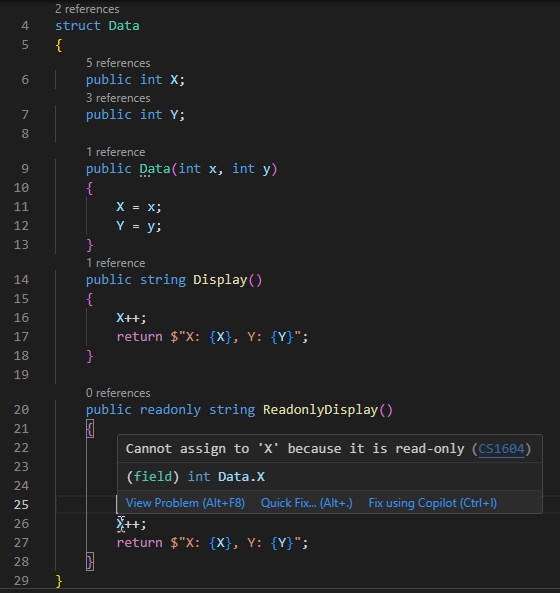
但要注意,在唯讀成員呼叫非唯讀方法時會產生防護性副本,以避免修改到原始結構執行個體,這可能衍生效率問題。public struct Accumulator { private int x; public Accumulator(int x) => this.x = x; // 非 readonly:可能修改狀態 public void Increment() { x++; // 修改欄位 } // readonly:承諾不修改原實例 public readonly int Total() { // 這裡呼叫非 readonly 方法,編譯器會對 this 產生防護性副本, // 並在「副本」上呼叫 Increment(),原本的 this 不會被修改 // 編譯器 warning CS8656: 從 'readonly' 成員呼叫非 readonly 成員 // 'Accumulator.Increment()' 會 產生 'this' 的隱含複本。 Increment(); return x; // 注意:這裡取的是原始 this 的 x 值 } } - 預設介面方法
介面也可以像抽象類別一樣加入實作邏輯,例如:// 定義介面,並給予部分方法預設實作 public interface IMyInterface { void SayHello(); // 純宣告 // 預設實作的方法 void SayWelcome() { Console.WriteLine("Welcome from interface!"); } } // 實作介面的類別 public class MyClass : IMyInterface { // 必須實作沒有預設實作的方法 public void SayHello() { Console.WriteLine("Hello from class!"); } } class Program { static void Main() { MyClass obj = new MyClass(); obj.SayHello(); // 只能直接呼叫類別實作的方法 // 轉為介面型別,呼叫預設介面方法 IMyInterface iobj = obj; iobj.SayWelcome(); } } - 模式比對增強功能:
- switch 運算式
- 屬性模式
- Tuple 模式
- 位置模式 老朋友
switch ... case ...多了許多新奇玩法:
using System; public class Program { public static void Main() { // 1. switch 運算式 var shape = new Circle { Radius = 5 }; Console.WriteLine(GetShapeDescription(shape)); // 輸出: Circle with radius 5 // 2. 屬性模式 var person = new Person { Name = "Alice", Age = 20 }; Console.WriteLine(CategorizePerson(person)); // 輸出: Adult // 3. Tuple 模式 var weather = ("Rainy", 12); Console.WriteLine(WeatherAdvice(weather)); // 輸出: Bring an umbrella and coat // 4. 位置模式 Console.WriteLine(DescribePoint(new Point(0, 0))); // 輸出: Origin Console.WriteLine(DescribePoint(new Point(3, 0))); // 輸出: On X axis at 3 Console.WriteLine(DescribePoint(new Point(0, 4))); // 輸出: On Y axis at 4 Console.WriteLine(DescribePoint(new Point(2, 3))); // 輸出: At (2, 3) } // 1. switch 運算式 static string GetShapeDescription(Shape shape) => // switch 可依據 shape 的類型執行不同邏輯 shape switch { Circle c => $"Circle with radius {c.Radius}", Rectangle r => $"Rectangle {r.Width} x {r.Height}", _ => "Unknown shape" }; // 2. 屬性模式 static string CategorizePerson(Person p) => p switch { // 依據 Person 的屬性執行不同邏輯 { Name: null } => "Anonymous", { Age: < 13 } => "Child", { Age: >= 13 and < 18 }=> "Teenager", { Age: >= 18 } => "Adult", _ => "Unknown" }; // 3. Tuple 模式 static string WeatherAdvice((string condition, int temperature) weather) => // 以 Tuple 傳入多個值,分別利用判斷 weather switch { ("Sunny", _) => "Wear sunglasses", ("Rainy", int t) when t < 15 => "Bring an umbrella and coat", ("Rainy", _) => "Bring an umbrella", _ => "Have a nice day" }; // 4. 位置模式 static string DescribePoint(Point p) => p switch { (0, 0) => "Origin", (0, var y) => $"On Y axis at {y}", (var x, 0) => $"On X axis at {x}", _ => $"At ({p.X}, {p.Y})" }; } // 幾何圖形 base class & derived abstract class Shape {} class Circle : Shape { public int Radius { get; set; } } class Rectangle : Shape { public int Width { get; set; } public int Height { get; set; } } // Person 類,呈現屬性模式 class Person { public string? Name { get; set; } public int Age { get; set; } } // Point 結構 (適合展示位置模式) public readonly struct Point { public int X { get; } public int Y { get; } public Point(int x, int y) => (X, Y) = (x, y); // 位置模式需要實作 Deconstruct 方法 public void Deconstruct(out int x, out int y) => (x, y) = (X, Y); } // 若為 C# 9.0 可使用 record struct,自動實作 Deconstruct 方法 // public record struct Point(int X, int Y); - Using 宣告免加大括號
可省去打字及縮排,讓程式更簡潔,下例中的 reader 會在區域變數範圍終點 Dispose(),也就是 LoadNumbers() 方法的結尾處。static IEnumerable<int> LoadNumbers(string filePath) { using StreamReader reader = File.OpenText(filePath); var numbers = new List<int>(); string line; while ((line = reader.ReadLine()) is not null) { if (int.TryParse(line, out int number)) { numbers.Add(number); } } return numbers; } - 靜態區域函式
跟一般區域函式差在無法捕獲外部變數,不會產生閉包(Closure),有助於提升效能。public static void Main() { int factor = 3; int result = Add(5, 10); Console.WriteLine($"加總結果: {result}"); // 靜態區域函式Bin static int Add(int a, int b) { // 無法存取外部區域變數 (如 factor) // 所有用到的資料都靠參數傳遞 return a + b; } } - 可處置的(Disposable) ref struct
在 C# 8.0 起,只要 ref struct 內部定義一個 public void Dispose() 方法,不需要實作 IDisposable 介面,也可以直接用在 using 語句或 using 宣告中,達到 Deterministic Cleanup (確定性清除資源)的效果。 - Nullable Reference Types
原本 Reference Type 如 string、object 的預設值為 null,但在程式中要時時檢查其值是否為 null 實在太煩了,NullReferenceException 又是超常見的系統爆炸原因,故 C# 8.0 加入了 Nullable Reference Types 的概念,將 string 等型別預設成不允許 null,若要允許需寫成string? s = null;。這個改變剛從 .NET 4.x 升到 .NET Core/.NET 6+ 時保證很有感,想不發現也難 😄。【延伸閱讀】C# 8 的 Nullable Reference Types by Huanlin 學習筆記 - 非同步資料流(Asynchronous Streams)
把 async/await 的概念延伸到 IEnumerable,新增 IAsyncEnumerable 同步產生與消費資料,不需要等待所有資料都準備好才處理。這項特性可讓資料擷取 (如 I/O、API 分頁、多筆慢速來源) 更有效率並提升應用程式的即時性。 public class Program { public static async Task Main(string[] args) { await foreach (var number in GenerateSequence()) { Console.WriteLine(number); } } static async IAsyncEnumerable<int> GenerateSequence() { for (int i = 0; i < 10; i++) { await Task.Delay(1000); // 模擬非同步工作 yield return i; } } } - 範圍運算子 ..
許多語言都支援在陣列索引值使用 .. 表示範圍,C# 8.0 也跟上了int[] numbers = [0, 10, 20, 30, 40, 50]; int amountToDrop = numbers.Length / 2; // 從 amountToDrop 開始到結尾的所有元素 int[] rightHalf = numbers[amountToDrop..]; Display(rightHalf); // output: 30 40 50 // 到 amountToDrop 之前的所有元素 int[] leftHalf = numbers[..^amountToDrop]; Display(leftHalf); // output: 0 10 20 // 去掉頭一個及最後兩個元素 int[] middle = numbers[1..^2]; Display(middle); // output: 10 20 30 // 從開頭到結尾的所有元素 int[] all = numbers[..]; Display(all); // output: 0 10 20 30 40 50 void Display<T>(IEnumerable<T> xs) => Console.WriteLine(string.Join(" ", xs)); - Null 聯合指派 ??=
用??指定變數為 null 的替代值是大家小學二年級就學過的 C# 技巧,??=則可用於「當變數為 null 時就設成特定值」,簡單說就是把以下程式版段縮成一行。variable ??= expression; // 相當於 if (variable is null) { variable = expression; } - 非受控建構的類型
C# 8 導入 Nullable Reference Types,因此泛型 where 約束條件也加入了指定參數是否允許為 null 的新語法:- where T : class? 表示 T 必須是 Nullable Reference Type
- where T : class 表示 T 必須是 Non-Nullable Reference type
- where T : struct 表示 T 必須是非 Nullable 的值型別
- where T : notnull 表示 T 必須為不可為 null 的型別 (Reference 或 Value Type 都可)
- 巢狀運算式中的 stackalloc
stackalloc 可在堆疊(Stack)上配置一塊記憶體區塊(如陣列、Buffer),所配置記憶體會隨方法回傳時自動釋放,不會造成 GC 壓力。使用 Span或 ReadOnlySpan 可以安全地操作 stackalloc 所配置的記憶體,且不需 unsafe 區塊。
在 C# 8 以前,stackalloc 只能出現在變數宣告時直接初始化及簡單的賦值運算,C# 8 起, stackalloc 可以出現在「巢狀化」的表達式中,例如:方法的傳入/回傳值、條件運算式或三元運算子、 其他需要 Span或 ReadOnlySpan 的運算式等。 // 直接巢狀 stackalloc 當方法參數 Span<int> numbers = stackalloc[] { 1, 2, 3, 4, 5, 6 }; var index = numbers.IndexOfAny(stackalloc[] { 4, 8, 12 }); Console.WriteLine(index); // 輸出: 3 // 三元運算子(條件運算式)結合 int length = 1000; Span<byte> buffer = length <= 1024 ? stackalloc byte[length] : new byte[length]; // 字串修整(Trim)運用 string input = "This is a simple string \r\n"; ReadOnlySpan<char> trimmedChar = input.AsSpan().Trim(stackalloc[] { ' ', '\r', '\n' }); Console.WriteLine(trimmedChar.ToString()); - 插補逐字字串的改善 講的是 $"..." Interpolated Strings 字串插值,當要結合 Verbatim String Literal 逐字字串常值
@"...",以前只能寫$@"content",C# 8 起寫@$"content"也成。
A concise overview of C# 8.0’s key features, including pattern matching, nullable reference types, async streams, and more, with practical code examples.
Comments
# by yoyo
想看黑暗大介紹 Span<T> , Memory<T> and Pipelines
# by Jeffrey
to yoyo, 沒 PO FB 文章還是有人看耶,感動~~~ 衝著這點,已將 Span<T> 排入 TODO
# by Ike
我有訂閱 RSS,按時收看
# by Jeffrey
to Ike,都 2025 年了,此舉可獲頒鐵粉勳章。(RESPECT)