挑戰在 Github Copilot 用三行提示產生範例 Excel 檔
 |  | 0 |  |
產生測試或展示用的範例是件煩人的小事,說難不難,但要憑空擬出一堆假名字、假數字,多半要費點功夫,而無中生有正是 LLM 最擅長的工作。文字型檔案 .txt、.json、.xml、.yaml 絕對沒問題,但如果要生出如下圖的 Excel 範例資料,有沒有簡單的做法?
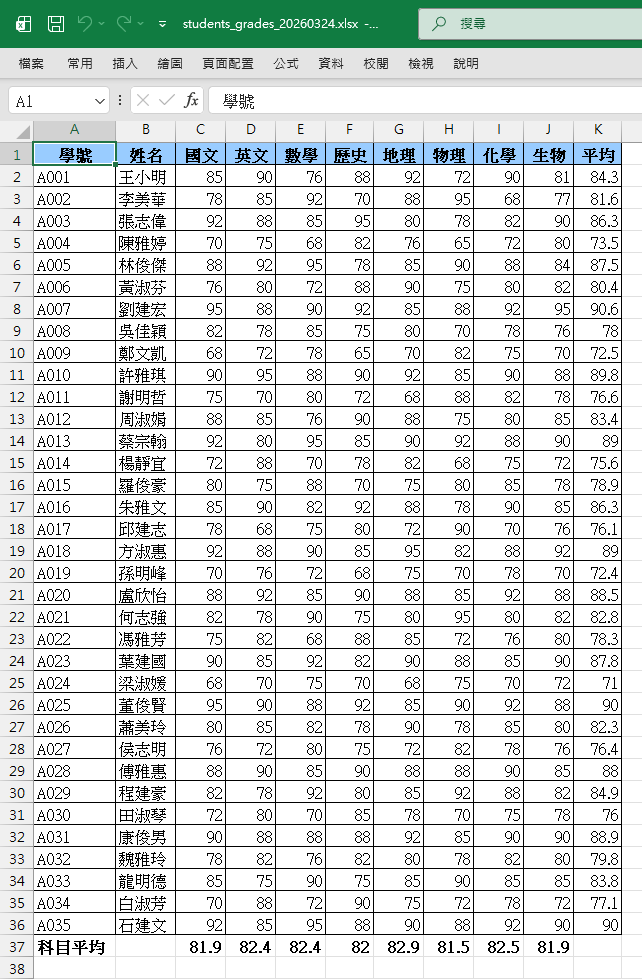
上面這個 Excel,我是用以下這段提示叫 VSCode Github Copilot 花了大約一分鐘做出來的:
建立一個學生成績 Excel 檔,產生 35 名學生成績,範例:
學號,姓名,國文,英文,數學,歷史,地理,物理,化學,生物
A001,王小明,85,90,76,88,92,72,90,81
AI 連這種工作都能輕鬆搞定好神奇,但江湖一點訣,說破不值半毛錢。其實也沒什麼,之前有展示過用 PowerShell 叫 Windows 上安裝的 Excel 起來做事,只要你知道 Excel COM+ 介面 API,便能完成各種花式操作,而這種小程式對 Claude Sonnet 4.6 來說是一塊小蛋糕,操作過程會像這樣:
使用 Github Copilot 生成範例 Excel 檔
關鍵是我在 ./github/copilot-instructions.md 寫了一小段說明,教模型若遇到使用者要生成或操作 Excel 檔,別想不開用 Python 大費周章安裝第三方程式庫,如何用 PowerShell 整合現有環境的 Excel 簡單搞,以下是簡單寫的初版:(打算實務遇到問題再微調,後續還可考慮包成 Skill)
# Excel jobs

When a user wants to create or manipulate Excel files, create a PowerShell script named <yyyymmdd-HHmmss>.ps1
in the ./excel-scripts directory to call the Excel application and execute Excel tasks.
Run the script and save the resulting .xlsx file (with a timestamp in the filename) to the ./excels folder.
After the job is completed, provide the user with the file path and delete the temporary script file.

script example:

"""
$excelApp = New-Object -ComObject Excel.Application
try {
    $excelApp.Visible = $true # always keep application visible
    $workBook = $excelApp.Workbooks.Add()
    # use Excel DOM to create content
    $workBook.SaveAs($savePath) | Out-Null
}
finally {
    if ($workBook) {
        $workBook.Close($false)
        [System.Runtime.InteropServices.Marshal]::ReleaseComObject($workBook) | Out-Null
    }
    $excelApp.Quit()
    [System.Runtime.InteropServices.Marshal]::ReleaseComObject($excelApp)
}
Write-Host "Excel is created at $savePath"
"""
已知的小問題是程式有錯時可能殘留 Excel 程序在工作管理員,理論上可以設法優化範例腳本避免,若不想花時間,事後再手動檢查刪除也是解法。
以上做法提供大家參考。
Comments
Be the first to post a comment