前端小技 - 使用瀏覽器原生 API 執行壓縮與解壓縮
 |  | 0 |  |
自從 IE 被送走,Trident 版 Edge 被微軟賜死,Edge 從善如流改用 Chromium 核心,瀏覽器又重回到當年的大一統時代。
對企業內部網站應用來說,瀏覽器版本統一意味不需要煩惱跨瀏覽器版本問題,只要開發人員測試 OK,很少會因使用者瀏覽器不同而出問題。
(年輕同學可能沒體驗過惱人的跨瀏覽器版本地獄,下圖是當年做過的 IE 模式相容矩陣表,真是不堪回首的一段過去...)
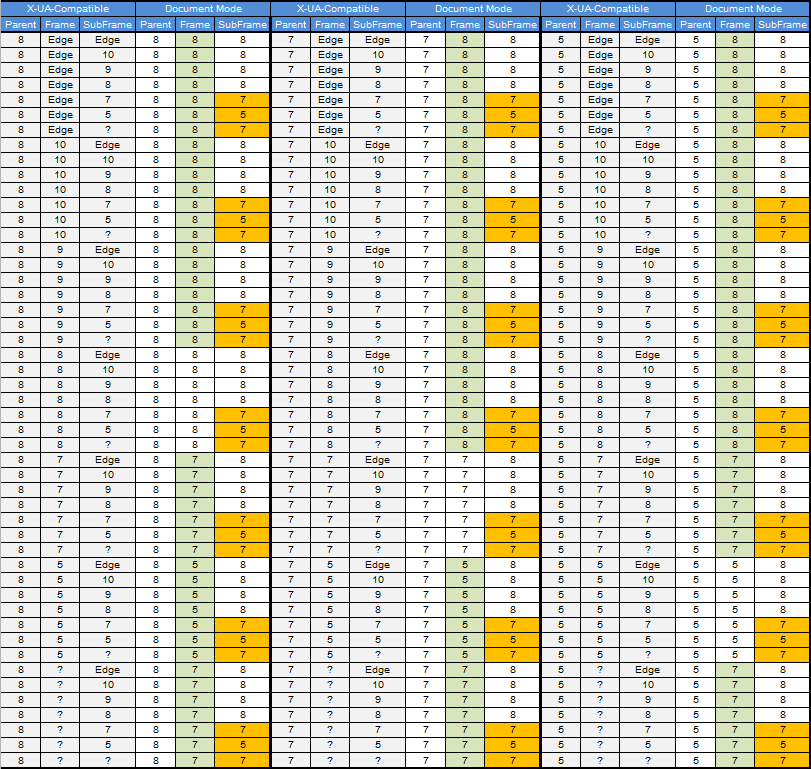
而主流瀏覽器的自動更新政策則為前端攻城獅帶來更符合人性的開發環境,新 CSS 規格、新 API 的支援比過去即時且完整,比較少因瀏覽器不支援只能看著好用新功能流口水的情況。
以寫程式常用到的壓縮解壓縮作業為例,過去要在 JavaScript 實作需仰賴第三方程式庫,而現在已可使用原生瀏覽器 API 輕易完成了,這篇就來實地演練一次。
CompressionStream 及 DecompressionStream 介面提供三種壓縮格式 - gzip、deflate(ZLib) 及 deflate-raw:
| 格式 | 封裝規範 | 內容結構 | 標頭/尾資訊 | 校驗和 | 典型用途 |
|---|---|---|---|---|---|
| gzip | RFC 1952 | GZIP header + DEFLATE + CRC32 | 有 | CRC-32 | 檔案壓縮、HTTP 傳輸 |
| deflate(ZLib) | RFC 1950 | ZLIB header + DEFLATE + ADLER32 | 有 | Adler-32 | 程式內部資料流、PNG 圖片 |
| deflate-raw | RFC 1951 | 只有 DEFLATE 資料本體 | 無 | 無 | 進階應用、ZIP 內部壓縮流 |
實作時,檔案壓縮/傳輸建議使用 gzip,因其標頭與校驗資訊完整,適合跨平台與長期儲存; 程式內部壓縮可用 deflate 適合在記憶體或資料流內部傳遞壓縮資料; deflate-raw 適合要自行處理標頭、校驗細節,或與其他格式結合的進階應用。
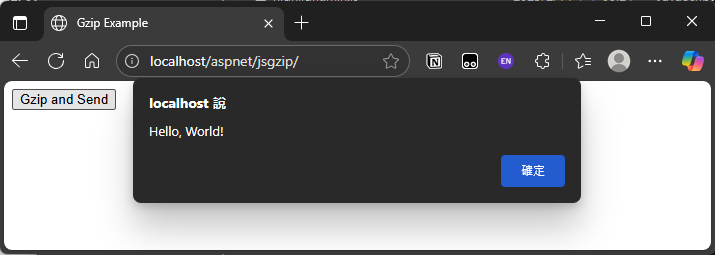
我設定的練習情境是用 JavaScript 將 "Hello" 文字壓成 GZip 檔案傳給 ASP.NET。ASP.NET 解壓後加上 ", World!" 重新壓成 pong.gz 傳回前端,前端再用 JavaScript 解壓出 test.txt 顯示出來。不用任何第三方套件,靠瀏覽器內建 API 跟 .NET 內建 API 便能搞定,體驗現代瀏覽器大一統時代的玩法。
<%@Page Language="C#"%>
<%@ Import Namespace="System.IO" %>
<%@ Import Namespace="System.IO.Compression" %>
<script runat="server">
    void Page_Load(object sender, EventArgs e)
    {
        if (Request.HttpMethod == "POST")
        {
            var content = DecompressGzip(Request.InputStream);
            content += ", World!";
            var gzipped = CompressGzip(content);
            Response.ContentType = "application/octet-stream";
            Response.AddHeader("Content-Disposition", "attachment; filename=pong.gz");
            Response.BinaryWrite(Convert.FromBase64String(gzipped));
            Response.End();
        }
    }
    // 伺服器端 GZIP 解壓縮
    string DecompressGzip(Stream input)
    {
        using (var decompressionStream = new GZipStream(input, CompressionMode.Decompress))
        using (var reader = new StreamReader(decompressionStream))
        {
            return reader.ReadToEnd();
        }
    }
    // 伺服器端 GZIP 壓縮
    string CompressGzip(string content)
    {
        var output = new MemoryStream();
        using (var compressionStream = new GZipStream(output, CompressionMode.Compress))
        using (var writer = new StreamWriter(compressionStream))
        {
            writer.Write(content);
        }
        return Convert.ToBase64String(output.ToArray());
    }
</script>
<!DOCTYPE html>
<html>
<head>
    <meta charset="utf-8" />
    <title>Gzip Example</title>
</head>
<body>
    <button onclick="test()" type="button">Gzip and Send</button>
    <script>
        async function test() {
            var content = "Hello";

            // Compress the content using gzip
            var compressedContent = await compressGzip(content);
            fetch('default.aspx', {
                method: 'POST',
                headers: {
                    'Content-Type': 'application/octet-stream'
                },
                body: compressedContent
            })
            // 讀取傳回的 GZip 檔案
            .then(response => {
                if (response.ok) {
                    return response.blob();
                }
                throw new Error('Network response was not ok.');
            })
            .then(blob => {
                //讀取檔案進行解壓縮
                const reader = new FileReader();
                reader.onload = () => {
                    const arrayBuffer = reader.result;
                    decompressGzip(arrayBuffer).then(decompressedText => {
                        alert(decompressedText);
                    });
                };
                reader.readAsArrayBuffer(blob);
            })
            .catch(error => console.error('Error:', error));
        }

        // 使用 CompressionStream API 進行 GZIP 壓縮
        async function compressGzip(content) {
            const stream = new CompressionStream('gzip');
            const writer = stream.writable.getWriter();
            const reader = stream.readable.getReader();
            // 寫入內容
            writer.write(new TextEncoder().encode(content));
            writer.close();

            // 讀取壓縮後的資料
            const chunks = [];
            while (true) {
                const { value, done } = await reader.read();
                if (value) {
                    chunks.push(value);
                }
                if (done) break;
            }

            // 將 chunks 內容組成 Uint8Array
            const totalLength = chunks.reduce((sum, chunk) => sum + chunk.length, 0);
            const result = new Uint8Array(totalLength);
            let offset = 0;
            for (const chunk of chunks) {
                result.set(chunk, offset);
                offset += chunk.length;
            }
            return result;
        }

        // 使用 DecompressionStream API 進行 GZIP 解壓縮
        async function decompressGzip(arrayBuffer) {
            const stream = new DecompressionStream('gzip');
            const writer = stream.writable.getWriter();
            const reader = stream.readable.getReader();
            // 寫入壓縮資料
            writer.write(arrayBuffer);
            writer.close();

            // 讀取解壓縮後的資料
            const chunks = [];
            while (true) {
                const { value, done } = await reader.read();
                if (value) {
                    chunks.push(value);
                }
                if (done) break;
            }

            // 將 chunks 內容組成 Uint8Array
            const totalLength = chunks.reduce((sum, chunk) => sum + chunk.length, 0);
            const result = new Uint8Array(totalLength);
            let offset = 0;
            for (const chunk of chunks) {
                result.set(chunk, offset);
                offset += chunk.length;
            }
            return new TextDecoder().decode(result);
        }

    </script>
</body>
</html>
測試成功。
Demonstrates using browser-native CompressionStream and DecompressionStream APIs for gzip/deflate, enabling file compression/decompression in JavaScript without third-party libraries.
Comments
Be the first to post a comment