ASP.NET MVC小改裝 - 以Json.NET取代JavaScriptSerializer
 |  | 1 |  |
在前篇文章中,我們實測驗證ASP.NET MVC 4的JsonResult採用JavaScriptSerializer進行JSON序列化,然而若要100%確認,其實還有更精準的做法--因為ASP.NET MVC 4是一個Open Source專案,Use the source, Luke!
由CodePlex取得ASP.NET MVC的原始程式碼,追蹤Controller.Json()可以查到以下這段,Json()會在內部建立了一個新的JsonResult物件傳回:
protected internal virtual JsonResult Json(object data, string contentType, Encoding contentEncoding, JsonRequestBehavior behavior)
{ return new JsonResult
{ Data = data,
ContentType = contentType,
ContentEncoding = contentEncoding,
JsonRequestBehavior = behavior
};
}
而深入JsonResult類別,可以在ExecuteResult()查出它是使用JavaScriptSerializer無誤!!
public override void ExecuteResult(ControllerContext context)
{ if (context == null)
{ throw new ArgumentNullException("context");
}
if (JsonRequestBehavior == JsonRequestBehavior.DenyGet && String.Equals(context.HttpContext.Request.HttpMethod, "GET", StringComparison.OrdinalIgnoreCase)) { throw new InvalidOperationException(MvcResources.JsonRequest_GetNotAllowed);
}
HttpResponseBase response = context.HttpContext.Response;
if (!String.IsNullOrEmpty(ContentType)) { response.ContentType = ContentType;
}
else { response.ContentType = "application/json"; }
if (ContentEncoding != null)
{ response.ContentEncoding = ContentEncoding;
}
if (Data != null)
{ JavaScriptSerializer serializer = new JavaScriptSerializer(); if (MaxJsonLength.HasValue) { serializer.MaxJsonLength = MaxJsonLength.Value;
}
if (RecursionLimit.HasValue) { serializer.RecursionLimit = RecursionLimit.Value;
}
response.Write(serializer.Serialize(Data));
}
}
Json.NET的作者針對ASP.NET MVC的JSON序列化寫過JsonNetResult,原則上在Controller中用它取代JsonResult就可在MVC中改以Json.NET進行序列化,但Controller.Json()預設還是會使用JavaScriptSerializer。在追蹤原始碼的過程,我留意到Controller.Json()被宣告成virtual,換句話說,只要繼承Controller建立客製版Controller類別,覆寫(Override) Json()方法改傳JsonNetResult,就能改變Controller行為,原程式不需修改就能將JavaScriptSerializer抽換成Json.NET!
以下是一個簡單的Controller改裝範例--JsonNetController:
(由於JsonRequestBehavior.DenyGet判斷的部分會用到只有System.Web.Mvc內部才能存取的錯誤息訊文字資源,此處取巧,在發生DenyGet情境時抛回JsonResult觸發原有錯誤)
using System; using System.Collections.Generic; using System.Linq; using System.Text; using System.Web; using System.Web.Mvc; namespace Newtonsoft.Json { //REF: http://james.newtonking.com/archive/2008/10/16/asp-net-mvc-and-json-net.aspx public class JsonNetResult : JsonResult
{ public JsonSerializerSettings SerializerSettings { get; set; } public Formatting Formatting { get; set; } public JsonNetResult() { SerializerSettings = new JsonSerializerSettings(); }
public override void ExecuteResult(ControllerContext context)
{ if (context == null)
throw new ArgumentNullException("context");
HttpResponseBase response = context.HttpContext.Response;
response.ContentType =
!string.IsNullOrEmpty(ContentType) ? ContentType : "application/json";
if (ContentEncoding != null)
response.ContentEncoding = ContentEncoding;
if (Data != null)
{ JsonTextWriter writer = new JsonTextWriter(response.Output) { Formatting = Formatting
};
JsonSerializer serializer = JsonSerializer.Create(SerializerSettings);
serializer.Serialize(writer, Data); writer.Flush();
}
}
}
public class JsonNetController : Controller
{ protected override JsonResult Json(object data, string contentType,
Encoding contentEncoding, JsonRequestBehavior behavior)
{ if (behavior == JsonRequestBehavior.DenyGet && string.Equals(this.Request.HttpMethod, "GET",
StringComparison.OrdinalIgnoreCase))
//Call JsonResult to throw the same exception as JsonResult return new JsonResult();
return new JsonNetResult()
{ Data = data,
ContentType = contentType,
ContentEncoding = contentEncoding
};
}
}
}
以前篇文章的BooController為例,我們將繼承來源由Controller改為JsonNetController,原有的Json(DateTime)寫法不需修改,但輸出結果就會改為Json.NET的版本:
using System; using System.Collections.Generic; using System.Linq; using System.Net; using System.Web; using System.Web.Mvc; using System.Web.Script.Serialization; using Newtonsoft.Json; namespace MyMvc.Controllers { public class BooController : JsonNetController
{ public ActionResult TestJson() { return Json(DateTime.Now, JsonRequestBehavior.AllowGet); }
public ActionResult TestJsonNotAllowGet() { return Json(DateTime.Now); }
public ActionResult DateJsonWtf() { WebClient wc = new WebClient(); Uri url = Request.Url;
string s = wc.DownloadString( string.Format("http://{0}:{1}/Boo/TestJson",
url.Host, url.Port));
JavaScriptSerializer jss = new JavaScriptSerializer(); DateTime d = jss.Deserialize<DateTime>(s);
return Content(string.Format(
"Now={0:MM-dd HH:mm}, Json={2}, Restored DateTime={1:MM-dd HH:mm}", DateTime.Now, d, s));
}
public ActionResult TestJsonNetResult() { return new JsonNetResult()
{ Data = DateTime.Now
};
}
}
}
測試JsonRequestBehavior.DenyGet的情境,可得到與JsonResult相同的錯誤訊息: 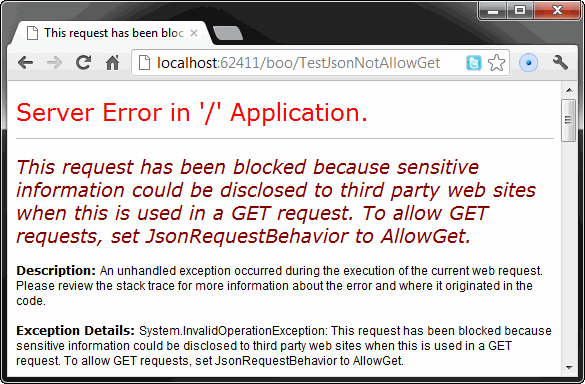
Json(DateTime.Now)傳回結果則已變成Json.NET的ISO 8601格式: 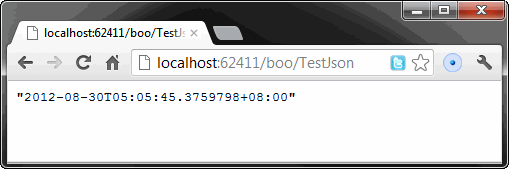
測試在C#端以JavaScriptSerializer還原TestJson的傳回結果,資料正確無時區差異。另外,此一結果也驗證了JavaScriptSerilalizer能正確地將"2012-08-30T05:04:38.1348135+08:00"的ISO 8601格式反序列化回DateTime。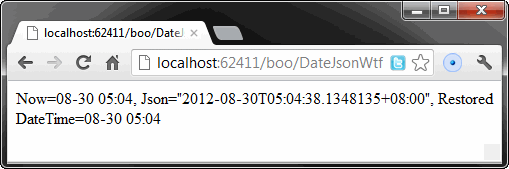
JavaScriptSerializer在先前的效能測試中,慘敗給Json.NET及DataContractJsonSerializer,而其獨有的DateTime編碼格式,在JavaScript等異質Client端需要額外處理,缺少時區資訊衍生的轉換地雷更是惱人,歸納下來,和IE6一樣,己成該從地表消失的禍水~ 對於新建專案,若無相容性的包袱,建議一律改用Json.NET,方為王道。
Comments
# by 小黑
感謝黑哥的分享,另有一個問題想請教;前陣子小弟測試google service api ,同樣的會傳出 json 格式資料,只是它的資料 屬性欄位皆為 英文小寫,想說當我們在設計 Entities 時,是否有方便 attribute 可以設定,當序列化時可以直接被轉為小寫?