小技巧-使用匿名型別快速捏出指定JSON格式
 |  | 0 |  |
同事有個小需求,已知城市、區域及郵遞區號要產生如下規格的 JSON 餵到前端:
{ "rows": { "row": [ { "City": "台北市",
"Area": "文山區",
"ZIP": "116"
}
]
}
}
先前介紹過 JObject 結合 dynamic 的花式玩法可以快速達成目標:
static void TestJObject(string city, string area, string zip)
{ dynamic root = new JObject(); root.rows = new JObject(); dynamic row = new JObject(); row.City = city;
row.Area = area;
row.ZIP = zip;
root.rows.row = new JArray(row); Console.WriteLine(JsonConvert.SerializeObject(root, Formatting.Indented));
}
不過,我認為這個案例用 JObject 有點殺雞用牛刀,用 C# 匿名型別可以更輕鬆搞定,就順手寫了範例。從同事驚嘆的反應,我猜應該有些朋友沒想過匿名型別可以這様玩,看來這技巧有分享的價值,那就野人獻曝一下好了。
程式碼說破就不值一文錢,new { PropName = PropValue… } 直接宣告匿名物件,new [] { } 可宣告匿名物件陣列,將物件用 JsonConvert.SerializeObject() 轉成 JSON,大功告成!
static void TestAnonyType(string city, string area, string zip)
{ var root = new { rows = new { row = new[] { new { City = city,
Area = area,
ZIP = zip
}
}
}
};
Console.WriteLine(JsonConvert.SerializeObject(root, Formatting.Indented));
}
}
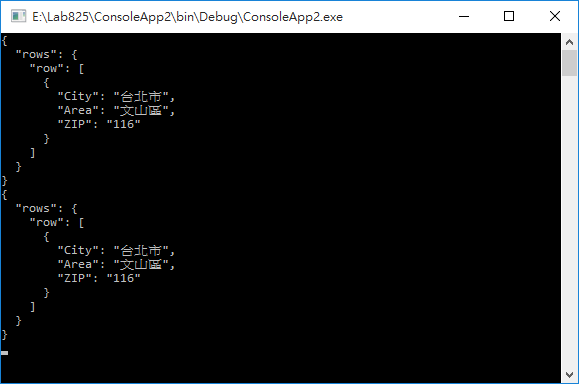
實測兩種寫法結果一致:
static void Main(string[] args)
{ TestJObject("台北市", "文山區", "116");
TestAnonyType("台北市", "文山區", "116");
Console.ReadLine();
}
雜耍表演完畢,下台一鞠躬~
Comments
Be the first to post a comment