7-Zip 安全漏洞通報與版本盤點工具
 |  | 2 |  |
7-Zip 最近被發現兩個安全漏洞:CVE-2025-11001 及 CVE-2025-11002,問題源於 7-Zip 解壓縮時對符號連結(Symbolic Link)與目錄穿越(Directory Traversal)的處理邏輯不夠周全,導致攻擊者可在 ZIP 檔刻意放入特殊的符號連結以「繞出」預期目錄,將惡意檔案覆蓋或寫入到系統敏感位置。一個可行的攻擊途徑是攻擊者設法將惡意 ZIP 檔送到使用者手上並誘騙其進行解壓縮,藉由漏洞將系統服務或使用者常用執行檔換成植入惡意程式的版本,一但加料版被執行即可完成攻擊。
延伸閱讀:
- 7-Zip Vulnerabilities Let Attackers Execute Arbitrary Code Remotely
- New 7-Zip high-severity vulnerabilities expose systems to remote attackers — users should update to version 25 ASAP
7-Zip 的最新版本 25.01已修正這個兩個漏洞,建議大家盡快更新。
(題外話:以 7-Zip 的輕巧穩定,執行速度快,功能又完整,Windows 真該把它收為內建工具並自動更新。)
檢查版本理論上用檔案總管就可以了。
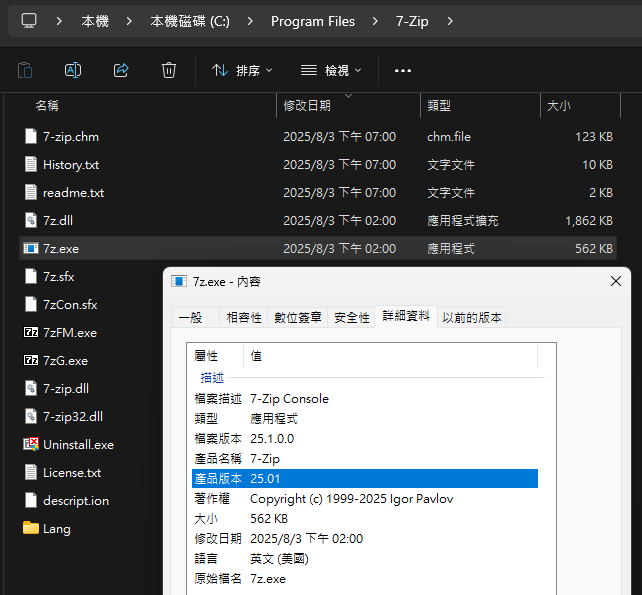
但為確保修補作業沒有遺漏,我決定寫個 PowerShell 腳本掃瞄資料夾,找出所有 7z.exe/7z.dll 並檢查版本,確保都有更新到最新版。
param (
    [Parameter(Mandatory = $true)]
    [string]$Path,
    [string]$CsvPath,
    [string[]]$Exclude = @()
)

function CheckVersion($filePath) {
    $version = '?'
    try {
        $version = (Get-Item $filePath).VersionInfo.ProductVersion
        $majorVersion = [int]::Parse($version.Split('.')[0])
        $passed = $majorVersion -ge 25
        $status = if ($passed) { "PASS" } else { "FAIL" }
    }
    catch {
        $status = "ERROR"
    }
    return [PSCustomObject]@{
        Path    = $filePath
        Version = $version
        Status  = $status
    }
}
function ShowResult($result) {
    $color = if ($result.Status -eq 'PASS') { 'Green' } elseif ($result.Status -eq 'FAIL') { 'Red' } else { 'Cyan' }
    Write-Host "$($result.Status)`t$($result.Version)`t$($result.Path)" -ForegroundColor $color
}

$gciErrors = $null

# -File to ensure we only get files, not directories
# -Force to include hidden/system directories/files
# -ErrorAction SilentlyContinue to suppress errors (e.g., access denied)
# -ErrorVariable gciErrors to capture any errors for later reporting
$results = @()

if ($Path.EndsWith('.csv')) {
    $csvPaths = @()
    try {
        $csvPaths = Import-Csv -Path $Path | ForEach-Object { $_.Path } | Where-Object { Test-Path $_ }
    }
    catch {
        Write-Host "Error reading CSV file: $_" -ForegroundColor Red
        exit 1
    }
    Write-Host "Verifying paths from [$Path]..." -ForegroundColor Yellow
    foreach ($csvPath in $csvPaths) {
        if (Test-Path $csvPath) {
            $result = CheckVersion -filePath $csvPath
            ShowResult -result $result
            $results += $result
        }
        else {
            $result = ([PSCustomObject]@{
                    Path    = $csvPath
                    Version = '?'
                    Status  = '404'
                })
            ShowResult -result $result
            $results += $result
        }
    }
    $CsvPath = $Path
    Write-Host "`nUpdating results to [$CsvPath]..." -ForegroundColor Yellow
    $results | Export-Csv -Path $CsvPath -NoTypeInformation -Encoding UTF8
}
else {
    $sw = [System.Diagnostics.Stopwatch]::StartNew()
    Write-Host "Scanning path [$Path] for 7z.exe and 7z.dll files..." -ForegroundColor Yellow
    $sw.Start()
    Get-ChildItem -Path $Path -Recurse -Directory -Force -ErrorAction SilentlyContinue -ErrorVariable +gciErrors |
    Where-Object {
        $excludeMatch = $false
        foreach ($excl in $Exclude) {
            if ($_.Name -ieq $excl -or $_.FullName -like "*\$excl\*") {
                $excludeMatch = $true
                break
            }
        }
        return -not $excludeMatch
    } |
    ForEach-Object {
        Write-Progress -Activity "Scanning directories..." -Status "Processing: $($_.FullName)"
        Get-ChildItem -Path $_.FullName -Filter '7z.*' -File -Force -ErrorAction SilentlyContinue -ErrorVariable +gciErrors |
        Where-Object { $_.Name -ieq '7z.exe' -or $_.Name -like '7z.dll' } |
        ForEach-Object {
            $result = CheckVersion -filePath $_.FullName
            ShowResult -result $result
            $results += $result
        }
    }
    $sw.Stop()
    Write-Host "`nScan completed in $($sw.Elapsed.TotalSeconds.ToString('n0')) seconds." -ForegroundColor Yellow
    # Generate default output CSV path
    if (-not $CsvPath) {
        $CsvPath = Join-Path -Path (Get-Location) -ChildPath "7zip_Scan_$(Get-Date -Format 'yyyyMMdd_HHmmss').csv"
    }
    Write-Host "`nExporting results to [$CsvPath]..." -ForegroundColor Yellow
    $results | Export-Csv -Path $CsvPath -NoTypeInformation -Encoding UTF8

    if ($gciErrors) {
        $displayErrors = Read-Host "`n$($gciErrors.Count) IO Errors, display? (Y/N)"
        if ($displayErrors -ieq 'Y') {
            $sb = New-Object -TypeName System.Text.StringBuilder
            foreach ($err in $gciErrors) {
                $sb.AppendLine($err.Exception.Message) | Out-Null
            }
            $tempPath = [System.IO.Path]::GetTempFileName() + ".txt"
            $sb.ToString() | Out-File -FilePath $tempPath -Encoding UTF8
            Start-Process -FilePath $tempPath
        }
    }
}
使用方法很簡單 Atk-Scan7zipVersion.ps1 D:\ 即可找出 D 槽所有的 7z.exe 及 7z.dll 的版本,大於 25.X 的顯示綠色,否則紅色 (無法判斷版號顯示灰色,理論上不會發生),並將結果存成 CSV。CSV 檔會依日期時間自動命名,或者也可自行指定,例如:Atk-Scan7zipVersion.ps1 D:\ -CsvPath E:\results.csv。(若有確定不需掃瞄的目錄可使用 -Exclude @('Log', 'Logs') 略過節省時間)
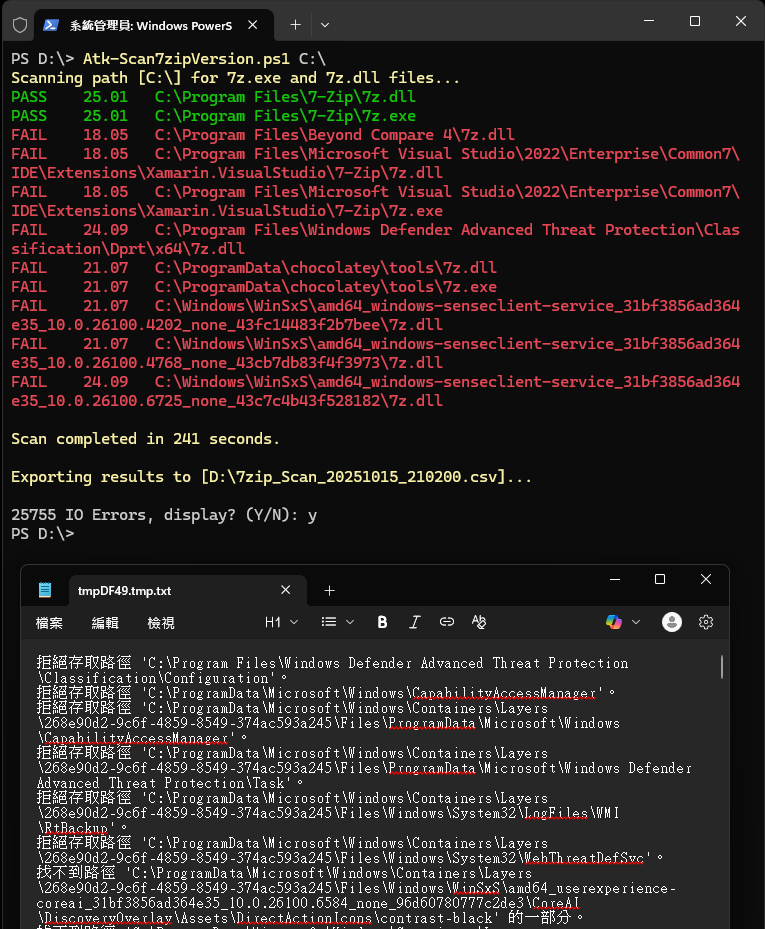
掃瞄時建議使用管理者權限,但實務上仍可能有些系統目錄會無法存取或找不到路徑,這類存取錯誤訊息會另存暫時目錄,若有需要可以查看。
如圖所示,掃瞄一次可能耗時數分鐘,掃瞄結果會存成 CSV 方便後續修補及複核版本是否更新完成。
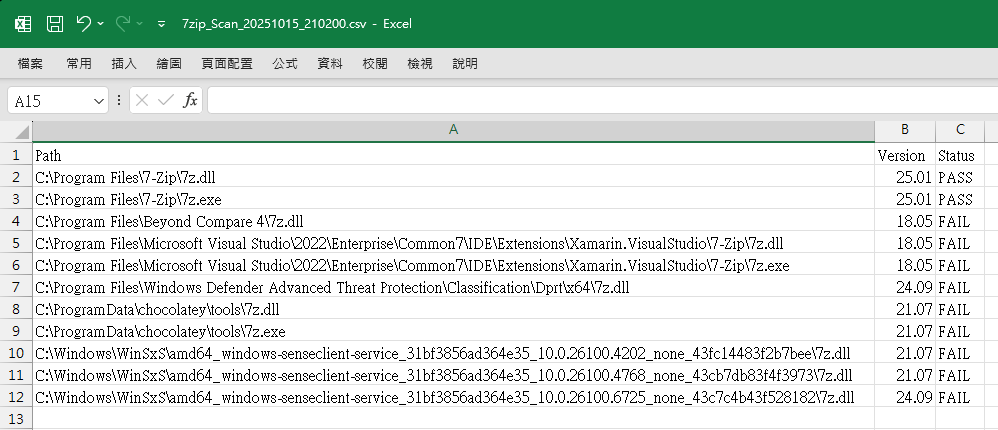
如要複核版本是否更新可帶入 CSV 路徑,腳本將直接依據清單上的路徑逐一檢查,並將結果更新回 CSV 檔,如此可省下重新掃瞄的時間,在幾秒內完成,。
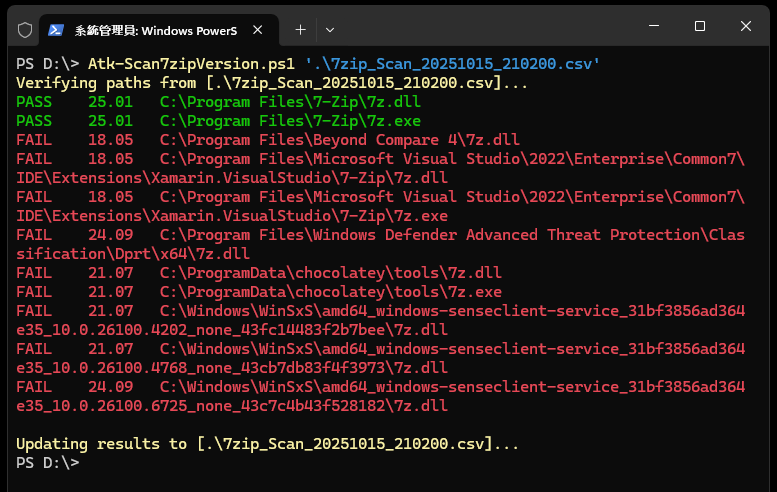
至於修補原則,實際掃瞄會發現很多軟體都依賴 7z.exe 解壓縮,例如範例中的 Chocolatey、Visual Studio Xamarin 擴充套件... 等,這類 7z.exe 解壓對象多侷限應用程式自身的套件、更新檔等,不會被用來解壓其他檔案。由於這次的攻擊需使用者互動(如開啟特定惡意 ZIP 檔)才能完成,故風險較高的是使用者日常使用的 7-Zip 程式,至於這類軟體自帶的 7z 程式或程式庫,要被拿來作惡不是那麼容易(BUT,資安有張無敵鬼牌:萬一萬一又萬一),加上強制置換軟體所屬檔案可能會有副作用,要不要也都更新?就留給大家自行拿捏了。
【同場加映】簡單整理 7-Zip 相關 dll 的用途:
- 7zr.dll:7zr 對應的是 Reduced (精簡版) 7-Zip,通常與 7zr.exe 搭配,只支援 7z 基本格式與核心 LZMA/LZMA2 編解碼(不含 bzip2),適合嚴格限制檔案大小且只需處理 7z, xz, lzma, split 格式的場合。參考
- 7za.dll:對應的是 Standalone/7za.exe 的動態程式庫,只支援 .7z,不提供 ZIP, RAR, CAB 等格式。參考 另外有不需要額外 .dll 的 7za.exe 執行檔,若只需要處理 .7z,部署一個檔案即可。參考
- 7z.dll:完整 7-Zip/SDK 的主要編解碼集合,GUI 與許多第三方程式會直接載入 7z.dll 以取得完整格式支援。
- 7zxa.dll/7zxr.dll:只需要解壓縮 .7z 的話可用。
一般來說,如要在 .NET 或其他語言引用 7-Zip 功能,用 7z.dll 可以獲取完整格式與 AES 加密等能力,並有現成封裝元件使用較方便;只有對部署體積很嚴格時,才退而選擇 7za/7zr 的精簡組合 。
Discusses 7-Zip vulnerabilities and shares a PowerShell script to scan, verify, and update 7z.exe/7z.dll versions for enhanced security.
Comments
# by EricHsu
本來只是剛好隨手點到 沒想到拜讀了大大的好文 話說 pwsh 也加減有再用 不過看到大大的腳本組織方式 應該是白學了XD 話說大大是因為有.NET的基礎 所以powershell才組織的如此系統工整嗎 還是有啥學習的 roadmap 可以供參考的 如方便的話想請教一下 感謝您
# by Jeffrey
to EricHsu,把 PowerShell 寫成這樣應該是所有程式設計師的本能,寫過 C#、JavaScript 或其他類似語言開發經驗,很自然而然會想寫成這樣,符合日常習慣更易讀懂程式邏輯。 有個好消息! 是現在學程式的黃金年代,可以請 AI 當家教,把自己的腳本丟給 Claude/Gemini/GPT/Copilot 請它提供修改建議,並解釋為什麼要這麼做。過往在論壇或社群發問新手常會被酸,現在有親切又有耐心的 AI 讓你問到飽,超幸福 DER。 但你說的也沒錯,PowerShell 要結合 .NET 才能發揮最大威力,若有心想寫得更好,C# 是更完整更強大的語言,幾乎無所不能,值得花點時間去學。等有 C#/.NET 基礎再回頭看 PowerShell 就是一塊小蛋糕了。