ASP.NET MVC 3 豬走路範例 (4)
 |  | 8 |  |
在前次完成的清單介面中,每筆資料都有編輯、顯示、刪除三種連結,分別指向/home/edit?name=xxx, /home/details?name=xxx, /home/delete?mode=xxx,但HomeController.cs裡還沒寫好這三個Action,所以這回一口氣在HomeController補上Edit, Details, Delete三種Action(Edit, Delete各有[HttpGet], [HttpPost]兩種),HomeController.cs擴充如下:
using System; using System.Collections.Generic; using System.Linq; using System.Web; using System.Web.Mvc; using FirstMvc.Models; namespace FirstMvc.Controllers { public class HomeController : Controller
{ public ActionResult Index() { //Index內含清單介面,故傳入List<string>顯示 return View(PlayerModel.GetPlayerNames()); }
public ActionResult About() { return View(); }
[HttpGet] // httq://server/home/create, 新增資料用 public ActionResult Create() { //預設會對映到/Views/Home/Create.cshtml return View(); }
[HttpPost] // httq://server/home/create 送出表單時 public ActionResult Create(PlayerModel player) { //前方送來的資料會自動對應到Player上(很神奇吧?) if (ModelState.IsValid) player.Save(); //轉到httq://server/home/index return RedirectToAction("Index");
}
//httq://server/home/details?name=xxx 顯示詳細資料 //name參數可用來承接?name=xxx所傳入的值 public ActionResult Details(string name)
{ return View(PlayerModel.Read(name)); }
[HttpGet]
//httq://server/home/edit?name=xxx //提供輸入欄位及Submit鈕 public ActionResult Edit(string name)
{ return View(PlayerModel.Read(name)); }
[HttpPost] //httq://server/home/edit?name=xxx 送出表單時 public ActionResult Edit(string name, FormCollection form)
{ //TODO: 實務上應加入更新權限檢核,在此省略 //先讀出資料 PlayerModel origPlayer = PlayerModel.Read(name);
//用前端傳回的資料更新Key以外的欄位 if ( origPlayer != null && TryUpdateModel<PlayerModel>(
origPlayer,
//列出要更新的屬性, Name不得更換,故只有Score //【補充】demo有篇TryUpdateModel介紹: http://demo.tc/Post/655 new string[] { "Score" }, form)
)
//資料無誤的話才儲存 origPlayer.Save();
else //更新失敗時
{ ModelState.AddModelError("UpdateError", "更新失敗!");
return View(origPlayer); }
return RedirectToAction("Index");
}
[HttpGet]
//httq://server/home/delete?name=xxx, //顯示詳細資料(等同Details),提供Submit鈕確認刪除 public ActionResult Delete(string name)
{ return View(PlayerModel.Read(name)); }
[HttpPost]//httq://server/home/delete?name=xxx, 送出表單時 public ActionResult Delete(string name, FormCollection col)
{ PlayerModel player = PlayerModel.Read(name);
if (player != null)
player.Delete();
return RedirectToAction("Index");
}
}
}
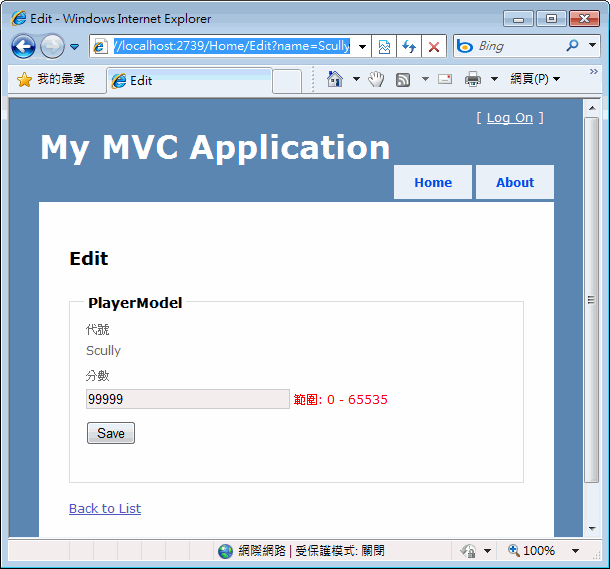
新增了Action,接著在Details, Edit, Delete三個方法上按右鍵新增View,原則上直接用自動產生的現成View即可,唯一要小調的是Edit.cshtml,因為Name欄位是Key,不希望開放使用者修改,但預設自動產生的Edit View,只要Model中沒有標註成PrimaryKey或ReadOnly的欄位,都會自動轉成輸入欄位,需要手動調整一下。另外,Edit.cshtml跟Create.cshtml一樣會有前端驗證,但無法杜絕不合規定的資料被送到後端來(可能是Javascript被停用、出錯失效或惡意破解),故伺服器端仍有驗證不過或更新程序出錯的可能,針對更新失敗的訊息,在Edit Actiont程式中可用ModelState.AddModelError(“UpdateError”, “…”)傳送到View,而更新失敗時,我們將傳入Model物件重新顯示Edit View,於是在送出鈕下方我加了一個@Html.ValidationMessage(“UpdateError”)來呈現更新失敗的消息。
<fieldset>
<legend>PlayerModel</legend>
<div class="editor-label">
@Html.LabelFor(model => model.Name) </div>
<div class="editor-field">
<!-- //原本有Editor,改為直接顯示 @Html.EditorFor(model => model.Name) @Html.ValidationMessageFor(model => model.Name) --> @Model.Name
</div>
<div class="editor-label">
@Html.LabelFor(model => model.Score) </div>
<div class="editor-field">
@Html.EditorFor(model => model.Score) @Html.ValidationMessageFor(model => model.Score) </div>
<p>
<input type="submit" value="Save" />
@Html.ValidationMessage("UpdateError") </p>
</fieldset>
以下是各操作介面的實際範例:
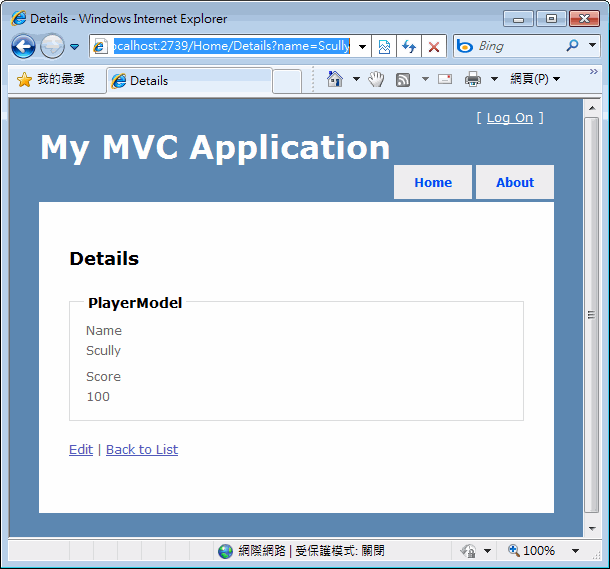
Details預設樣版會以純文字方式呈現Model的各欄位,下方有連結連至Edit及Index。
Edit View預設跟Create一樣,有Client端的欄位檢核功能,Name欄位已被我們改成文字顯示。
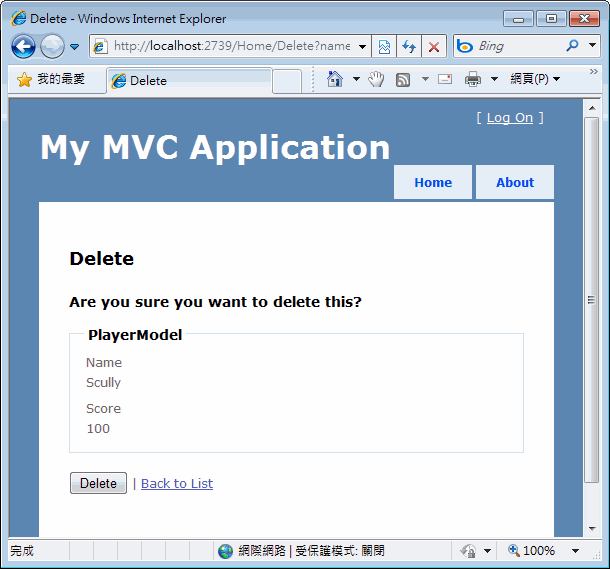
Delete View跟Details很像,下方有個刪除鈕,按下時將執行[HttpPost]Delete Action將資料刪除。
好了,在不需要寫太多程式的情況下,我們就搞出一個可新增修改刪除資料的網站,透過這個範例,大家應該能窺探ASP.NET MVC 3實作常用網站功能的方式。
當然,如此簡陋的介面肯定無法滿足客戶機車又刁鑽實務運作上的複雜需求(廢話,如果這樣就能驗收,網站開發人員的重要性就跟盲腸一樣了,幸好從基本版型到驗收還有很長的路要走,大家有充分的空間可以展現自己的價值),ASP.NET MVC在設計上彈性頗佳,有很多機制允許加掛自訂邏輯,例如: 如果你對預設的Scaffold template不滿意,可以自己客製依Model自動產生Create/Edit/Delete View的超強模版、如果你系統裡的Model他X的複雜,前方送來的欄位資料要九彎十八拐才能對應到適當的屬性上,也可以自訂一個他X的複雜ModelBinder來搞定、如果你痛恨每個Action上都要加上共用的權限檢查機制,那就寫個權限控管ActionFilter,之後只要在Action前方加個[PermissionCheck(System=”會計系統", Module=”關帳")]就可以套用權限檢查,不用再寫半行Code…
整體而言,ASP.NET MVC是個擴充性很好的架構,應足以應付大型專案的複雜需求,希望這趟豬走路表演能讓Web Form開發人員對ASP.NET MVC 3有粗略的認識,做為未來規劃ASP.NET專案時的參考。
Comments
# by 斯洛
有沒有partial view裡面有partial view的示範XDD 因為這東西 害我要放掉razor orz 改ascx+aspx改到快瞎了
# by Ray
看了1~4 整個很像Ruby on rails !
# by sam
[HttpPost] // httq://server/home/create 送出表單時 public ActionResult Create(PlayerModel player) { //前方送來的資料會自動對應到Player上(很神奇吧?) if (ModelState.IsValid) player.Save(); //轉到httq://server/home/index return RedirectToAction("Index"); } 黑暗大大,小弟正在研究怎麼會自動之應到參數那…在想這麼神奇的事情是怎麼發生的 orz。 如果您已知道,麻請不吝指導,感謝。 ^^
# by sam
[HttpPost] // httq://server/home/create 送出表單時 public ActionResult Create(PlayerModel player) { //前方送來的資料會自動對應到Player上(很神奇吧?) if (ModelState.IsValid) player.Save(); //轉到httq://server/home/index return RedirectToAction("Index"); } 黑暗大大,小弟正在研究 神奇是怎麼發生的,如果您知道的話,煩請不吝指導,感謝 ^^
# by Alex Lee
To Sam: 你可以看一下 呼叫這個Action 的View 會有引用 PlayModel 且在View中也會有欄位資料 與 PlayModel 對應的公開屬性相關聯
# by 小黑
練習了幾次,對於 asp.net mvc 專案需要 Run 起來看開發頁面結果,似乎很花費時間,請問黑大,有否類似 asp.net webSite 只需要在該頁重整即可看到結果的開發方式,並且專案程式碼還是可以直接修改的,或是其他方式加快開發速度?
# by Jeffrey
to 小黑, ASP.NET MVC比較像Web App Project,要Build過才能執行,我自己的經驗是不要每次都用偵錯模式啟動IE檢視,第一次執行起來後,另外開一個瀏覽器檢視同一URL,之後停止偵錯後IISExpress或WebDevServer上的網站仍可繼續使用,此時修改cshtml直接儲存重整就可以看到結果,如果是Model/Controller的.cs修改,則按F6重Build後重新整理網頁就可測試修改後的效果,會比每次按F5快多了。
# by 小黑
謝謝黑大